


- Document Solutions for PDF JS Overview
- Key Features
- Licensing and Redistribution
- Quick Start
- Memory Management
-
Features
- Create and Save
- Document Properties
- Pages
- Text
- Graphics
- Form XObjects
- Images
- Fonts
-
Annotations
- Text Annotation
- Free Text Annotation
- Line Annotation
- Polyline Annotation
- Square Annotation
- Circle Annotation
- Polygon Annotation
- 3D Annotation
- Stamp Annotation
- Ink Annotation
- File Attachment Annotation
- Link Annotation
- RichMedia Annotation
- Sound Annotation
- Widget Annotation
- Watermark Annotation
- Redact Annotation
- Text Markup Annotation
- Caret Annotation
- Appearance Streams
- Forms
- Output Intents
- Merge and Split PDFs
- Actions
- Outline
- Tagged PDF
- PDF Conformance
- Attachments
- Redact Annotation
- Security
- Digital Signatures
- Incremental Update
- Linearization
- Export
- Image Features
- Snippet Helpers
- Samples
- Tutorials
- API Reference
- Release Notes
3D Annotation
A 3D annotation embeds interactive 3D artwork in a PDF document. PDF viewers can display the model directly on the page and allow users to interact with predefined views and rendering settings.
Use the Model3DAnnotation class to add a 3D annotation to a page. The annotation uses a Model3DStream object to store the embedded 3D model data in U3D or PRC format.
A Model3DStream object can also contain a collection of Model3DView objects. Each view defines camera position, rendering mode, lighting scheme, and other display settings for the 3D model.
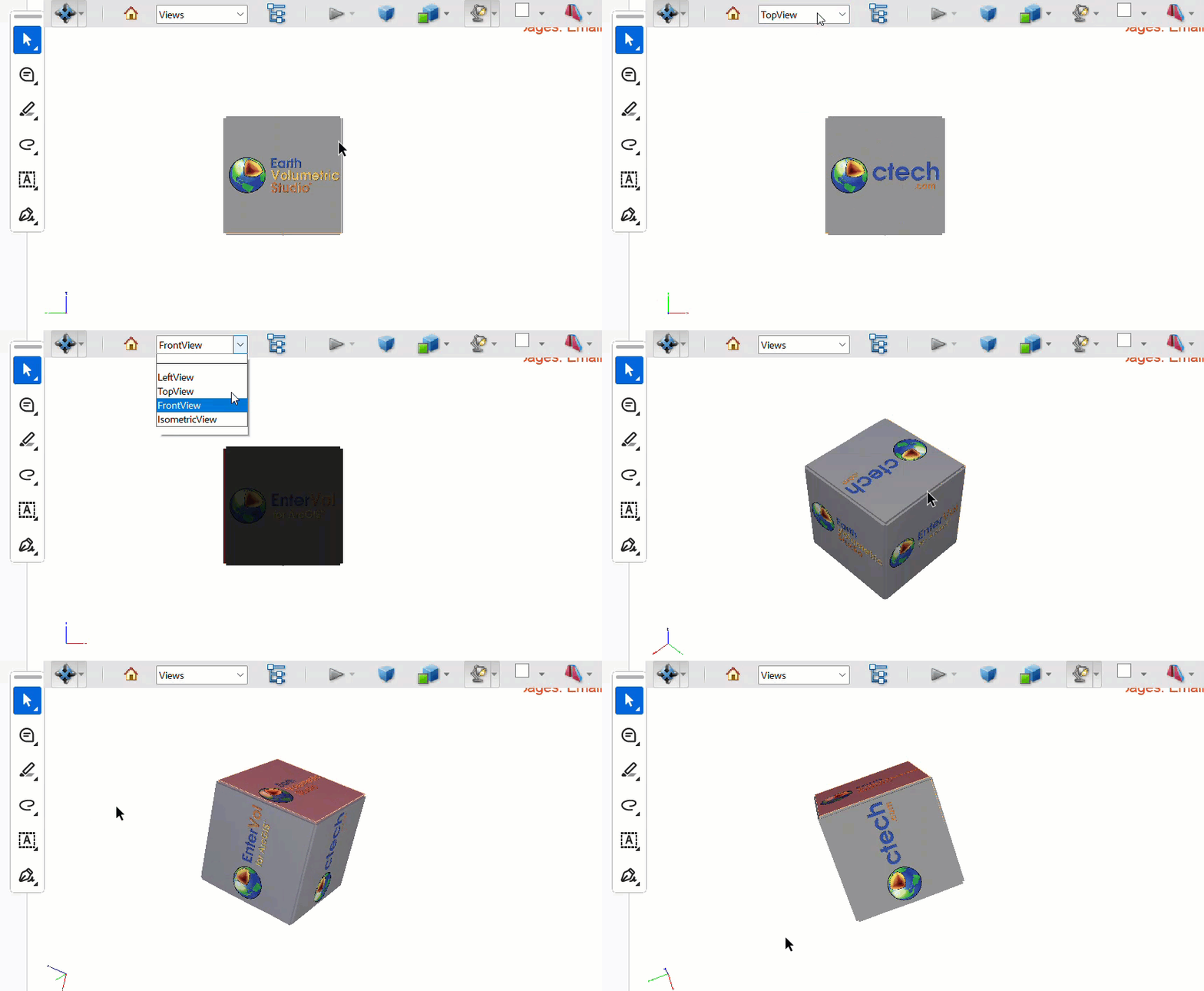
Refer to the following example code to add a 3D annotation to a PDF document:
const doc = new PdfDocument();
const p = doc.newPage();
const rma = new Model3DAnnotation();
const bytes = await readFile("CTech.u3d");
rma.stream = new Model3DStream(bytes, Model3DStreamFormat.U3D);
rma.page = p;
rma.rect = { x: 10, y: 10, width: 300, height: 200 };
rma.activationCondition = Model3DActivationCondition.PageBecomesVisible;
rma.deactivationCondition = Model3DDeactivationCondition.PageBecomesInvisible;
await writeFile("SimpleCase.pdf", doc.savePdf());
//
// Creates a Model3DAnnotation with three Model3DView objects displaying
// the 3D object from top, left, front and isometric perspectives.
//
const doc2 = new PdfDocument();
const p2 = doc2.newPage();
// add 3D annotation to the page using 'json' syntax
p2.annotations.add({
    type: '3D',
    activationCondition: Model3DActivationCondition.PageBecomesVisible,
    deactivationCondition: Model3DDeactivationCondition.PageBecomesInvisible,
    rect: { x: 10, y: 10, width: 300, height: 200 },
    // the annotation 3D stream
    stream: {
        data: bytes,
        format: Model3DStreamFormat.U3D,
        // define collection of predefined views
        views: [
            {
                // LEFT VIEW
                // NOTE: The value "54.9447" is derived from the bounding box of the 3D model stored inside the 3D file.
                // DsPdf cannot parse U3D / PRC files, so the user must obtain this value from the file by other means.
                uiName: "LeftView",
                cameraDistance: 54.9447,
                cameraPosition: {
                    m11: 0.0, m12: 1.0, m13: 0.0,
                    m21: 0.0, m22: 0.0, m23: 1.0,
                    m31: 1.0, m32: 0.0, m33: 0.0,
                    tx: -54.9447, ty: 0.0, tz: 0.0
                }
            },
            {
                // TOP VIEW
                uiName: "TopView",
                cameraDistance: 54.9447,
                cameraPosition: {
                    m11: -1.0, m12: 0.0, m13: 0.0,
                    m21: 0.0, m22: 1.0, m23: 0.0,
                    m31: 0.0, m32: 0.0, m33: -1.0,
                    tx: 0.0, ty: 0.0, tz: 54.9447
                }
            },
            {
                // FRONT VIEW
                uiName: "FrontView",
                cameraPosition: {
                    m11: -1.0, m12: 0.0, m13: 0.0,
                    m21: 0.0, m22: 0.0, m23: 1.0,
                    m31: 0.0, m32: 1.0, m33: 0.0,
                    tx: 0.0, ty: -54.9447, tz: 0.0
                }
            },
            {
                // ISOMETRIC VIEW
                uiName: "IsometricView",
                cameraPosition: {
                    m11: 0.707107, m12: -0.707107, m13: 0.0,
                    m21: -0.5, m22: -0.5, m23: 0.707107,
                    m31: -0.5, m32: -0.5, m33: -0.707107,
                    tx: 27.4724, ty: 27.4724, tz: 38.8518
                }
            }
        ],
    },
    // set view with index 1 as default view (TopView in this case)
    defaultView: 1
});
// Set the default view to Top
await writeFile("3DViews.pdf", doc2.savePdf());
//
// Change the 3D content
//
const doc3 = PdfDocument.load(await readFile("SimpleCase.pdf"));
// get the annotation
const an = doc3.pages.getAt(0).annotations.getAt(0);
// change the stream
an.set3DContent(await readFile("rgba.u3d"), Model3DStreamFormat.U3D);
await writeFile("Changed3DContent.pdf", doc3.savePdf());
Limitation
DsPdfJS embeds 3D models in U3D or PRC format but doesn't parse the internal structure of those files. If your application needs information such as the model’s bounding box or camera distance, obtain those values from the source file using external tools before creating the 3D annotation.