


Incremental Update
Incremental update allows you to modify a PDF document without rewriting the entire file. Instead of recreating the document from scratch, the changes are appended to the end of the file while the original content remains unchanged. This approach improves performance and reduces the risk of data loss when updating existing documents.
Incremental updates are commonly used when modifying existing PDFs, especially in workflows that involve repeated updates or digital signatures. Because the original content is preserved, new changes can be applied without altering previously written data.
In DsPdfJS, incremental updates are applied when saving a document by specifying the saveMode option with the value SaveMode.IncrementalUpdate.
For information about loading and saving PDF documents, see Create and Save.
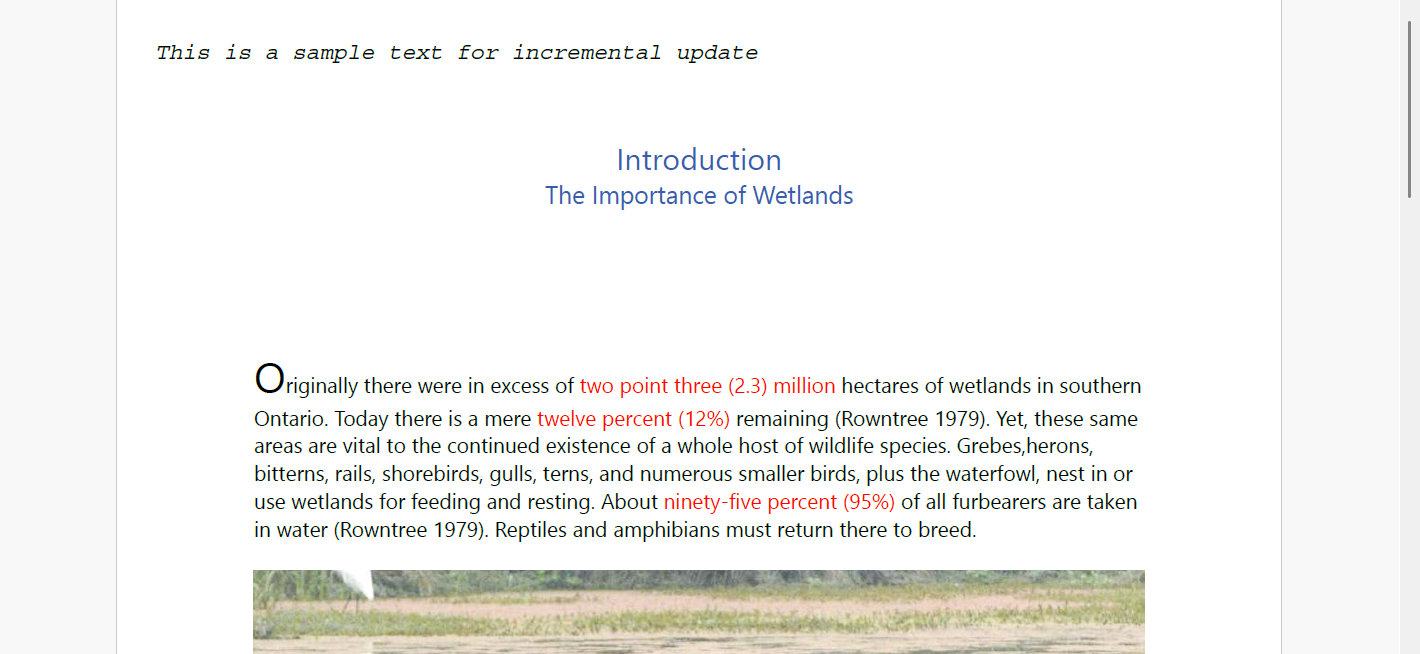
Update PDF Incrementally
You can update an existing PDF document incrementally by loading the document, making changes, and saving it with incremental update mode enabled.
To incrementally update a PDF file:
Load an existing PDF document using the PdfDocument.load method.
Modify the document, for example by adding text or graphics to a page.
Save the document using the savePdf method and set the saveMode option to SaveMode.IncrementalUpdate.
The following code example shows how to update a PDF document incrementally:
Note: The examples on this page use helper functions from the Snippet Helpers module. These utilities are provided only to simplify the examples and are not part of the DsPdfJS API.
// load existing PDF
const inputDocData = await Util.loadFile("Wetlands.pdf");
const doc = PdfDocument.load(inputDocData);

// draw text on a first page
doc.pages.getAt(0).context.drawText("This is a sample text for incremental update",
    Font.getPdfFont(StandardPdfFont.CourierItalic),
    12,
    "Black", 20, 20);

// Save the document
const docData = doc.savePdf({ saveMode: SaveMode.IncrementalUpdate });
Util.saveFile("UpdatePDFIncrementally.pdf", docData);