


Outline
An outline is a hierarchical list of items that represents the structure of a PDF document and helps users navigate to specific sections or locations. For more information about outlines, see PDF Specification 2.0, Section 12.3.3.
In DsPdfJS, outlines are managed through the document’s outlines collection, which is an OutlineNodeCollection. Each item in the outline is represented by an OutlineNode. Using the collection and node properties, you can add, retrieve, modify, and remove outline nodes in a PDF document.
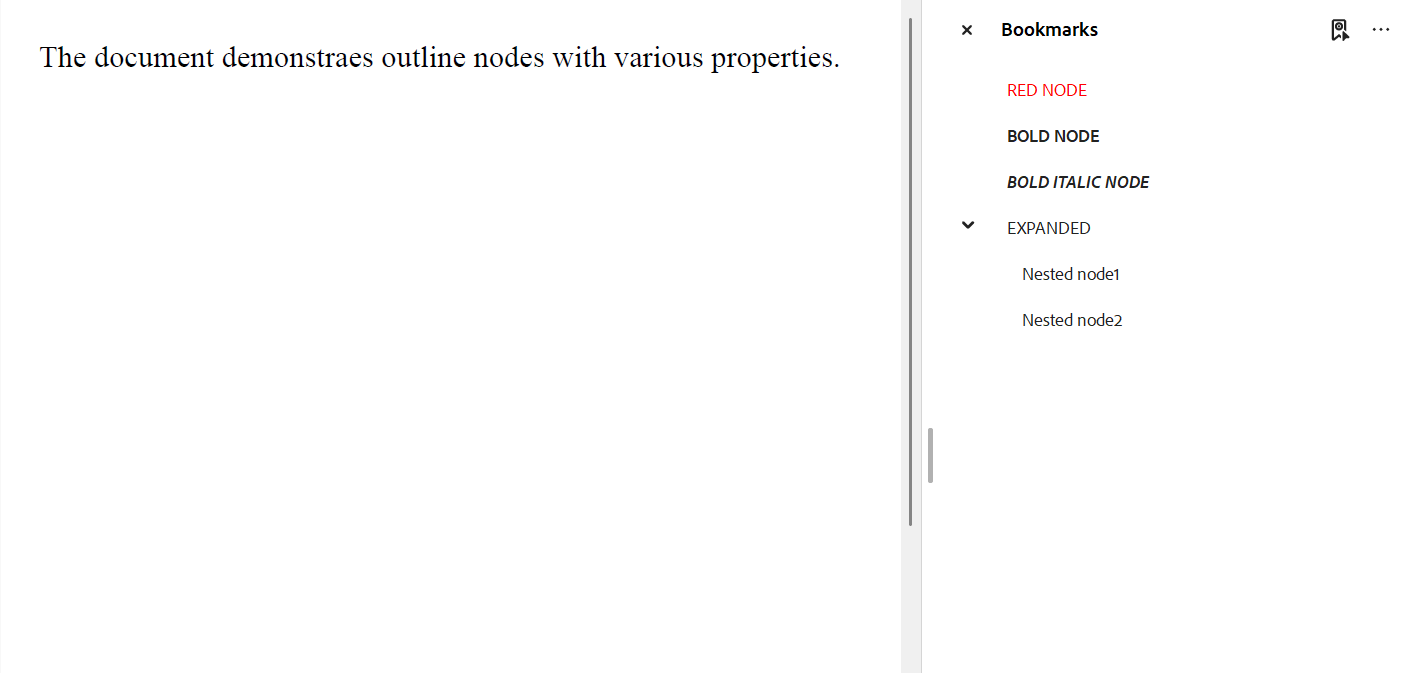
Add Outline Node
You can add outline nodes to a PDF document using the document’s outlines collection.
To add an outline node:
Create an instance of the OutlineNode class or define the node using JSON syntax.
Set the required properties such as title, destination (dest) or action, and optional appearance settings.
Add the node to the document’s outline by calling the add method of the OutlineNodeCollection class.
Note: The examples on this page use helper functions from the Snippet Helpers module. These utilities are provided only to simplify the examples and are not part of the DsPdfJS API.
// create document
const doc = new PdfDocument();

// add sample page
const page = doc.newPage();
page.context.drawText("The document demonstraes outline nodes with various properties.",
    Font.getPdfFont(StandardPdfFont.Times), 16, "Black", 20, 20);

// add outlines
// add using "json" syntax
doc.outlines.add({
    title: "RED NODE",
    textColor: "Red",
    dest: { type: 'fit', page: doc.pages.getAt(0) }
});

// add using OutlineNode object
const on = new OutlineNode("BOLD NODE", { type: "fit", page: doc.pages.getAt(0) });
on.textStyle = OutlineNodeFontStyle.Bold;
doc.outlines.add(on);

//
doc.outlines.add({
    title: "BOLD ITALIC NODE",
    textStyle: OutlineNodeFontStyle.Italic | OutlineNodeFontStyle.Bold,
    dest: { type: 'fit', pageIndex: 0 }
})

// add node with children in one call
doc.outlines.add({
    title: "EXPANDED",
    dest: { type: 'fitb', page: doc.pages.getAt(0) },
    expanded: true,
    children: [
        {
            title: "Nested node1",
        },
        {
            title: "Nested node2"
        }
    ]
})

Util.saveFile("Outline.pdf", doc.savePdf());
Get Outline Node
You can retrieve outline nodes from the document’s outlines collection.
To get an outline node:
Access the document’s outlines collection, which returns an OutlineNodeCollection.
Call the getAt method on the collection and specify the index of the outline node you want to retrieve.
const node = doc.outlines.getAt(0);
console.log(node.title);
Modify Outline Node
To modify an outline node in a PDF document, retrieve the node from the document’s outlines collection and update its properties.
To modify an outline node:
Access the document’s outlines collection.
Retrieve the required node using the getAt method and specify its index.
Set new values for the node properties, such as title, textColor, textStyle, etc.
const modifyNode = doc.outlines.getAt(0);
modifyNode.title = "Changed title";
Delete Outline Node
You can remove outline nodes from a PDF document using the document’s outlines collection.
To delete outline nodes:
Call the removeAt method on the OutlineNodeCollection class and specify the index of the outline node you want to delete.
Call the clear method on the OutlineNodeCollection class to remove all outline nodes from the document.
// Delete a particular outline node
doc.outlines.removeAt(0);

// Delete all the outline nodes
doc.outlines.clear();