Output Intents
Output intents describe the color characteristics of output devices on which a PDF document is rendered.
In DsPdfJS, you access output intents through the PdfDocument.outputIntents property, which provides a collection of OutputIntent objects associated with the document. Each output intent specifies information about the intended output device or production condition.
The OutputIntent class represents a PDF output intent and lets you define metadata that describes the target output environment. This information helps PDF processors match the colors used in the document to the color capabilities of the target device.
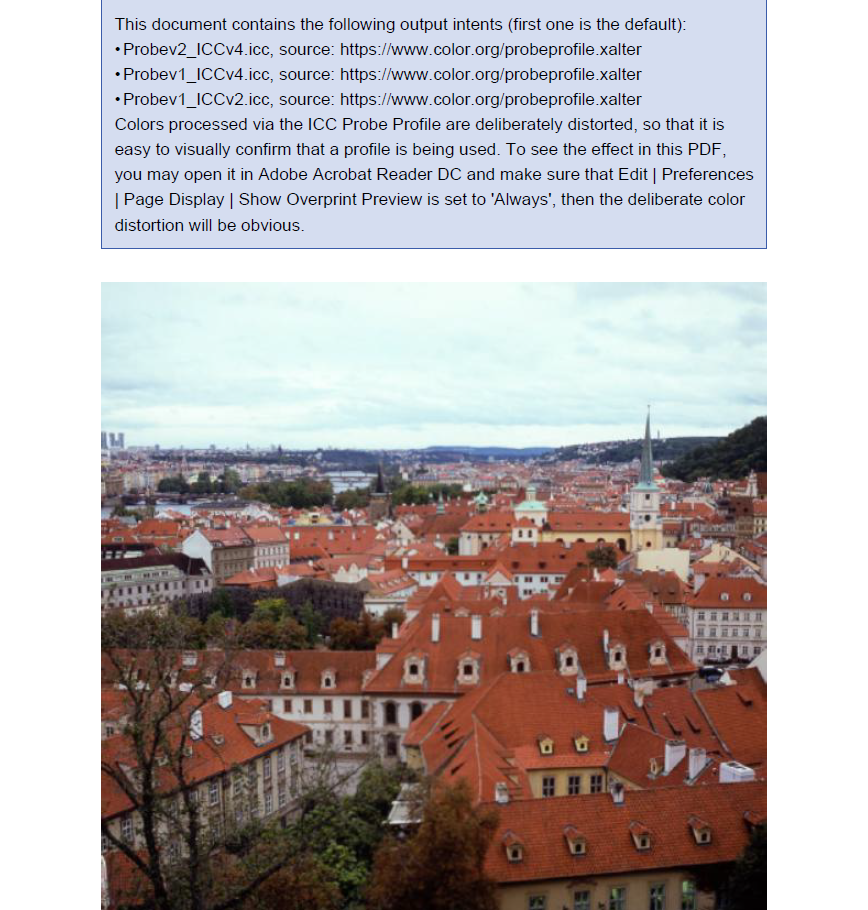
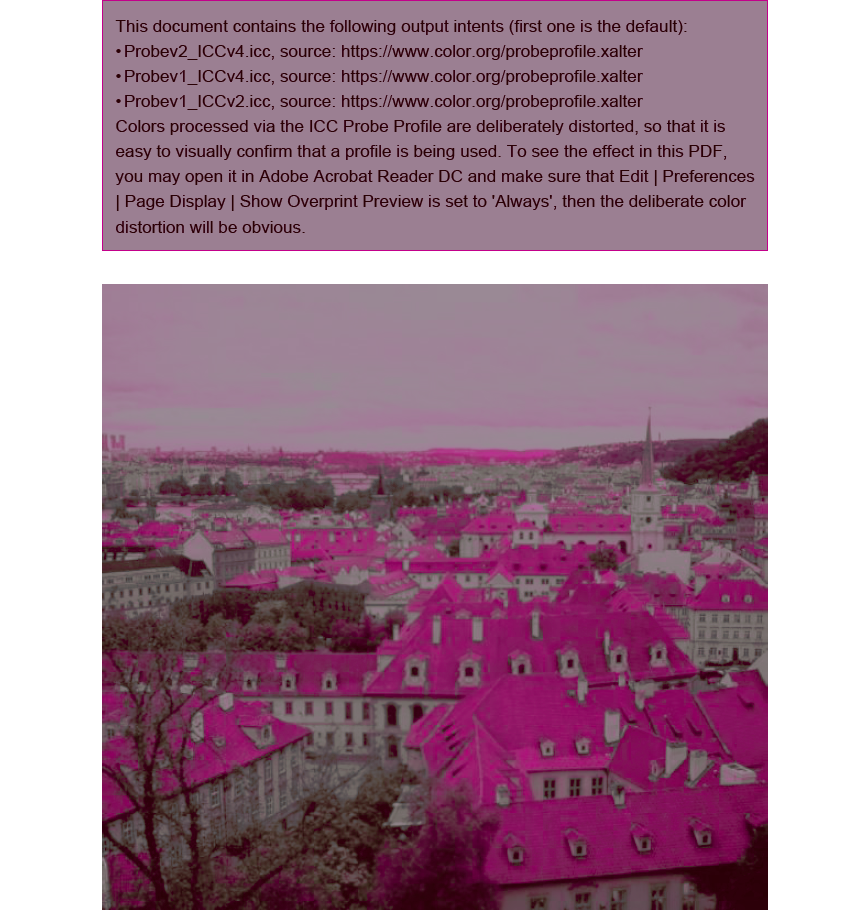
You can use output intents together with ICC profiles to convert source colors in the document to the colorants required for the intended output device or production workflow. DsPdfJS provides the IccProfile class to represent ICC profiles used by output intents. Create an ICC profile from raw ICC data using the IccProfile.create method.
You set the subtype of an output intent using the subtype property of the OutputIntent class. Common values include:
GTS_PDFX
GTS_PDFA1
ISO_PDFE1
Refer to the following code example to set output intents and ICC profiles in a PDF document:
const doc = new PdfDocument();
const page = doc.newPage();

const lines = [
    "This document contains the following output intents (first one is the default):",
];

let i = 0;
for (const profile of profiles) {
    const iccData = await Util.loadFile(`common/${profile.fileName}`);
    const iccProfile = IccProfile.create(iccData);
    const oi = OutputIntent.createDefaultForPdfA();
    oi.outputCondition = `Output intent testing ${i++}`;
    oi.registryName = "http://www.color.org";
    oi.outputConditionIdentifier = profile.fileName;
    oi.destOutputProfile = iccProfile;
    doc.outputIntents.add(oi);

    lines.push(`\u2022\u2003${profile.fileName}, source: ${profile.url}`);
}

lines.push(
    "Colors processed via the ICC Probe Profile are deliberately distorted, " +
    "so that it is easy to visually confirm that a profile is being used. " +
    "To see the effect in this PDF, you may open it in Adobe Acrobat Reader DC and make sure that " +
    "Edit | Preferences | Page Display | Show Overprint Preview is set to 'Always', " +
    "then the deliberate color distortion will be obvious."
);

const rc = addNote(lines.join("\n"), page);
// Load the image
const imageData = await Util.loadFile("images/roofs.png");
const image = Image.load(imageData);
// Draw the image below the note
page.context.drawImage(
    image,
    rc.x,
    rc.y + rc.height + 24,
    rc.width,
    rc.width,
    { keepAspectRatio: true }
);
const pdfData = await doc.savePdf();
Util.saveFile("OutputIntents.pdf", pdfData);


// Helper function addNote
function addNote(text, page) {
    const g = page.context;
    const resolution = g.resolution; // default 72 pts/inch
    const pad = resolution / 8;      // 1/8 inch padding
    const margin = resolution;       // 1 inch margin

    const boundsX = margin;
    const boundsY = margin;
    const boundsW = g.width - margin * 2;
    const boundsH = g.height - margin * 2;

    const helvetica = Font.getPdfFont(StandardPdfFont.Helvetica);
    const tl = new Layout({
        defaultFormat: new Format({ font: helvetica, fontSize: 12 }),
        maxWidth: boundsW,
        maxHeight: boundsH,
        marginLeft: pad,
        marginRight: pad,
        marginTop: pad,
        marginBottom: pad,
    });
    tl.append({ text });
    tl.performLayout();

    const rectX = boundsX;
    const rectY = boundsY;
    const rectW = tl.contentWidth + pad * 2;
    const rectH = tl.contentHeight + pad * 2;

    g.drawRect(rectX, rectY, rectW, rectH, {
        fillColor: "rgb(213,221,240)",
        lineColor: "rgb(59,92,170)",
        lineWidth: 0.5,
    });
    g.drawLayout(tl, boundsX, boundsY);

    return { x: rectX, y: rectY, width: rectW, height: rectH };
}
Before setting the 'Use Overprint Preview' option | After setting the 'Use Overprint Preview' option |
|---|---|
|
|