


PDF Conformance
DsPdfJS provides APIs for creating PDF documents that conform to PDF/A and PDF/UA requirements. Use the conformance-related APIs to configure document metadata, tagged content, namespaces, document language, and other required document settings.
See Tagged PDF for information about creating tagged documents.
Create PDF/A Documents
Use the conformanceLevel property and related document settings to declare and configure PDF/A documents.
Supported PDF/A conformance levels include:
PdfA1a
PdfA1b
PdfA2a
PdfA2b
PdfA2u
PdfA3a
PdfA3b
PdfA3u
PdfA4
PdfA4e
PdfA4f
Depending on the selected conformance level, PDF/A documents may require:
tagged content
embedded fonts
document metadata
output intents
associated embedded files
Create PDF/A-4 Documents
PDF/A-4 documents are based on PDF 2.0. PDF/A-4e supports engineering workflows and RichMedia annotations. PDF/A-4f supports arbitrary embedded files associated with document elements.
The following example demonstrates how to create a PDF/A-4 document:
// PDF/A-4 document demonstrating the features acceptable in PDF/A-4:
//   - based on PDF 2.0 (pdfVersion must be >= 2.0)
//   - tagged content, transparency, form XObjects
//   - AcroForm fields with JavaScript actions (allowed in PDF/A-4)
//   - an embedded PDF file that itself conforms to PDF/A
//     (PDF/A-4 allows embedding PDF/A-conforming PDF files; for arbitrary
//     embedded files use PDF/A-4f, for engineering/3D workflows PDF/A-4e)
//   - conformance declared through metadata (metadata.pdfA / metadata.pdfRev),
//     and the DocumentInfo dictionary must NOT be present
// PDF/A requires all fonts to be embedded:
const font = Font.load(new Uint8Array(await readFile(path.join(__dirname, '..', 'Resources', 'arial.ttf'))));
// Generates a small PDF/A-2b document used below as an embedded attachment
// (PDF/A-4 allows embedding PDF files that themselves conform to PDF/A):
function createPdfAAttachment() {
    const edoc = new PdfDocument();
    const p = edoc.pages.addNew();
    const tl = new Layout({
        defaultFormat: new Format({ font: font, fontSize: 12 }),
        maxWidth: p.width - 40
    });
    tl.append('An embedded attachment that itself conforms to PDF/A-2b.');
    tl.performLayout();
    p.context.drawLayout(tl, 20, 20);
    edoc.documentInfo = { creator: 'DsPdfJS' };
    edoc.metadata = { creatorTool: 'DsPdfJS', title: 'Embedded PDF/A-2b attachment' };
    edoc.conformanceLevel = PdfAConformanceLevel.PdfA2b;
    edoc.viewerPreferences.displayDocTitle = true;
    return edoc.savePdf();
}
const doc = new PdfDocument();
const page = doc.pages.addNew();
const g = page.context;
// PDF/A-4 requires tagged content:
const sePart = new StructElement('Part');
doc.structTreeRoot.children.add(sePart);
let mcid = 0;
let y = 20;
// a tagged heading
const seHeading = new StructElement('H1');
seHeading.defaultPage = page;
sePart.children.add(seHeading);
const tlh = new Layout({
    defaultFormat: new Format({ font: font, bold: true, fontSize: 20 }),
    maxWidth: page.width - 40
});
tlh.append('PDF/A-4 document');
tlh.performLayout();
g.beginMarkedContent({ name: 'H1', mcid: mcid });
g.drawLayout(tlh, 20, y);
g.endMarkedContent();
seHeading.contentItems.add(new McidContentItemLink(mcid++));
y += tlh.contentHeight + 10;
// a tagged paragraph
const seParagraph = new StructElement('P');
seParagraph.defaultPage = page;
sePart.children.add(seParagraph);
const tl = new Layout({
    defaultFormat: new Format({ font: font, fontSize: 12 }),
    maxWidth: page.width - 40
});
tl.append('A PDF/A-4 (PDF 2.0 based) document containing tagged content, transparency, ' +
    'a form XObject, AcroForm fields with a JavaScript calculation action, and an ' +
    'embedded PDF/A-2b file associated with the document. The field below the two ' +
    'operand fields recalculates their sum.');
tl.performLayout();
g.beginMarkedContent({ name: 'P', mcid: mcid });
g.drawLayout(tl, 20, y);
g.endMarkedContent();
seParagraph.contentItems.add(new McidContentItemLink(mcid++));
y += tl.contentHeight + 20;
// AcroForm fields with a JavaScript action are allowed in PDF/A-4:
let fld = new TextField();
doc.acroForm.fields.add(fld);
fld.name = 'fldA';
fld.value = '1';
fld.widget.rect = { x: 20, y: y, width: 200, height: 25 };
fld.widget.page = page;
fld.widget.flags = AnnotationFlags.Print;
fld = new TextField();
doc.acroForm.fields.add(fld);
fld.name = 'fldB';
fld.value = '2';
fld.widget.rect = { x: 250, y: y, width: 200, height: 25 };
fld.widget.page = page;
fld.widget.flags = AnnotationFlags.Print;
// the summary field recalculated by a JavaScript action
fld = new TextField();
doc.acroForm.fields.add(fld);
fld.name = 'fldSum';
fld.value = '3';
fld.widget.rect = { x: 150, y: y + 35, width: 200, height: 25 };
fld.widget.page = page;
fld.widget.flags = AnnotationFlags.Print;
fld.recalculateValue = new ActionJavaScript("event.value = this.getField('fldA').value + this.getField('fldB').value");
y += 80;
// decorations (transparency and form XObjects are allowed) marked as artifacts:
g.beginMarkedContent({ name: 'Artifact', type: TagArtifactType.Layout });
g.drawRect(20, y, 150, 80, { fillColor: [255, 0, 0, 40 / 255] });
const fxoRect = { x: 0, y: 0, width: 80, height: 50 };
const fxo = new FormXObject(doc, fxoRect);
const gfxo = fxo.context;
gfxo.drawRect(fxoRect, { fillColor: [238, 130, 238, 40 / 255] });
const tf = new Layout({
    defaultFormat: new Format({ font: font, fontSize: 8 }),
    maxWidth: fxoRect.width,
    maxHeight: fxoRect.height,
    textAlignment: TextAlignment.Center,
    paragraphAlignment: ParagraphAlignment.Center
});
tf.append('FormXObject');
tf.performLayout();
gfxo.drawLayout(tf, 0, 0);
gfxo.drawRect(fxoRect, { lineColor: 'Blue', lineWidth: 3 });
g.drawForm(fxo, { x: 200, y: y + 15, width: fxoRect.width, height: fxoRect.height }, { keepAspectRatio: false });
g.endMarkedContent();
// an embedded PDF/A-conforming PDF file associated with the document:
const ef = new EmbeddedFileStream(createPdfAAttachment());
// ModificationDate and MimeType must be specified for embedded files in PDF/A
ef.modificationDate = new Date();
ef.mimeType = 'application/pdf';
const fs = new FileSpecification('attachment.pdf', ef);
fs.unicodeFile.fileName = fs.file.fileName;
fs.relationship = FileSpecificationRelationshipType.Unspecified;
doc.embeddedFiles.add('attachment.pdf', fs);
doc.associatedFiles.add(fs);
// mark as tagged
doc.markInfo.marked = true;
// the document version must be >= 2.0
doc.pdfVersion = '2.0';
// PDF/A-4 conformance is declared through metadata (not conformanceLevel):
doc.metadata = { title: 'PDF/A-4 sample' };
doc.metadata.pdfA = PdfAConformanceLevel.PdfA4;
doc.metadata.pdfRev = '2026';
doc.viewerPreferences.displayDocTitle = true;
// the DocumentInfo dictionary must not be present in PDF/A-4:
doc.documentInfo = null;
const outputFile = path.join(__dirname, 'PdfA4.pdf');
await writeFile(outputFile, doc.savePdf());
console.log(`Created ${outputFile}`);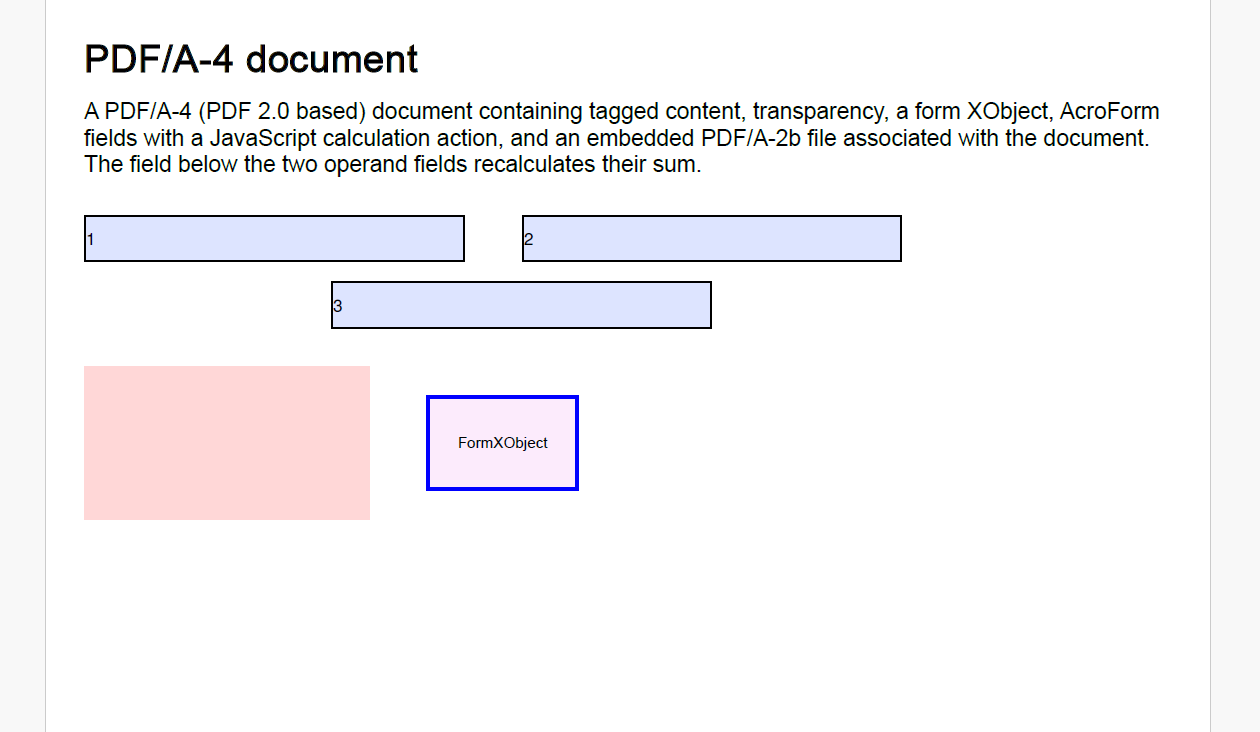
Create PDF/UA Documents
Use tagged PDF content and document metadata to configure PDF/UA documents.
Supported PDF/UA versions include:
PDF/UA-1
PDF/UA-2
PDF/UA documents require:
tagged PDF structure
embedded fonts
document title
document language
Create PDF/UA-2 Documents
PDF/UA-2 documents additionally support PDF 2.0 structure namespaces and structure-based destinations.
The following example demonstrates how to create a PDF/UA-2 document:
// PDF/UA-2 document demonstrating the features relevant to PDF/UA-2:
//   - based on PDF 2.0: the structure tree uses the PDF 2.0 structure namespace
//     ("http://iso.org/pdf2/ssn") with a Document root element
//   - fully tagged content: headings, paragraphs, a figure with alternate text
//   - outlines pointing directly to structure elements
//   - an annotation with a tagged appearance stream, referenced from the
//     structure tree with OBJR + MCR links, and structure-based tab order
//   - a file attachment with a description
//   - conformance declared with metadata.pdfUa = 2 and metadata.pdfUaRev
const doc = new PdfDocument();
// PDF/UA requires all fonts to be embedded:
const font = Font.load(new Uint8Array(await readFile(path.join(__dirname, '..', 'Resources', 'arial.ttf'))));
const img = Image.load(new Uint8Array(await readFile(path.join(__dirname, '..', 'Resources', 'clouds.jpg'))));
// PDF/UA-2 structure tree: the default PDF 2.0 structure namespace
// with a Document root element belonging to it:
const ns = new Namespace('http://iso.org/pdf2/ssn');
doc.structTreeRoot.namespaces.add(ns);
const seDoc = new StructElement('Document');
seDoc.ns = ns;
doc.structTreeRoot.children.add(seDoc);
const sePart = new StructElement('Part');
seDoc.children.add(sePart);
const page = doc.pages.addNew();
const g = page.context;
let mcid = 0;
let y = 20;
// a tagged heading
const seHeading = new StructElement('H1');
seHeading.defaultPage = page;
sePart.children.add(seHeading);
const tlh = new Layout({
    defaultFormat: new Format({ font: font, bold: true, fontSize: 20 }),
    maxWidth: page.width - 40
});
tlh.append('PDF/UA-2 document');
tlh.performLayout();
g.beginMarkedContent({ name: 'H1', mcid: mcid });
g.drawLayout(tlh, 20, y);
g.endMarkedContent();
seHeading.contentItems.add(new McidContentItemLink(mcid++));
y += tlh.contentHeight + 10;
// tagged paragraphs; an outline node points directly to the first one
for (let i = 0; i < 2; i++) {
    const seParagraph = new StructElement('P');
    seParagraph.defaultPage = page;
    sePart.children.add(seParagraph);
    const tl = new Layout({
        defaultFormat: new Format({ font: font, fontSize: 12 }),
        maxWidth: page.width - 40
    });
    tl.append(`Paragraph ${i + 1}. A PDF/UA-2 document is based on PDF 2.0: its structure ` +
        'tree uses the PDF 2.0 structure namespace with a Document root element, outlines ' +
        'can point directly to structure elements, and annotations are referenced from the ' +
        'structure tree with OBJR/MCR links and structure-based tab order.');
    tl.performLayout();
    g.beginMarkedContent({ name: 'P', mcid: mcid });
    g.drawLayout(tl, 20, y);
    g.endMarkedContent();
    seParagraph.contentItems.add(new McidContentItemLink(mcid++));
    y += tl.contentHeight + 20;
    if (i === 0) {
        // an outline node pointing to the structure element itself
        doc.outlines.add(new OutlineNode('First paragraph', new DestinationFit(seParagraph)));
    }
}
// a tagged figure with an alternate description
const seFigure = new StructElement('Figure');
seFigure.defaultPage = page;
seFigure.actualText = 'Figure 1';
seFigure.alternateDescription = 'A photo of clouds';
sePart.children.add(seFigure);
g.beginMarkedContent({ name: 'Figure', mcid: mcid });
g.drawImage(img, { x: 30, y: y + 20, width: 300, height: 150 }, { keepAspectRatio: true, alignX: ImageAlignHorz.Center, alignY: ImageAlignVert.Center });
g.endMarkedContent();
seFigure.contentItems.add(new McidContentItemLink(mcid++));
y += 180;
// A stamp annotation with a tagged appearance stream:
const stamp = new StampAnnotation();
stamp.name = 'stamp';
stamp.userName = 'User';
// Contents should be provided for annotations in PDF/UA documents
stamp.contents = 'Approved stamp';
stamp.page = page;
stamp.rect = { x: 350, y: 40, width: 200, height: 50 };
const fxo = new FormXObject(doc, { x: 0, y: 0, width: stamp.rect.width, height: stamp.rect.height });
const gg = fxo.context;
const r = { x: 0, y: 0, width: stamp.rect.width, height: stamp.rect.height };
// the background is a decoration — mark it as an artifact
gg.beginMarkedContent({ name: 'Artifact', type: TagArtifactType.Background, bbox: r });
gg.drawRect(r, { fillColor: [173, 255, 173, 1] });
gg.drawRect(r, { lineColor: 'DarkGreen', lineWidth: 2 });
gg.endMarkedContent();
// the text is real content — tagged with MCID 0 of THIS content stream
gg.beginMarkedContent({ name: 'P', mcid: 0 });
const tls = new Layout({
    defaultFormat: new Format({ font: font, fontSize: 16 }),
    maxWidth: r.width,
    maxHeight: r.height,
    textAlignment: TextAlignment.Center,
    paragraphAlignment: ParagraphAlignment.Center
});
tls.append('Approved');
tls.performLayout();
gg.drawLayout(tls, 0, 0);
gg.endMarkedContent();
stamp.appearanceStreams.normal.default = fxo;
// the structure element referencing the annotation (OBJR) and the tagged
// content inside its appearance stream (MCR):
const seStamp = new StructElement('Annot');
seStamp.defaultPage = page;
seStamp.actualText = 'Approved';
seStamp.contentItems.add(new ObjrContentItemLink(stamp));
const mcr = new McrContentItemLink();
mcr.formXObject = fxo;
mcr.contentStreamOwner = stamp;
mcr.mcid = 0;
seStamp.contentItems.add(mcr);
sePart.children.add(seStamp);
// structure-based tab order is required for PDF/UA pages with annotations
page.annotationsTabsOrder = AnnotationsTabsOrder.StructureOrder;
// the page footer is excluded from the logical structure via an artifact tag
g.beginMarkedContent({ name: 'Artifact', type: TagArtifactType.Pagination, subtype: TagArtifactSubtype.Footer });
g.drawText('Page 1', new Format({ font: font, fontSize: 9 }), 20, page.height - 30);
g.endMarkedContent();
// a file attachment; PDF/UA requires a description for attachments
const ef = new EmbeddedFileStream(new TextEncoder().encode('Attachment content'));
ef.creationDate = new Date();
ef.modificationDate = new Date();
const fs = new FileSpecification('readme.txt', ef);
fs.desc = 'A description of the attachment (required for PDF/UA)';
fs.relationship = FileSpecificationRelationshipType.Data;
doc.embeddedFiles.add('readme.txt', fs);
// mark as tagged
doc.markInfo.marked = true;
// PDF/UA-2 requires PDF 2.0
doc.pdfVersion = '2.0';
// declare PDF/UA-2 conformance
doc.metadata = { title: 'PDF/UA-2 sample' };
doc.metadata.pdfUa = 2;
doc.metadata.pdfUaRev = '2026';
doc.viewerPreferences.displayDocTitle = true;
// the document language is required for PDF/UA
doc.lang = 'en';
const outputFile = path.join(__dirname, 'PdfUA2.pdf');
await writeFile(outputFile, doc.savePdf());
console.log(`Created ${outputFile}`);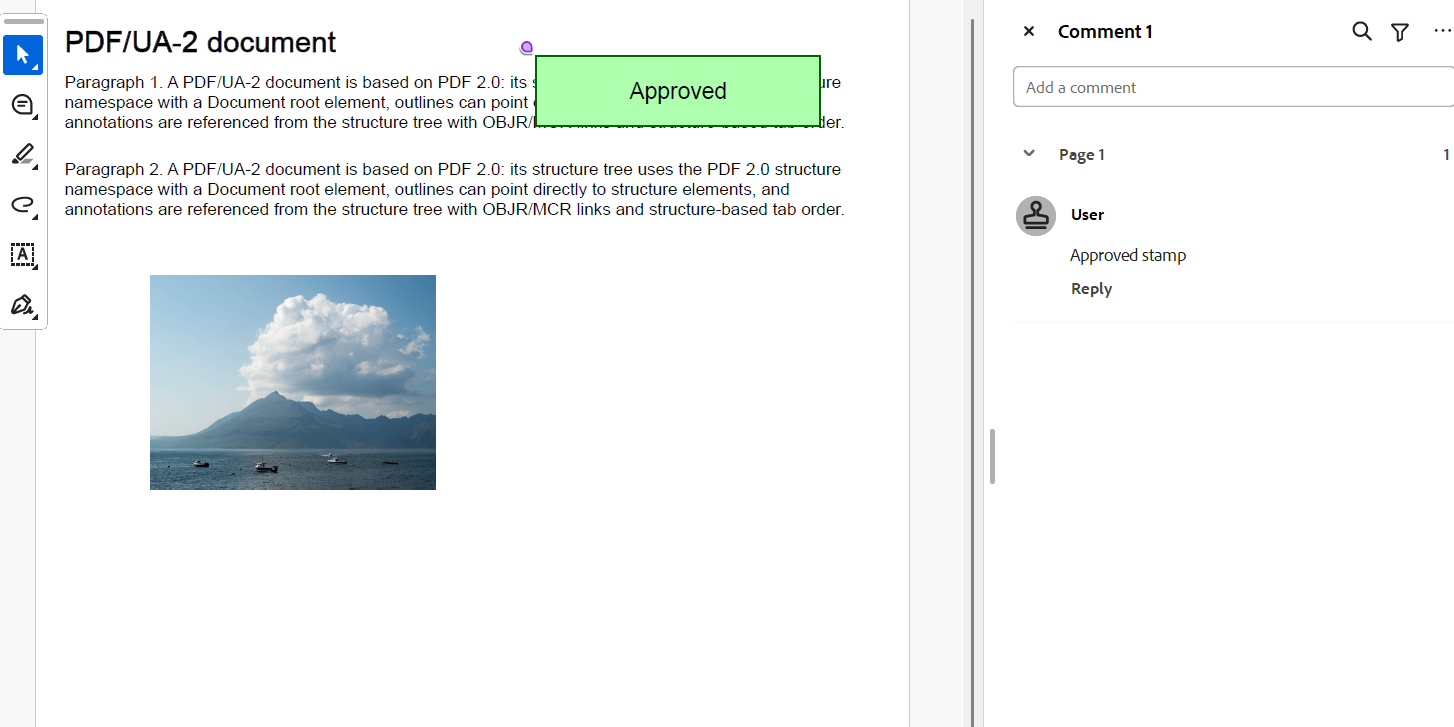
Note: DsPdfJS provides the APIs required to create PDF/A and PDF/UA documents, but it does not automatically validate compliance or convert arbitrary PDF documents into compliant PDF/A or PDF/UA files. Ensure that the document content and metadata meet the requirements defined in the relevant ISO specifications.