


- SpreadJS Overview
- Getting Started
- JavaScript Frameworks
- Best Practices
- Features
- SpreadJS Designer
- SpreadJS Designer VSCode Plugin
- Tutorials
-
SpreadJS Designer Component
- Getting Started
- Quick Start
- Theme
- Designer Interface
- JavaScript Frameworks
- Template-Based Workbook Initialization
- Customizations
-
Work in Designer Component
- AutoSum Functions
- Set Range Template Cell
- Name Box
- Select Cells Using Go To
- Find and Replace
- Edit Font Size
- Edit Font Family
- Configure Cell Borders
- Manage Conditional Formatting Rules
- Shape Selection Pane
- Automatic Outline
- Format Painter
- Sort and Filter
- Table Slicer
- Data Source
- TableSheet
- GanttSheet Designer
- ReportSheet Designer
- Data Chart Designer
- Text to Columns
- Remove Duplicates
- Pivot Table
- Dockable Side Panel
- Command Palette
- Transform Cells with LAMBDA Formula
- Threaded Comments Panel
- What-If Analysis
- Insert Function Dialog
- Named Cell Templates
- Insert Pictures in Designer
- Toolbar Ribbon
- API Documentation
- SpreadJS Collaboration Server
- Touch Support
- Formula Reference
- Import and Export Reference
- Events
- API Documentation
- Release Notes
Previewing Data
The Data tab provides a read-only preview of the current table data.
It reflects the active table configuration and allows you to verify structural and visual settings before binding the table to a runtime component.
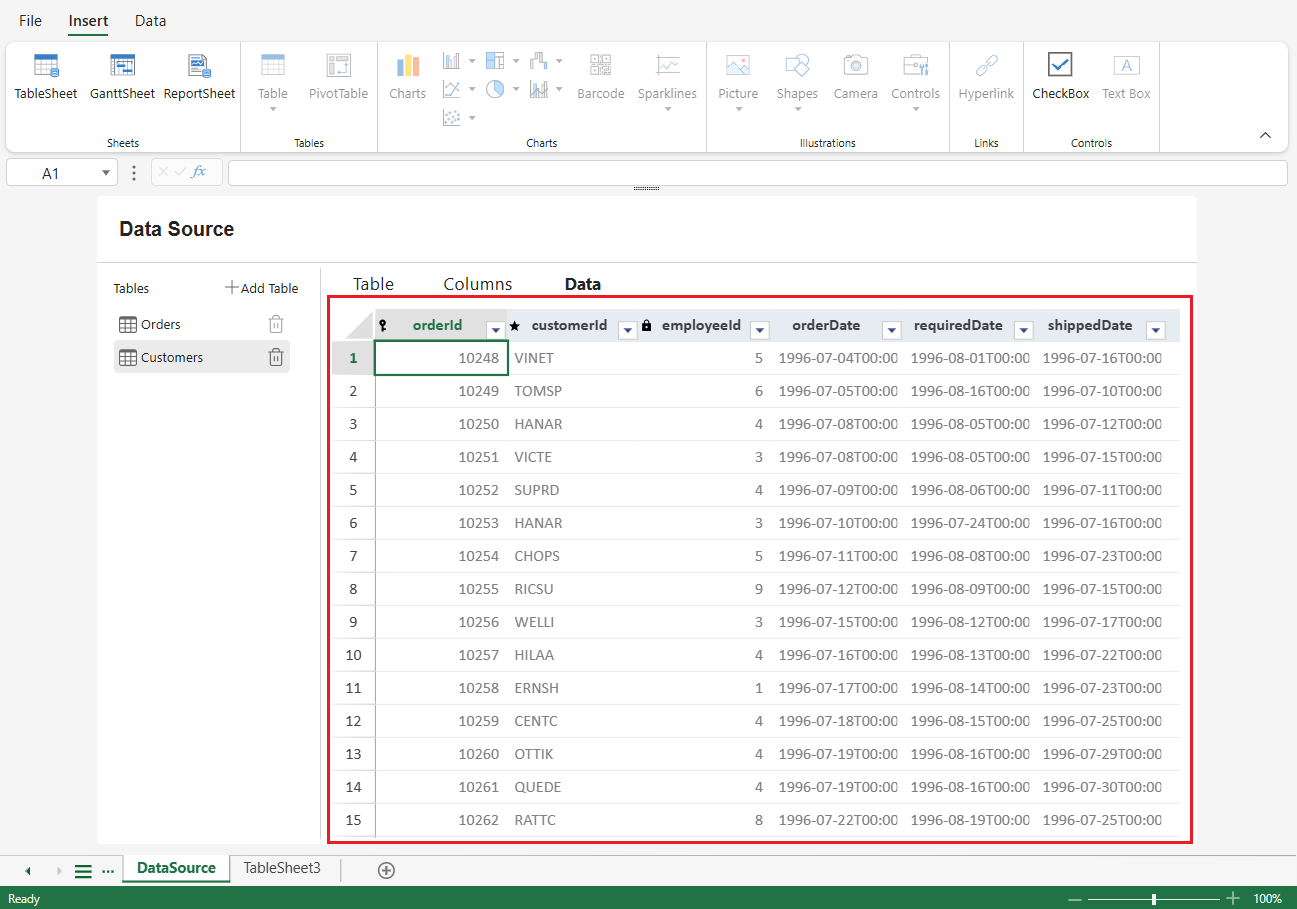
What the Preview Reflects
The Data preview behaves similarly to a TableSheet view in terms of rendering:
Column headers
Row index
Data values
Column styles
Calculated columns
Column visibility settings
Header indicators (such as Primary Key, Required, Read Only, and Relationship)
This allows you to confirm that schema and column configurations are applied as expected.
Read-Only Behavior
Data cannot be edited directly in this view.
All structural changes must be made in the Table or Columns tabs.
The Data tab is intended for inspection and validation only.
Relationship and Hierarchy Limitations
Relationship columns are not expanded or navigable in this view.
Hierarchical interaction and advanced runtime behaviors are not provided.
Features that depend on runtime data binding are not available.
The preview only indicates that such configurations exist.
Purpose of the Data Tab
The Data tab serves as a configuration verification layer.
For full runtime interaction—including editing, relationship traversal, and advanced hierarchical behavior—bind the table to a supported SpreadJS component such as TableSheet or GanttSheet.