C1Window to C1Dialog control 2025v2 399 in NET Framework 4.8.1

Posted by: enrique.pv-ext on 19 December 2025, 8:40 am EST

    • Post Options:
    • Link

    Posted 19 December 2025, 8:40 am EST - Updated 19 December 2025, 8:52 am EST

    Hi,

    Migrate from 2010v1 to 2025v2 399 in ASP.NET WebForms NET Framework 4.8.1.

    Using C1GridView from C1.Web.Wijmo.Controls.48.dll

    Changes C1Window to C1Dialog control.

    CaptionButtons now, has not this properties:

    
        <CollapseExpandButton Visible="False" />
                  <CloseButton Visible="True" />
                   <Icon Visible="true" />
                   <MaximizeButton Visible="False" />
                   <MinimizeButton Visible="False" />
                   <PinButton Visible="False" />
                    <ReloadButton Visible="False" />
              

    And Error ContentTemplate property

    El tipo 'C1.Web.Wijmo.Controls.C1Dialog.C1Dialog' no tiene ninguna propiedad pública cuyo nombre sea 'ContentTemplate'.

    My code (fragment):

    
                    <cc5:C1Dialog ID="C1WindowAddEntry"
                                runat="server" 
                                AutoExpand="False" 
                                ImageHeight="0" 
                                ImageWidth="0"  
                                Width="615px" 
                                Height="220px"
                                VisualStylePath="~/VisualStyles" 
                                UseEmbeddedVisualStyles="False"
                                VisualStyle="CustomVisualStyle2" 
                                AllowResize="False" 
                                StartPosition="Page"  
                                HorizontalAlign="Center" 
                                VerticalAlign="Middle" 
                                OnClientHidden="AddWindowClosing" >
                    <CaptionButtons>
                    </CaptionButtons>
                    <ContentTemplate>
                        <%--<cc8:C1FormDecorator ID="C1FormDecorator1" runat="server" VisualStylePath="~/VisualStyles" 
                                                            UseEmbeddedVisualStyles="false"
                                                            VisualStyle="Vista" 
                                                            DecorationZoneID="DecoratedZoneAdd" DecoratedControls="DropDownList"  />--%>
                        <div style="padding:15px" id="DecoratedZoneAdd">
                             <div style="padding-bottom:45px; display:block">
                                    <div style="float:left;"> 
                                        <div style="float:left; width:120px; padding-top:3px" >
                                            <asp:Label ID="LabelDescription" runat="server"  CssClass="minititle" Width="100"></asp:Label> 
                                        </div>           
                                        <div style="float:left">
                                            <asp:TextBox ID="TextBoxDescription"  MaxLength="50" runat="server"></asp:TextBox>
                                            <asp:RequiredFieldValidator ID="RequiredFieldValidatorTextBoxDescription"  
                                                                ControlToValidate="TextBoxDescription" 
                                                                runat="server"  Display="None"
                                                                ValidationGroup="AddGroupValidation"
                                                                 Font-Names="Tahoma" Width="20px">                                    
                                            </asp:RequiredFieldValidator>
                                            <ajaxToolkit:ValidatorCalloutExtender  BehaviorID="require_validate_extenderTextBoxDescription"
                                                                            runat="Server" 
                                                                            ID="PNReqE"
                                                                            TargetControlID="RequiredFieldValidatorTextBoxDescription" 
                                                                            Width="250px"
                                                                            HighlightCssClass="validatorCalloutHighlight" 
                                                                            CssClass="CustomValidatorCalloutStyle"
                                                                            WarningIconImageUrl='<%# "~/App_Themes/" + Theme + "/Imagenes/alert-large.gif" %>'
                                                                            CloseImageUrl='<%# "~/App_Themes/" + Theme + "/Imagenes/close.gif" %>'>
                                                <Animations>
                                                    <OnShow>                                    
                

    Not ContentTemplate in C1Dialog . I use Content element.

    Now, my javascript code not working for modal : showModal function

    
    // This function show or hide a C1Window given 
    function SetC1WindowVisibility(C1WindowClientID, Visible) {
        try {
            var dialog = $find(C1WindowClientID);
           
            if (Visible == true) {
                dialog.showModal();
                dialog.set_startPosition(1);
                dialog.set_verticalAlign(1);
                dialog.set_horizontalAlign(1);
                setModalLayerVisibility(true);
            }
            else {
                dialog.hide();
                setModalLayerVisibility(false);
            }
        }
        catch (e) {
            alert('Error en SetC1WindowVisibility1: ' + e.message);
        }
    }

  • Posted 22 December 2025, 5:00 am EST - Updated 22 December 2025, 12:08 pm EST

    I use

    var $dlg = $("#" + C1WindowClientID);
    $dlg.c1dialog("open");
    $dlg.c1dialog("close");

    Not working this code (set_x, set_y, set_text… ) with C1Dialog, any alternatives ?

     dialog.showModal();
    
       dialog.set_x(200);
       dialog.set_y(250);
    
      dialog.get_visible();
    
     dialog.set_text(title);
     dialog.set_startPosition(C1.Web.UI.Controls.C1Window.C1WindowPosition.page);
     dialog.set_verticalAlign(C1.Web.UI.Controls.C1Window.VerticalPosition.middle);
     dialog.set_horizontalAlign(C1.Web.UI.Controls.C1Window.HorizontalPosition.center);
     
    dialog.hide();
    

    Anyways, too I need, when the pages load first time

    IsPostback = false

    the C1Dialog will be hide (not visible).

    ShowModalWindowOnLoad not exists in C1Dialog:

     C1Window1.ShowModalWindowOnLoad = value;

    This C# code doesn’t working now with C1Dialog:

         this.C1Window1.AllowMove = false;
         this.C1Window1.X = 120;
         this.C1Window1.Y = 280;
         this.C1Window1.StartPosition = C1.Web.UI.Controls.C1Window.C1WindowPosition.Manual;
         //this.C1Window1.HorizontalAlign = C1.Web.UI.Controls.C1Window.HorizontalPosition.;
  • Posted 22 December 2025, 1:44 pm EST

    Hi,

    Thanks for reaching out to us.

    The C1Window control is no longer available in the current version of ASP.NET WebForms. Therefore, it is suggested to use the C1Dialog control instead.

    You can refer to the following documentation links for more details:

    You may also review the product demo here:

    https://developer.mescius.com/componentone/demos/aspnet/ControlExplorer/C1Dialog/Overview.aspx

    The same sample is also available locally after installing the product at the following path:

    C:\Users\Documents\ComponentOne Samples\ASP.NET Web Forms\WebForms\CS\ControlExplorer

    Please go through these references for implementation. If you still face any issues, kindly share a minimal sample application that reproduces the problem.

    We appreciate your cooperation.

    Thanks & regards,

    Aastha

  • Posted 23 December 2025, 3:12 am EST

    Thanks a lot. Maybe useful wijmo wjdialog reference ?

    I need, when the pages load first time

    IsPostback = false

    the C1Dialog will be hide (not visible).

    In all samples, always the dialog is visible when the page loads (IsPostback = false).

    Can you help me ?

  • Posted 24 December 2025, 1:55 am EST - Updated 24 December 2025, 2:01 am EST

    Hi,

    Thanks for the additional information.

    Thank you for your question.

    The C1Dialog being visible on initial page load in our samples is intentional for demonstration purposes.

    However, you can easily keep the dialog hidden when the page loads for the first time (IsPostBack = false) and show it only when required.

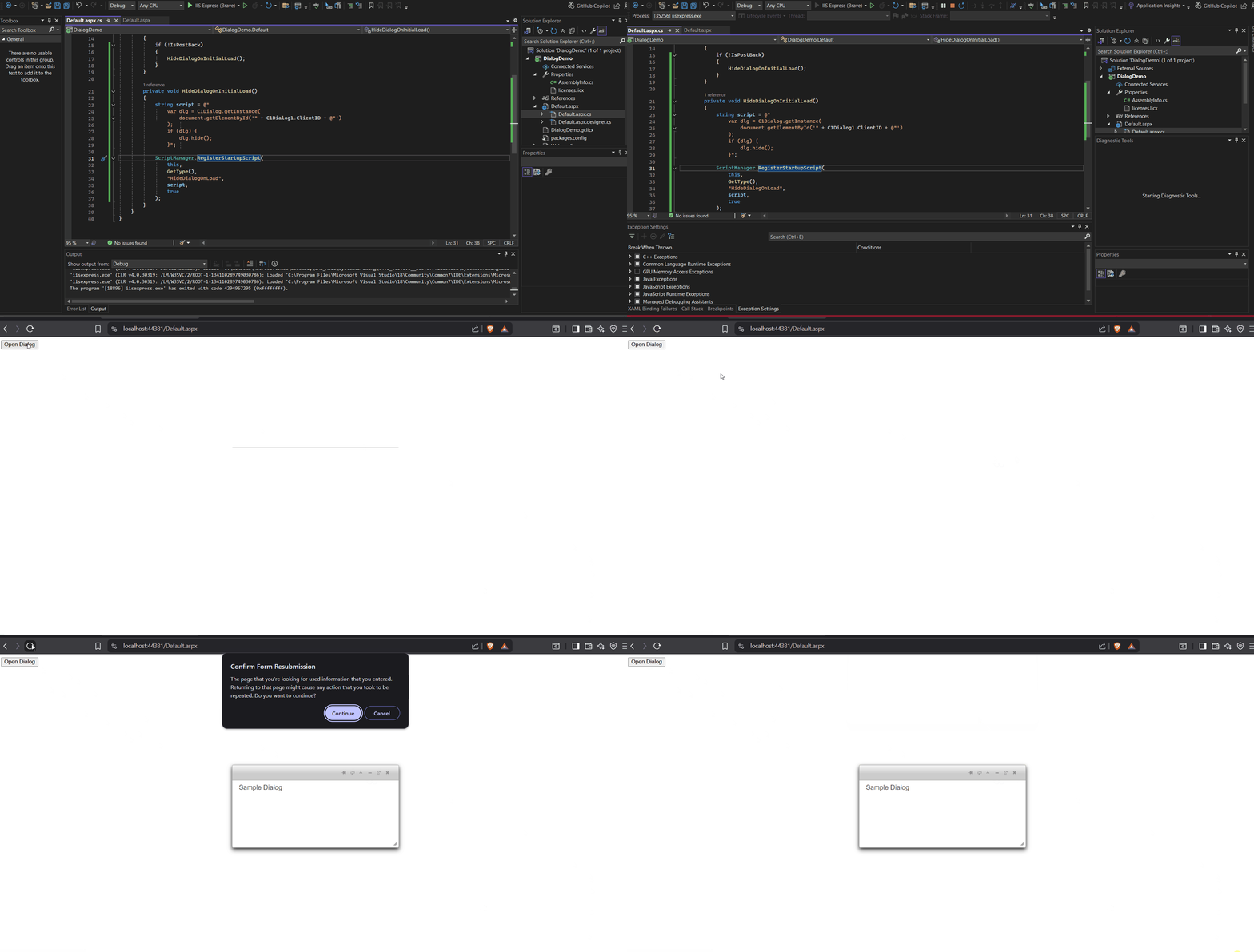
    The recommended approach is to hide the dialog on the initial load using the client-side API and then show it on user action, for example a button click. This allows the dialog to be rendered in the DOM while remaining hidden.

    We have attached a sample application for your reference. See DialogDemo.zip

    Kindly check the following GIF showing the output behavior of our application:

    Hope this helps!

    Thanks & regards,

    Aastha

  • Posted 26 December 2025, 5:07 am EST - Updated 26 December 2025, 8:22 am EST

    Thanks a lot !

    Now, I use c1dialog(“close”) and c1dialog(“open”):

         <script type="text/javascript" id="scriptWindows">
    		//<![CDATA[
    
    			$(document).ready(function () {
    
                     $("#<%=C1WindowAddEntry.ClientID%>").c1dialog("close");
    
             });
    
    		//]]>
    		</script>

    Better use

    var dlg = C1Dialog.getInstance(
                        document.getElementById('<%= C1Dialog1.ClientID %>')
                    );

    and methods:

    dlg.show();
    dlg.hide();

    For me, I get

    CurrencyConfigurator.aspx:1044 Uncaught ReferenceError: C1Dialog is not defined
        at CurrencyConfigurator.aspx:1044:27

    In my legacy code using C1Window 2012v1, I use C1Window functions:

        var show = function (args) {
            var w = controls.C1Window1;
            //w.set_showModalWindowOnLoad(false);
            
            if (title != '') { w.set_text(title); }
            
            if (width) {
                w.set_width(width);
            }
    
            if (height) {
                w.set_height(height);
            }
            
            w.set_startPosition(1);
            w.set_verticalAlign(1);
            w.set_horizontalAlign(1);
            w.showModal();
            controls.btnAccept.focus();
        };

    Two questions:

    1. ReferenceError: C1Dialog is not defined

    Now, I use C1Dialog 2025v2 399,

    1. which are the new functions ?

    set_showModalWindowOnLoad
    set_text
    set_width
    set_height
    set_startPosition
    set_verticalAlign
    set_horizontalAlign
    showModal

    Can you help me, please? Thanks in advanced

  • Posted 29 December 2025, 6:25 am EST - Updated 29 December 2025, 6:50 am EST

    1. explain new properties AppendTo, MaintainVisibilityOnPostback, MaintainStatesOnPostback, ShowOnLoad and Show ?
    <cc5:C1Dialog ID="C1WindowAddEntry"
                OnClientHidden="AddWindowClosing" AppendTo="body" 
    Localization-Close="Close" Localization-Maximize="Maximize" 
    Localization-Minimize="Minimize" Localization-Pin="Pin" Localization-Refresh="Refresh" 
    Localization-Toggle="Toggle" 
                MaintainVisibilityOnPostback="True" Show="blind" 
                MaintainStatesOnPostback="True" ShowOnLoad="False" >

    Can you help me, please? Thanks in advanced

  • Posted 29 December 2025, 7:07 am EST

    Hi,

    We are currently discussing it with our developers. [Internal Tracking ID: C1WEB-30276] We will update you on this as soon as we hear back from them.

    Thanks & regards,

    Aastha

  • Posted 29 December 2025, 11:28 am EST

    thanks,

    another question:

    $dlg.hide(); not same than $dlg.c1dialog(“close”);

    Thanks & regards,

  • Posted 30 December 2025, 7:02 am EST

    Hi,

    Here is the information to the additional query:

    1. AppendTo - Specifies where the dialog element is added in the HTML DOM using a jQuery selector. Here are the reference links to better understanding:

    https://developer.mescius.com/componentone/docs/webforms/online-dialog/C1.Web.Wijmo.Controls.45~C1.Web.Wijmo.Controls.C1Dialog.C1Dialog~AppendTo.html

    1. MaintainVisibilityOnPostback - When set to true, the dialog remains open after a full or partial postback if it was visible before the postback. Reference link: https://developer.mescius.com/componentone/docs/webforms/online-dialog/Showing.html#:~:text=MaintainVisibilityOnPostback%3D"False"

    2. MaintainStatesOnPostback - It is a value that indicates whether to maintain the states when post back. Reference Link: https://developer.mescius.com/componentone/docs/webforms/online-dialog/C1.Web.Wijmo.Controls.45~C1.Web.Wijmo.Controls.C1Dialog.C1Dialog~MaintainStatesOnPostback.html

    3. ShowOnLoad - Automatically opens the dialog when the page is loaded for the first time. Reference Link: https://developer.mescius.com/componentone/docs/webforms/online-dialog/C1.Web.Wijmo.Controls.45~C1.Web.Wijmo.Controls.C1Dialog.C1Dialog~ShowOnLoad.html

    4. Show - Defines the effect used when the dialog opens. Reference link: https://developer.mescius.com/componentone/docs/webforms/online-dialog/C1.Web.Wijmo.Controls.45~C1.Web.Wijmo.Controls.C1Dialog.C1Dialog~Show.html

    >> About $dlg.hide() vs $dlg.c1dialog(“close”)

    These two are not the same.

    $dlg.hide() - This only hides the HTML element using jQuery. The C1Dialog control does not know it was closed, and the modal overlay or internal state may still remain.

    $dlg.c1dialog(“close”) - This correctly closes the dialog using the C1Dialog API, updates its internal state, and removes the modal overlay.

    Note: ASP.NET WebForms is now considered a legacy technology, and there is no active development ongoing for it. Since you are upgrading from a very old version, some features may need to be reimplemented.

    We strongly recommend considering a migration to ASP.NET MVC to benefit from the latest features, improvements, and full product support.

    You can refer to the following documentation for more details: https://developer.mescius.com/componentone/docs/mvc/online-mvc/overview

    *Additionally, we kindly request that you create separate tickets for new queries. This helps us track and address each requirement more clearly.

    Thanks & regards,

    Aastha

Need extra support?

Upgrade your support plan and get personal unlimited phone support with our customer engagement team

Learn More

Forum Channels