C1Menu Styles CSS 2010v1 to 2025v2 399 in ASP.NET WebForms

Posted by: enrique.pv-ext on 18 September 2026, 6:32 am EST

  • Posted 18 September 2026, 6:32 am EST - Updated 18 September 2026, 6:37 am EST

    new ticket for separate concerns to avoid any misunderstandings about C1Menu Styles CSS

    Reference https://developer.mescius.com/forums/webforms-edition/styles-css-2010v1-to-2025v2-399-in-asp-net-webforms

    Fix aligns menu using

    /* (A) contenedor exterior: envuelve icono izquierdo + texto real cuando el ítem tiene IconClass */
    .wijmo-wijmenu-child .wijmo-wijmenu-link > .wijmo-wijmenu-text {
        display: flex;
        align-items: flex-start;   /* icono alineado con la primera línea de texto, no centrado verticalmente */
        flex-wrap: nowrap;         /* icono y texto en la misma fila; el texto envuelve internamente, el icono no baja de línea */
        flex: 1 1 auto;
        min-width: 0;              /* imprescindible para que el hijo flex pueda envolver texto en vez de desbordar */
    }
    
    /* icono izquierdo, ahora correctamente localizado como hijo directo de (A) */
    .wijmo-wijmenu-child .wijmo-wijmenu-link > .wijmo-wijmenu-text > .ui-icon {
        flex: 0 0 auto;             /* nunca se encoge ni envuelve, siempre ocupa su propia celda */
        margin-top: 2px;            /* ajuste fino para que se asiente junto a la primera línea de texto */
    }
    
    /* (B) span interior: el texto real */
    .wijmo-wijmenu-child .wijmo-wijmenu-link > .wijmo-wijmenu-text > .wijmo-wijmenu-text {
        white-space: normal;
        overflow-wrap: break-word;
        flex: 1 1 auto;
        min-width: 0;
    }
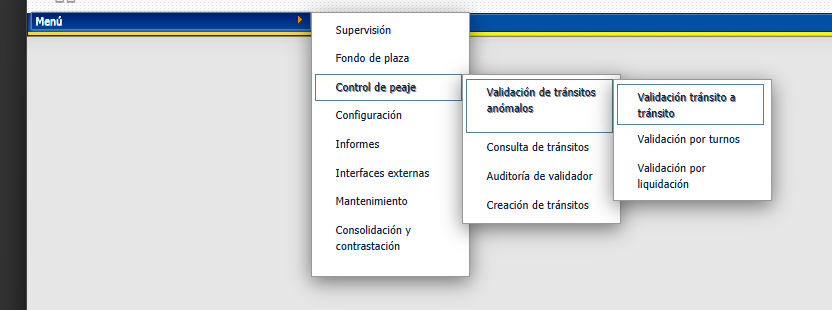
    

    NOw, how use icons in Menu wijmo ?

    IN legacy Menu:
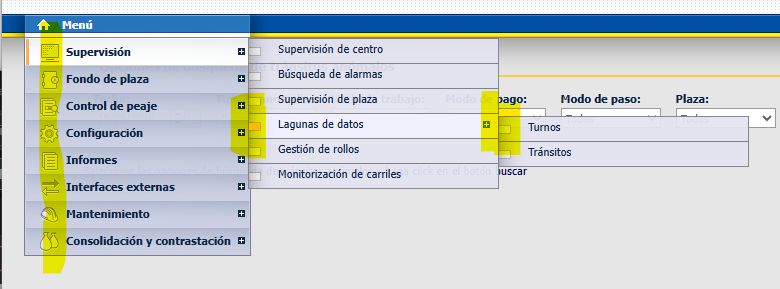
    any alternatives ??

  • Posted 21 September 2026, 4:03 am EST

    Hello Enrique,

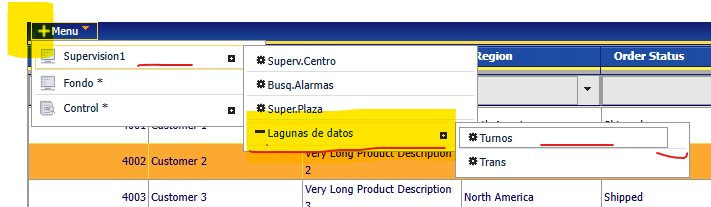
    There are three ways to display icons in Menu:

    1. Using default UI icons: https://developer.mescius.com/componentone/docs/webforms/online-menu/addingiconstoc1menui.html

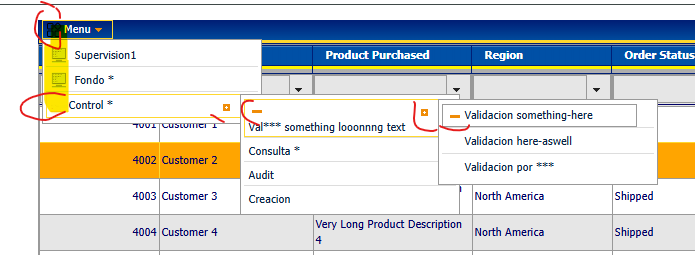
      In the attached sample, refer to “Control *” MenuItem displaying gear icon.

    2. Using static image files from disk.

      In the attached sample, refer to “Menu” MenuItem displaying a png image as icon.

    3. Using third party icons via CDN link.

      In the attached sample, refer to “Supervision” MenuItem displaying a FlatIcon from https://www.flaticon.com/

    Sample: Menu_Sample.zip

    Regards,

    Uttkarsh.

  • Posted 21 September 2026, 7:34 am EST - Updated 21 September 2026, 7:40 am EST

    Thanks all! I’ll try applies three ways to display icons in Menu.

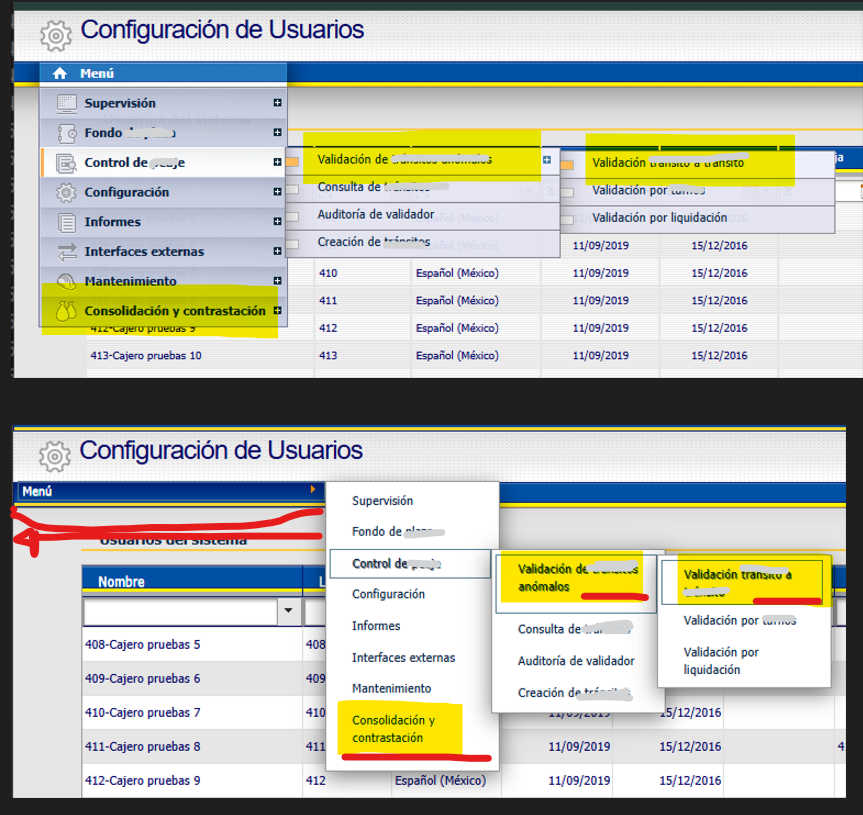
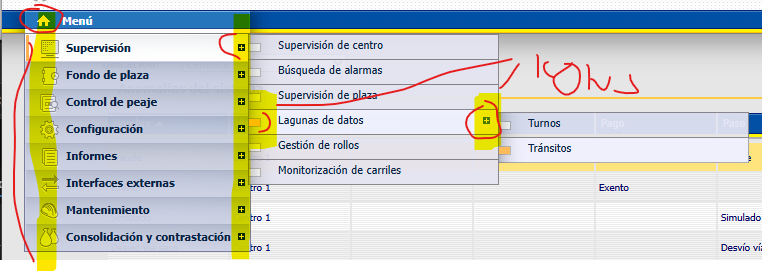
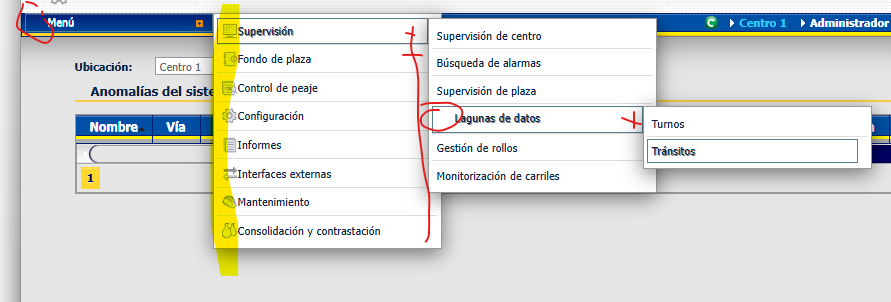
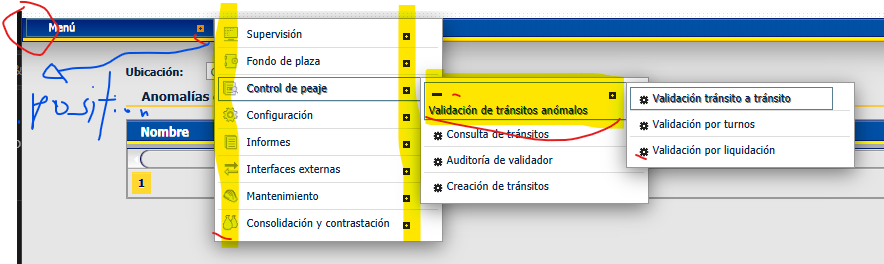
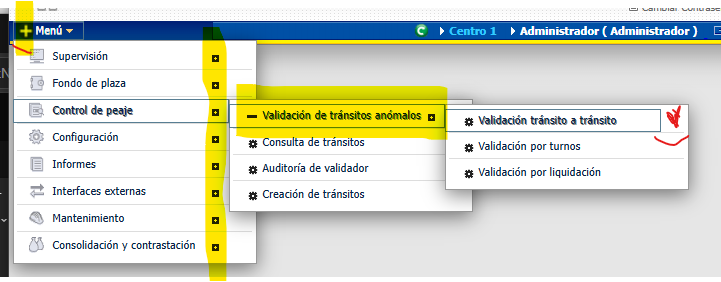
    Now, another question, about position Menu, if can be Below the menu—in a layer beneath the menu—just like in the legacy version—it now appears to the right of the menu arrow.

    …and the menu option text gets cut off and wraps to the next line; can it appear on a single line without breaking (no wrap)?

    Must be has a Icon + if there are more one options.

    And a Line below each options.

    Thanks a lot !!please, any help will be very grateful, friends

  • Posted 22 September 2026, 12:44 am EST

    Hello Enrique,

    → Now, another question, about position Menu, if can be Below the menu—in a layer beneath the menu—just like in the legacy version—it now appears to the right of the menu arrow.

    This happens because you might have set position related property for C1Menu. By default, the Menu dropdown is displayed directly below. Furthermore, you can set ‘Position-At-Left’ property to ‘Left’ to get the desired behavior.

    <wijmo:C1Menu ID="C1Menu1" runat="server" Position-At-Left="Left" >
        <Items>
         ...
    

    → …and the menu option text gets cut off and wraps to the next line; can it appear on a single line without breaking (no wrap)?

    For this, increase the width of Menu dropdowns as follows:

    .wijmo-wijmenu .wijmo-wijmenu-parent .wijmo-wijmenu-child {
        width: 220px;
    }
    

    → Must be has a Icon + if there are more one options.

    You can achieve it by replacing ‘ui-icon-triangle-1-e’ icon with ‘ui-icon-squaresmall-plus’ icon using JS as follows:

    $(document).ready(function () {
        $("#MainContent_C1Menu1")
            .find(".ui-icon-triangle-1-e")
            .removeClass("ui-icon-triangle-1-e")
            .addClass("ui-icon-squaresmall-plus");
    });
    

    → And a Line below each options.

    You can achieve it using CSS as follows:

    .wijmo-wijmenu-list > .wijmo-wijmenu-item > .wijmo-wijmenu-child > .wijmo-wijmenu-item {
        border-bottom: 1px solid #ddd;
    }
    .wijmo-wijmenu-list > .wijmo-wijmenu-item > .wijmo-wijmenu-child > .wijmo-wijmenu-item:last-child {
        border-bottom: none;
    }
    

    Sample: Menu_Sample_Mod.zip

    Regards,

    Uttkarsh.

  • Posted 22 September 2026, 6:03 am EST - Updated 22 September 2026, 6:08 am EST

    Thanks all !!!

    width of Menu and lines beloww all is OK. Thanks friends!

    I try Position-At-Left, but position is the same, not below.

    I tyr another properties:

    Position-At-Top=“Top”

    what is Direction=“Ltr” ?

    what is DisplayVisible=“true” ?

    <cc1:C1Menu ID="C1Menu1" runat="server" Height="15px" Width="195px"
                        OnLoad="C1Menu1_Load"
                        Direction="Ltr"
                        DisplayVisible="true"
                        Orientation="Vertical"
                        Position-At-Left="Left" Position-At-Top="Top"
    
                        Trigger=".wijmo-wijmenu-item"
                        TriggerEvent="MouseEnter">
                        <Items>
                            <cc1:C1MenuItem runat="server" Text="Menú">
                            </cc1:C1MenuItem>
                        </Items>
                    </cc1:C1Menu>

    Position is the ul element menu (style inline):

    <ul class="wijmo-wijmenu-list ui-widget-content ui-corner-all ui-helper-clearfix wijmo-wijmenu-child ui-helper-reset" aria-hidden="true" style="display: none; left: 187.703px; top: -5.29688px; position: absolute;">
    
    element.style {
        display: none;
        left: 187.703px;
        top: -5.29688px;
        position: absolute;
    }

    The icons “ui-icon ui-icon-gear” only work in root, not in child items :cry:

    Build menu using C#, and apply IconClass to “ui-icon ui-icon-gear” in Root item and childs items.

        protected void _buildMenu(int iLevel, List<GuiMenuItem> menuItems, C1.Web.Wijmo.Controls.C1Menu.C1MenuItemCollection guiItems)
        {
            if (iLevel > 3)
                return;
    
            foreach (GuiMenuItem gmi in menuItems)
            {
                if (iLevel == 0)
                {
                    var nmit = new C1.Web.Wijmo.Controls.C1Menu.C1MenuItem();
                    nmit.Text = gmi.Description;
    
                    //nmit.NestedGroupCheckable = false; // NO EXISTE en 2025v2 399
                    nmit.IconClass = "ui-icon ui-icon-gear"; // <===========================
                    guiItems.Add(nmit);
                    _buildMenu(1, gmi.Children, guiItems[0].Items);
                }
                else
                {
                    guiItems.Add(new C1MenuItem() { Text = gmi.Description });
                    var mi = guiItems[guiItems.Count - 1];
    
                    //mi.ImageUrl = gmi.IconUrl; // No existe ImageUrl en en 2025v2 399
                    mi.IconClass = "ui-icon ui-icon-arrowrefresh-1-s";
                    mi.IconClass = "ui-icon ui-icon-gear"; // <===========================
    
                    mi.NavigateUrl = gmi.Url;
                    if (gmi.Url != string.Empty)
                    {
                        mi.Attributes.Add("onclick", "showclock();");
                    }
                    mi.ToolTip = gmi.Tooltip;
                    // mi.NestedGroupCheckable = false; // NO EXISTE en 2025v2 399
                    _buildMenu(iLevel + 1, gmi.Children, mi.Items);
                }
            }
        }
    

    any suggestions please ?

    I’ll try create sample based in your sample code…

  • Posted 23 September 2026, 4:49 am EST

    Hello Enrique,

    → what is Direction=“Ltr” ?

    Please refer to https://developer.mozilla.org/en-US/docs/Web/CSS/Reference/Properties/direction

    → what is DisplayVisible=“true” ?

    This property gets or sets a value that indicates whether a server control is rendered as UI on the page. Note that a server control is created and invisible if DisplayVisible is set to false.

    For the other issues, could you share a sample project that reproduces them so we can investigate properly? None of the behavior you’ve mentioned happens by default, so it’s likely coming from some custom code or scripts in the project. Without a project to look at, it’ll be difficult for us to pinpoint the cause and suggest a solution.

    Regards,

    Uttkarsh.

  • Posted 23 September 2026, 10:34 am EST - Updated 23 September 2026, 10:39 am EST

    I’ll try reproduce the same in your sample:

    I attached zip with the csproj, and styles for testing it.

    Icon supervision option not appears.

    I cannot reproduce yet Menu Position and icons suboptions

    GridView_Pagination.zip

  • Posted 24 September 2026, 1:31 am EST - Updated 24 September 2026, 1:36 am EST

    Hello Enrique,

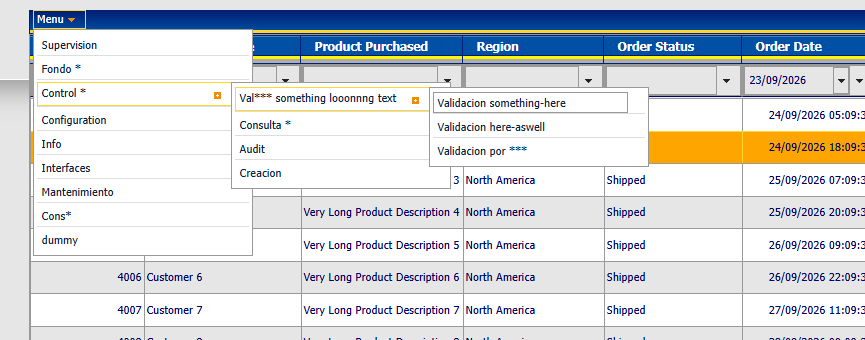
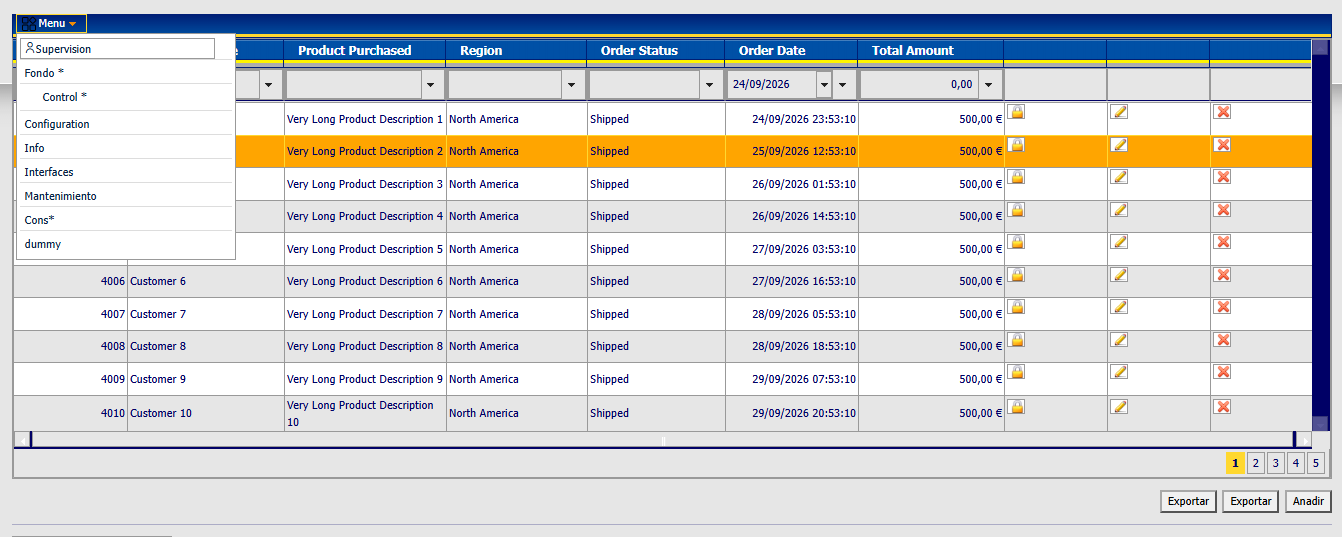
    We’re sorry but we could not reproduce the behavior; we are able to see the icon in “Supervision” option:

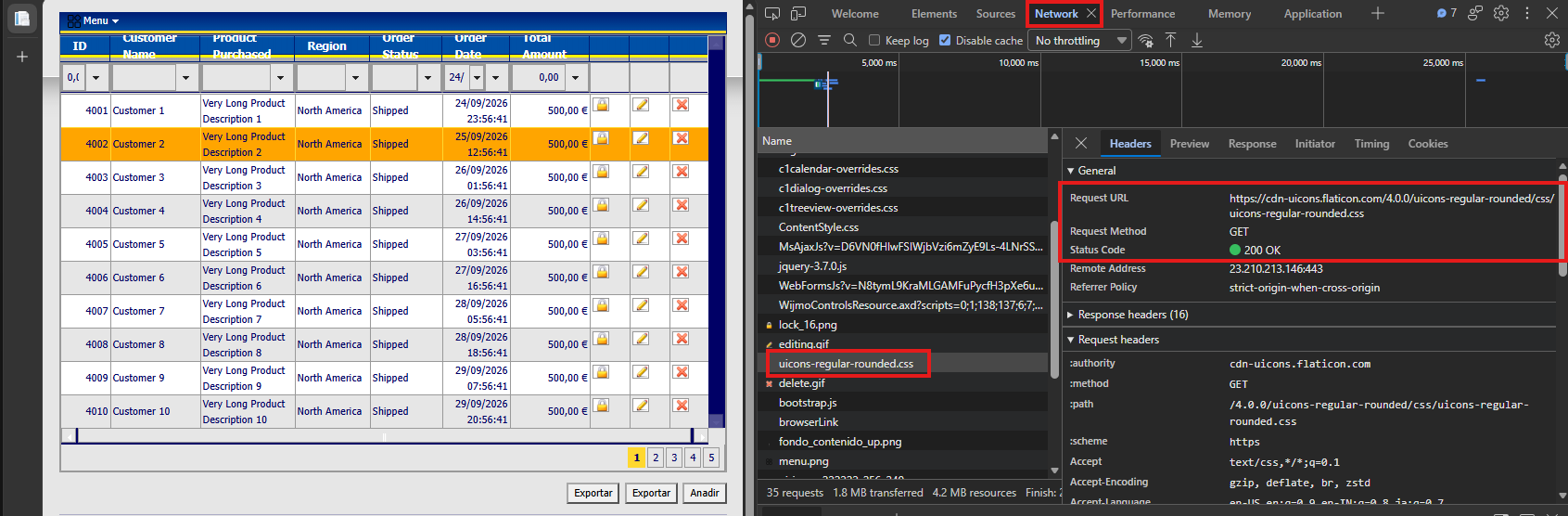
    Could you please share network logs and check “uicons-regular-rounded.css” is loaded correctly:

    Also check if you observe any errors in browser console as well.

    ref: https://support.swyftsol.com/knowledge-base/how-to-collect-browser-console-and-network-logs-for-troubleshooting

    Regards,

    Uttkarsh.

  • Posted 24 September 2026, 5:10 am EST - Updated 24 September 2026, 6:00 am EST

    yeah, check “uicons-regular-rounded.css” is loaded correctly: OK 200.

    my-menu-icon don’t applies to Menu ??

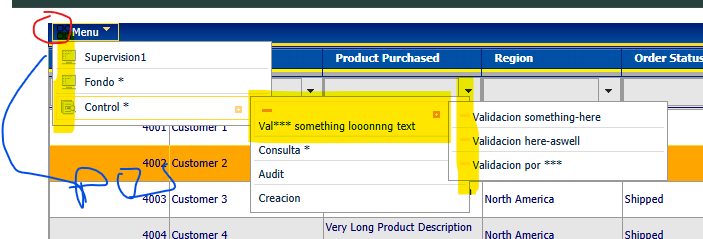
     <wijmo:C1MenuItem Text="Menu" IconClass="ui-icon my-menu-icon">
            /*menuitem icon*/
            .ui-icon{
                margin-top: 1px;
                margin-right: 2px;
            }
            .my-menu-icon {
                background-image: url('<%= ResolveUrl("~/Content/icons/menu.png") %>') !important;
                background-repeat: no-repeat !important;
                background-position: center !important;
                background-size: 16px 16px;   
            }

    and what is IconClass=“fi fi-rr-user” ? dont applies class “fi fi-rr-user” in html generated ?

    <wijmo:C1MenuItem Text="Supervision" IconClass="fi fi-rr-user" />
        <wijmo:C1Menu ID="C1Menu1" runat="server">
            <Items>
                <wijmo:C1MenuItem Text="Menu" IconClass="ui-icon my-menu-icon">
                    <Items>
                        <wijmo:C1MenuItem Text="Supervision" IconClass="fi fi-rr-user" />
                        <wijmo:C1MenuItem Text="Fondo *" />
                        <wijmo:C1MenuItem Text="Control *" IconClass="ui-icon ui-icon-gear">
                            <Items>
                                <wijmo:C1MenuItem Text="Val*** something looonnng text">
                                    <Items>
                                        <wijmo:C1MenuItem Text="Validacion something-here" />
                                        <wijmo:C1MenuItem Text="Validacion here-aswell" />
                                        <wijmo:C1MenuItem Text="Validacion por ***" />
                                    </Items>
                                </wijmo:C1MenuItem>
                                <wijmo:C1MenuItem Text="Consulta *" />
                                <wijmo:C1MenuItem Text="Audit" />
                                <wijmo:C1MenuItem Text="Creacion" />
                            </Items>
                        </wijmo:C1MenuItem>
                        <wijmo:C1MenuItem Text="Configuration" />
                        <wijmo:C1MenuItem Text="Info" />
                        <wijmo:C1MenuItem Text="Interfaces" />
                        <wijmo:C1MenuItem Text="Mantenimiento" />
                        <wijmo:C1MenuItem Text="Cons*" />
                        <wijmo:C1MenuItem Text="dummy" />
                    </Items>
                </wijmo:C1MenuItem>
            </Items>
        </wijmo:C1Menu>

    html generated:

    <div class="scrollcontainer checkablesupport"><ul class="wijmo-wijmenu-list ui-helper-reset" id="MainContent_C1Menu1" tabindex="0" aria-activedescendant="wridecrvfuwycmun" role="menu" style="display: block;">
    	<li role="menuitem" class="ui-widget wijmo-wijmenu-item ui-state-default ui-corner-all wijmo-wijmenu-parent" aria-haspopup="true" style=""><a href="#" class="wijmo-wijmenu-link ui-corner-all ui-state-focus" id="wridecrvfuwycmun"><span class="wijmo-wijmenu-text"><span class=" wijmo-wijmenu-icon-left"></span><span class="wijmo-wijmenu-text">Menu</span></span><span class="ui-icon ui-icon-triangle-1-s"></span></a><ul class="wijmo-wijmenu-list ui-widget-content ui-corner-all ui-helper-clearfix wijmo-wijmenu-child ui-helper-reset" aria-hidden="true" style="display: none; left: -0.296875px; top: 13.7031px; position: absolute;">
    		<li role="menuitem" class="ui-widget wijmo-wijmenu-item ui-state-default ui-corner-all" aria-haspopup="true"><a href="#" class="wijmo-wijmenu-link ui-corner-all"><span class="wijmo-wijmenu-text"><span class=" wijmo-wijmenu-icon-left"></span><span class="wijmo-wijmenu-text">Supervision</span></span></a></li><li role="menuitem" class="ui-widget wijmo-wijmenu-item ui-state-default ui-corner-all" aria-haspopup="true"><a href="#" class="wijmo-wijmenu-link ui-corner-all"><span class="wijmo-wijmenu-text"><span class=" wijmo-wijmenu-icon-left"></span><span class="wijmo-wijmenu-text">Fondo *</span></span></a></li>
    

    please, friends, any help about it ?

  • Posted 24 September 2026, 7:06 am EST - Updated 24 September 2026, 7:11 am EST

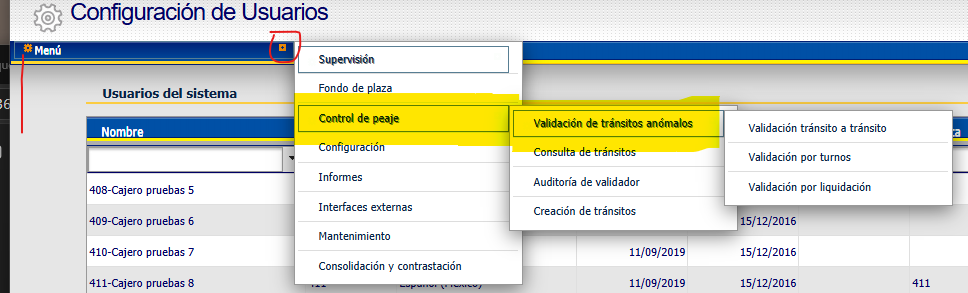
    I dont know why , but now it’s appears !! (caché ?? rarely…)

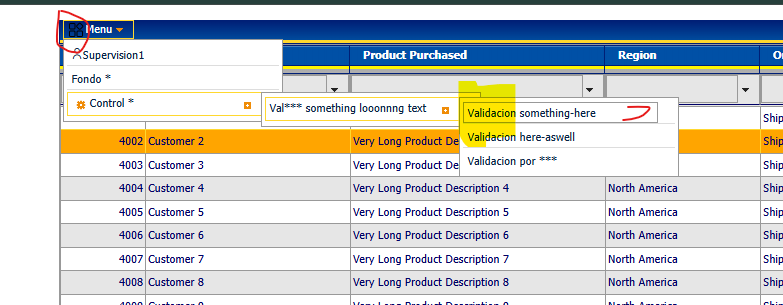
    Visible for <wijmo:C1MenuItem Text=“Supervision1” IconClass=“fi fi-rr-user” />

    Not visible for <wijmo:C1MenuItem Text=“Menu” IconClass=“ui-icon my-menu-icon”>

  • Posted 24 September 2026, 7:27 am EST - Updated 24 September 2026, 7:50 am EST

    I’try with my webapp

    In root Menu, not visible nmit.IconClass = “ui-icon my-menu-icon”;

    Level 1, visible using “fi fi-rr-user”;

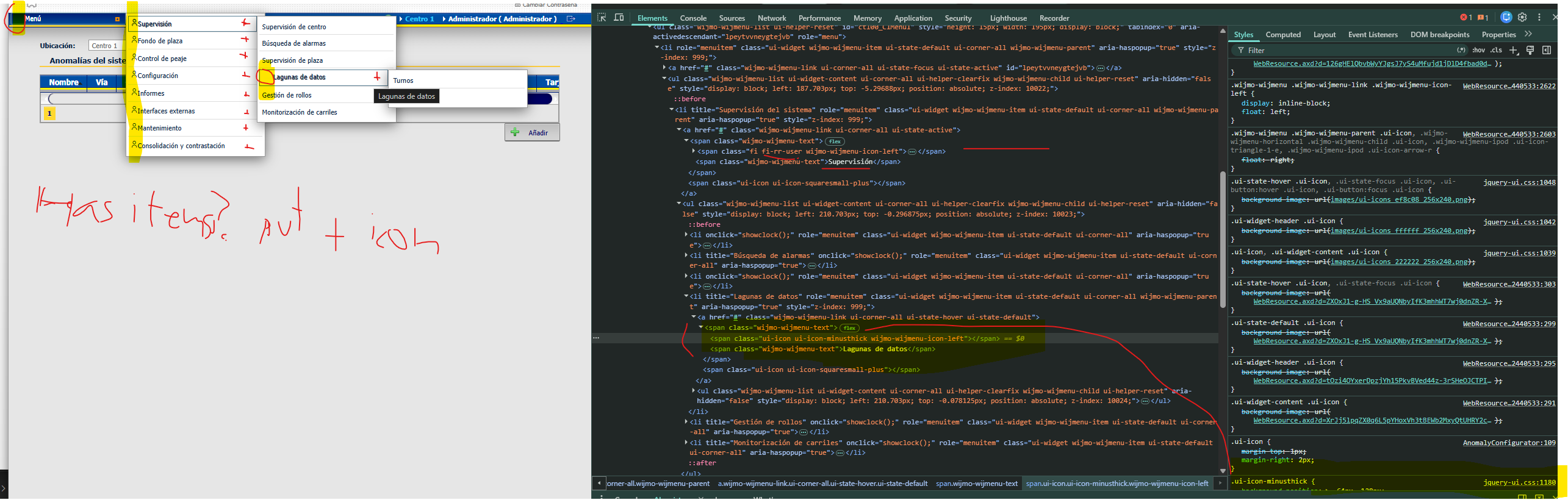
    Level > 1, not visible “ui-icon ui-icon-minusthick”, and I need icon to right (plus or similar) if has items the parent node tiem

    mi.IconClass = "";
     if (iLevel == 1) mi.IconClass = "fi fi-rr-user";
     if (iLevel > 1 && hasItems) mi.IconClass = "ui-icon ui-icon-minusthick";// "ui -icon ui-icon-gear";

    Full code buildMenu:

      protected void _buildMenu(int iLevel, List<GuiMenuItem> menuItems, C1.Web.Wijmo.Controls.C1Menu.C1MenuItemCollection guiItems)
      {
          if (iLevel > 3)
              return;
    
          foreach (GuiMenuItem gmi in menuItems)
          {
              if (iLevel == 0)
              {
                  var nmit = new C1.Web.Wijmo.Controls.C1Menu.C1MenuItem();
                  nmit.Text = gmi.Description;
    
                  //nmit.NestedGroupCheckable = false; // NO EXISTE en 2025v2 399
                  nmit.IconClass = "ui-icon my-menu-icon";
                  guiItems.Add(nmit);
                  _buildMenu(1, gmi.Children, guiItems[0].Items);
              }
              else
              {
                  guiItems.Add(new C1MenuItem() { Text = gmi.Description });
                  var mi = guiItems[guiItems.Count - 1];
                  var hasItems = gmi.Children.Count > 0;
    
                  //mi.ImageUrl = gmi.IconUrl; // No existe ImageUrl en en 2025v2 399
                  mi.IconClass = "ui-icon ui-icon-arrowrefresh-1-s";
                  mi.IconClass = "";
                  if (iLevel == 1) mi.IconClass = "fi fi-rr-user";
                  if (iLevel > 1 && hasItems) mi.IconClass = "ui-icon ui-icon-minusthick";// "ui -icon ui-icon-gear";
    
                  mi.NavigateUrl = gmi.Url;
                  if (gmi.Url != string.Empty)
                  {
                      mi.Attributes.Add("onclick", "showclock();");
                  }
                  mi.ToolTip = gmi.Tooltip;
                  // mi.NestedGroupCheckable = false; // NO EXISTE en 2025v2 399
                  _buildMenu(iLevel + 1, gmi.Children, mi.Items);
              }
          }
      }

    LEGACY Menu with icons !!

    any help, please ??

  • Posted 24 September 2026, 7:55 am EST - Updated 24 September 2026, 9:44 am EST

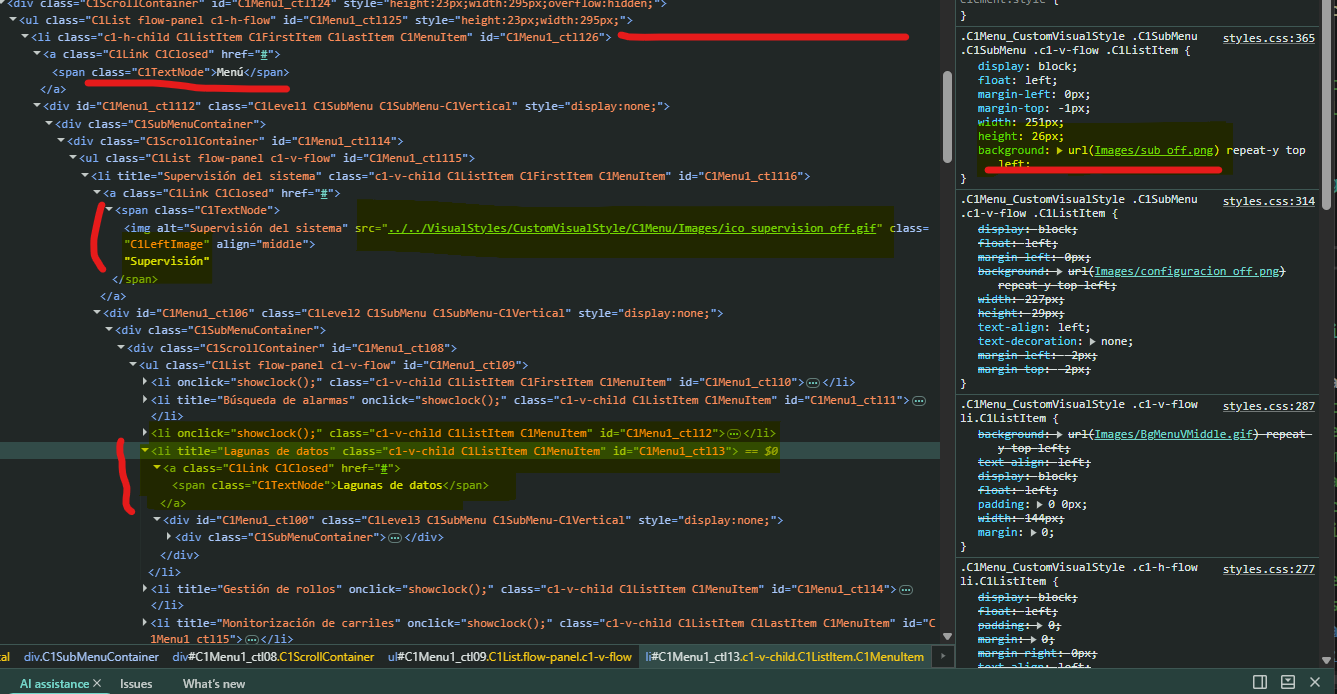
    I have value (from legacy) IconUrl in database (sample: VisualStyles/CustomVisualStyle/C1Menu/Images/ico_supervision_off.gif)

    How-to applies IconUrl to IconClass ?

                        //mi.ImageUrl = gmi.IconUrl; // No existe ImageUrl en en 2025v2 399
                        var iconUrl = gmi.IconUrl;
                        var iconClassFromIconUrl = "";
                        mi.IconClass = "ui-icon ui-icon-arrowrefresh-1-s";
                        mi.IconClass = "";
                        if (iLevel == 1) mi.IconClass = "fi fi-rr-user"; // use iconClassFromIconUrl !!!
                        if (iLevel > 1 && hasItems) mi.IconClass = "ui-icon ui-icon-minusthick";// "ui -icon ui-icon-gear";

    I get it

                       //mi.ImageUrl = gmi.IconUrl; // No existe ImageUrl en en 2025v2 399
                        mi.IconClass = "ui-icon ui-icon-arrowrefresh-1-s";
                        mi.IconClass = "";
                        if (iLevel == 1)
                        {
                            var iconUrl = gmi.IconUrl;
                            var iconClassFromIconUrl = "";
    
                            //var ruta = "VisualStyles/CustomVisualStyle/C1Menu/Images/";
                            //var iconUrl = ruta + "ico_supervision_off.gif";
    
                            // Path.GetFileNameWithoutExtension quita ruta padre Y extensión en un solo paso
                            iconClassFromIconUrl = System.IO.Path.GetFileNameWithoutExtension(iconUrl);
                            // Clase CSS derivada del nombre del icono
                            string cssClassName = "icon-" + iconClassFromIconUrl;   // "icon-ico_supervision_off"
    
                            // Regla CSS completa, con ruta+extensión originales (x)
                            string cssRule = $@"
    .{cssClassName} {{
        display: inline-block;
        width: 16px;
        height: 16px;
        background-image: url('/{iconUrl}');
        background-repeat: no-repeat;
        background-position: center;
        background-size: contain;
    }}";
                            System.Diagnostics.Debug.WriteLine(cssRule);
    
                            mi.IconClass = cssClassName; // "fi fi-rr-user"; // use iconClassFromIconUrl !!!
                        }
                        if (iLevel > 1 && hasItems) mi.IconClass = "ui-icon ui-icon-minusthick";// "ui -icon ui-icon-gear";
    .icon-ico_supervision_off,
    .icon-ico_fondoplaza_off,
    .icon-ico_control_off,
    .icon-ico_configuracion_off,
    .icon-ico_informes_off {
        display: inline-block;
        width: 16px;
        height: 16px;
        background-repeat: no-repeat;
        background-position: center;
        background-size: contain;
    }
    
    .icon-ico_supervision_off   { background-image: url('/VisualStyles/CustomVisualStyle/C1Menu/Images/ico_supervision_off.gif'); }
    .icon-ico_fondoplaza_off    { background-image: url('/VisualStyles/CustomVisualStyle/C1Menu/Images/ico_fondoplaza_off.gif'); }
    .icon-ico_control_off       { background-image: url('/VisualStyles/CustomVisualStyle/C1Menu/Images/ico_control_off.gif'); }
    .icon-ico_configuracion_off { background-image: url('/VisualStyles/CustomVisualStyle/C1Menu/Images/ico_configuracion_off.gif'); }
    .icon-ico_informes_off      { background-image: url('/VisualStyles/CustomVisualStyle/C1Menu/Images/ico_informes_off.gif'); }
    

    For Menu, only dont appears root icon

    align menu bellow

    left icon for item (level > 1)

    level > 0 → plus + icon (on right) if has Children Items

  • Posted 24 September 2026, 10:38 am EST - Updated 24 September 2026, 10:43 am EST

    i try your sample

    align is OK , (my webapp KO)

    Level 1, icon Supervision , Fondo OK

    Level 1, icon Control KO,

    icon plus (Control) for all items (level 0), always visible, and plus hover icon if hover o active item

    my webapp KO using

    “ui-icon ui-icon-minusthick” (left)

    and plus icon (right)

    for each subItems

    Code project based in your sample:

    Grid.zip

  • Posted 25 September 2026, 2:52 am EST

    Hello Enrique,

    → my-menu-icon don’t applies to Menu ??

    It is visible in the image you attached on “24 September 2026, 7:06 am EST”. See the 㗊​ icon in red-circle you have marked.

    → what is IconClass=“fi fi-rr-user” ? dont applies class “fi fi-rr-user” in html generated

    This the class used to render FlatIcons served with “uicons-regular-rounded.css” CDN.

    → I dont know why , but now it’s appears !! (caché ?? rarely…)

    Yes, cache can definitely be the cause here. Please clean the project before each run, and do a hard refresh of the browser right after the page loads at the start. In Chrome, you can hard refresh using Ctrl+F5.

    → In root Menu, not visible nmit.IconClass = “ui-icon my-menu-icon”;

    Make sure you have CSS rules we have shared in Default.aspx → styles

    → How-to applies IconUrl to IconClass ?

    Please refer to the three ways (point 2 specifically) we provided to display Icons in the first response: https://developer.mescius.com/forums/webforms-edition/c1menu-styles-css-2010v1-to-2025v2-399-in-asp-net-webforms#87138


    Thank you for sharing a sample. We have fixed issues you described. Please let us know if we missed anything.

    → Icons only appear when button hovered

    This happens because of the following CSS rule in jquery-ui.css : line 1042

    .ui-widget-header .ui-icon {
    	background-image: url("images/ui-icons_ffffff_256x240.png");
    }
    

    It puts white icons which appears invisible with white background. You can override it to always display jquery icons:

    .ui-widget-header .ui-icon {
        background-image: url('<%= ResolveUrl("~/Content/customer-styles/images/ui-icons_ffd27a_256x240.png") %>');
    }
    
    .ui-state-hover .ui-icon,
    .ui-state-focus .ui-icon,
    .ui-button:hover .ui-icon,
    .ui-button:focus .ui-icon {
        background-image: url('<%= ResolveUrl("~/Content/customer-styles/images/ui-icons_ef8c08_256x240.png") %>');
    }
    

    → Menu icon is not displayed

    We have added some more CSS rules to ‘my-menu-icon’ class like width, height and background-size. Please see if it helps:

    .my-menu-icon {
        width: 16px;
        height: 16px;
        background-size: contain;
        background-image: url('<%= ResolveUrl("~/Content/icons/menu.png") %>') !important;
    }
    

    Note: do not use ‘ui-icon’ class with custom icons (example: ‘icon-ico_supervision_off’).

    Sample: Grid_Mod.zip

    Regards,

    Uttkarsh.

  • Posted 25 September 2026, 2:56 am EST

    Hello Enrique,

    Here is the sample project:

    Grid_Mod 1.zip

    Regards,

    Kartik

  • Posted 25 September 2026, 4:21 am EST - Updated 25 September 2026, 5:57 am EST

    Thanks all , friends !!

    In my webapp, finally I get icons visible for options, only I’ll apply hover styles , thanks!

    → In root Menu, not visible for me, I’ll review styles in your sample (Important I think)

    → position Menu for me is wrong, not below… I’ll review, comparing F12 Devtools with your sample…

    → one suboption in 2 lines, I’ll up the witdh to style…

    Yeah, in your sample

    → In root Menu, visible for me, but better in white color, not black color ??

    → position Menu is right in your sample, mine not (comparing…)

    → one suboption in 2 lines, I’ll up the witdh to style…

    Only I’ll choose better icons for options… (level > 1), gear ?? minus … ??

    Plus icon (position right) is OK if the option has more items…

    thanks!!!

    Position Menu:

    In MY ContentMasterPage.master :

    <cc1:C1Menu ID="C1Menu1" runat="server" Height="15px" Width="195px"
        ...
        Orientation="Vertical" Position-At-Left="Left" Position-At-Top="Top"
        ...>

    Your sample:

    <wijmo:C1Menu ID="C1Menu1" runat="server" Height="15px">

    I delete Direction=“Ltr” DisplayVisible="true"Orientation=“Vertical” Position-At-Left=“Left” Position-At-Top=“Top”

    Menu iconis OK (I choose another ), position Menu is OK,

    icons for suboptions selected -hover not changes color,

    and border and space with suboption item

  • Posted 28 September 2026, 1:42 am EST

    Hello Enrique,

    → In root Menu, visible for me, but better in white color, not black color ??

    The icon we used is colored black. You can use a white one.

    → one suboption in 2 lines, I’ll up the witdh to style…

    Yes, increasing the width should remove this issue.

    → Only I’ll choose better icons for options… (level > 1), gear ?? minus … ??

    Either one works, so pick whichever fits your application best.

    → icons for suboptions selected -hover not changes color,

    → and border and space with suboption item

    Both of these behaviors depend on the CSS styling you are currently using. Could you please share the CSS rules you currently have in your application? This will help us investigate the behavior and provide you a solution that fits with your current implementation.

    Regards,

    Uttkarsh.

  • Posted 28 September 2026, 6:15 am EST - Updated 28 September 2026, 6:20 am EST

    Hi all

    → In root Menu, OK

    → one suboption in 2 lines, I’ll up the witdh to style… OK

    Issues now:

    → icons for suboptions selected -hover not changes color,

    → and border and space with suboption item

    I share the sample in zip with CSS rules, css files, images, icons… view Site.Master and Default.aspx

    zip sample grid

    GridView_Pagination.zip

  • Posted 29 September 2026, 3:26 am EST

    Hello Enrique,

    → icons for suboptions selected -hover not changes color,

    This did not work, because background-image set is being overridden. Use ‘!important’ declaration in CSS:

    .ui-widget-header .ui-icon {
    	background-image: url('<%= ResolveUrl("~/Content/customer-styles/images/ui-icons_ffd27a_256x240.png") %>') !important;
    }
    
    .ui-state-hover .ui-icon,
    .ui-state-focus .ui-icon,
    .ui-button:hover .ui-icon,
    .ui-button:focus .ui-icon {
    	background-image: url('<%= ResolveUrl("~/Content/customer-styles/images/ui-icons_ef8c08_256x240.png") %>') !important;
    }
    

    → and border and space with suboption item

    We could not find a way to dynamically size menu options. Please use a ‘max-width’ like ‘220px’ along with ‘width’ set as ‘max-content’:

    .wijmo-wijmenu .wijmo-wijmenu-parent .wijmo-wijmenu-child {
    	width: max-content !important;
    	max-width: 220px !important;  /*adjust to whatever cap you want */
    }
    
    /*remove extra space on the right end of menu option*/
    .wijmo-wijmenu .wijmo-wijmenu-link{
    	width: 100% !important;
    }
    

    Please refer to the attached updated sample and let us know if it works for you: GridView_Pagination_Mod.zip

    Regards,

    Uttkarsh.

Need extra support?

Upgrade your support plan and get personal unlimited phone support with our customer engagement team

Learn More

Forum Channels