C1GridView Styles CSS 2010v1 to 2025v2 399 in ASP.NET WebForms

Posted by: enrique.pv-ext on 21 September 2026, 8:24 am EST

  • Posted 21 September 2026, 8:24 am EST - Updated 21 September 2026, 8:29 am EST

    new ticket for separate concerns to avoid any misunderstandings about C1GridView Styles CSS

    Reference https://developer.mescius.com/forums/webforms-edition/styles-css-2010v1-to-2025v2-399-in-asp-net-webforms

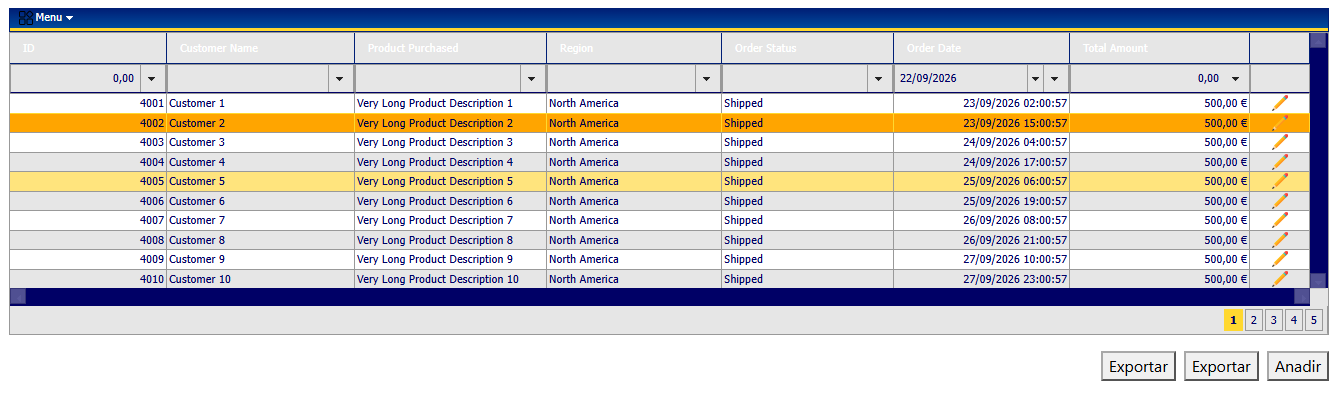
    Comparing legacy and migrated , CSS GridView
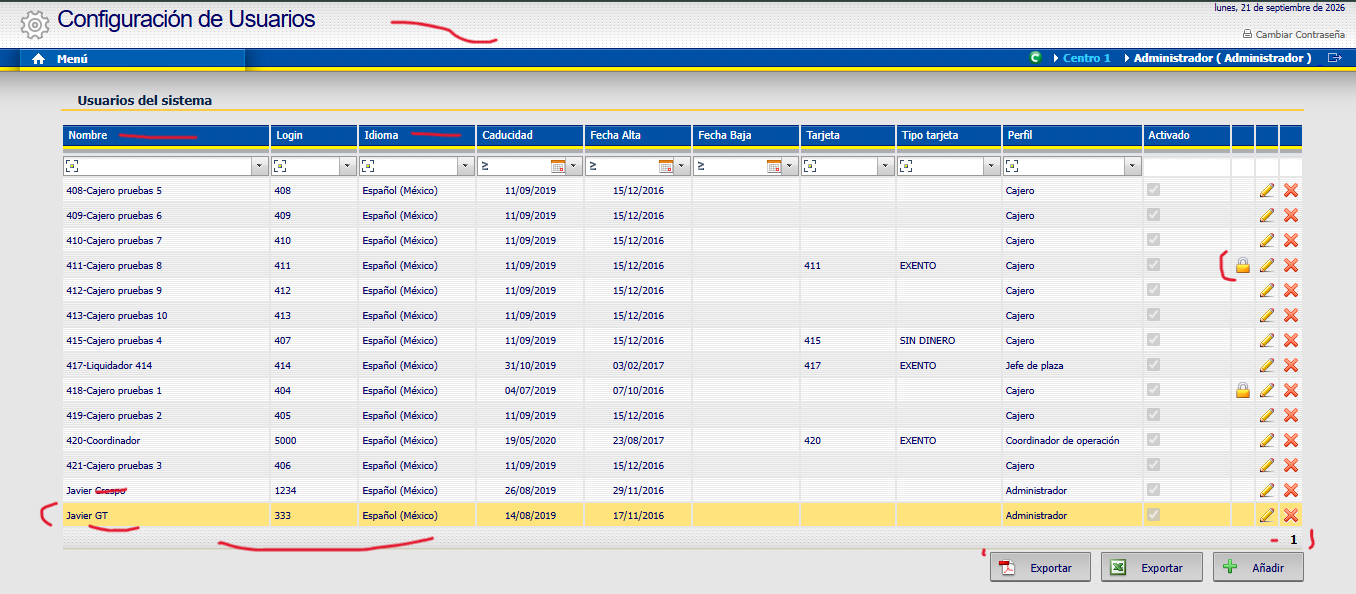
    Migrated
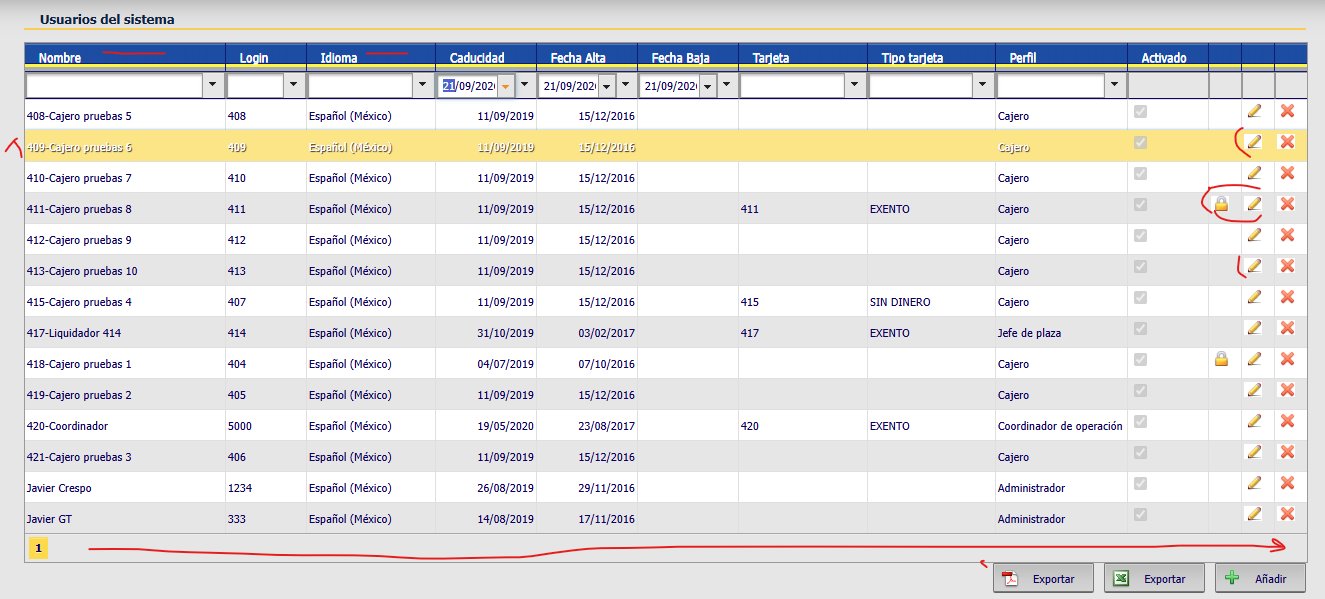
    I notice a few differences. The columns aren’t vertically centered against the blue background; they are flush against the yellow line (which is part of the background image).

    In the selected row, the text appears in white.

    The pagination (the numbers) appears on the left instead of the right.

    The buttons lack padding at the bottom of the GridView.

    The GridView icons aren’t transparent in the alternating row with the gray background, whereas in the legacy version they are (??).

    any solution, alternatives??

    Thanks all, my friends !! please, help me…

  • Posted 22 September 2026, 3:31 am EST - Updated 22 September 2026, 3:36 am EST

    Hello Enrique,

    → The columns aren’t vertically centered against the blue background; they are flush against the yellow line (which is part of the background image).

    We’re sorry but we did not understand the exact issue you are describing. Could you please share legacy and new images of C1GridView comparing the exact behavior?

    → In the selected row, the text appears in white.

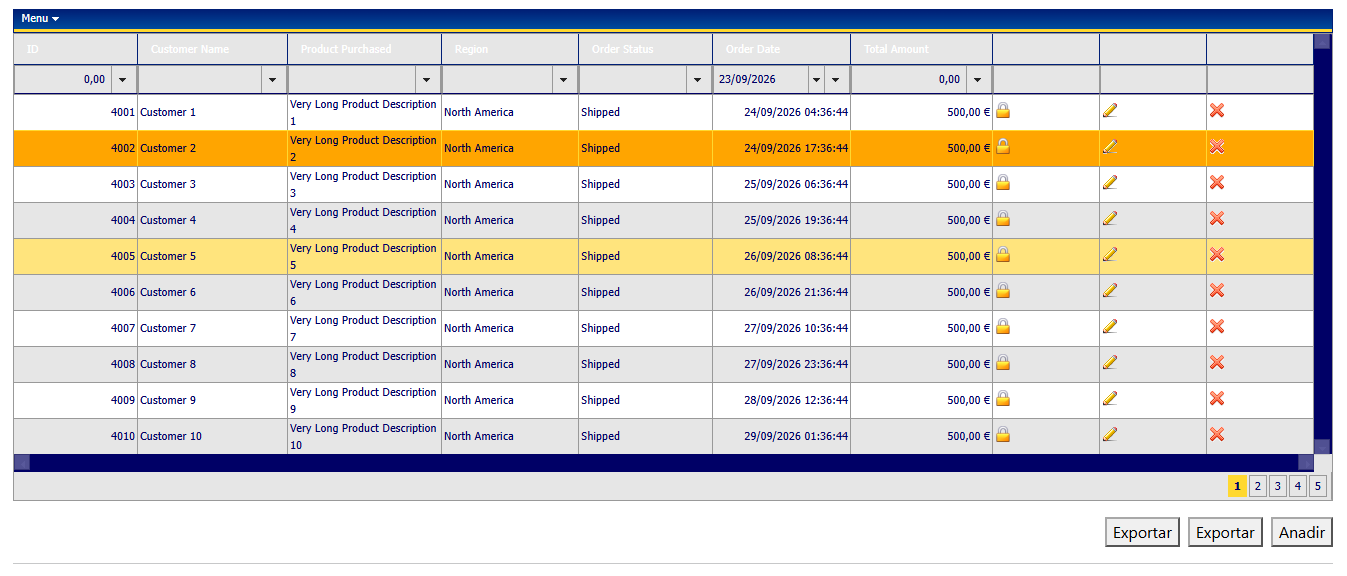
    We’re sorry but we could not observe this behavior at our end. Please refer to the attached image.

    → The pagination (the numbers) appears on the left instead of the right.

    We have already discussed it in the following thread: https://developer.mescius.com/forums/webforms-edition/dataformat-and-align-for-columns-gridview-2025v2-399#85497

    → The buttons lack padding at the bottom of the GridView.

    The position of buttons is based on your CSS styling. Please refer to the attached sample to see how we have styled the buttons’ position.

    → The GridView icons aren’t transparent in the alternating row with the gray background, whereas in the legacy version they are (??).

    We’re sorry but we could not observe this behavior at our end. We tried to implement image buttons in columns as per your image, but we did not observe any white background behind the images.

    Could you please share your implementation for further investigation? Also, please observe differences between our implementation and let us know if we’re doing anything differently.

    Sample: GridView_Sample.zip

    Regards,

    Uttkarsh.

  • Posted 22 September 2026, 7:49 am EST - Updated 22 September 2026, 7:54 am EST

    I’ll try share my implementation.

    Apply The pagination on the right for all GridViews in the webApp ? Dont change each gridview in all pages aspx or ascx.

    https://developer.mescius.com/forums/webforms-edition/dataformat-and-align-for-columns-gridview-2025v2-399#85497

    Now, I attached images (gif, not pngs)

        <cc1:C1ButtonField ButtonType="Image" CommandName="UNLOCK"
            ImageUrl="~/App_Themes/Content/Imagenes/lock_16.png" Text="Button">
            <ItemStyle Width="10px" />
        </cc1:C1ButtonField>
        <cc1:C1CommandField ShowEditButton="True"
            ButtonType="Image" CancelImageUrl="~/App_Themes/Content/Imagenes/cancel.gif"
            DeleteImageUrl="~/App_Themes/Content/Imagenes/delete.gif"
            EditImageUrl="~/App_Themes/Content/Imagenes/editing.gif"
            UpdateImageUrl="~/App_Themes/Content/Imagenes/accept.gif">
        </cc1:C1CommandField>
    
        <cc1:C1CommandField ShowDeleteButton="True"
            ButtonType="Image"
            DeleteImageUrl="~/App_Themes/Content/Imagenes/delete.gif">
        </cc1:C1CommandField>

    Images gifs and lock.png

    Legacy using styles like VisualStyles\Vista\C1GridView and the same images gif …

    C1GridView.zip

  • Posted 23 September 2026, 6:10 am EST - Updated 23 September 2026, 6:15 am EST

    Hello Enrique,

    → Apply The pagination on the right for all GridViews in the webApp ? Dont change each gridview in all pages aspx or ascx.

    You can right-align the pager buttons for one specific grid, a group of grids, or all grids on the page, just by scoping the CSS using an ID, a class, or no selector at all. Let us know your exact scenario and we’ll help you get there.

    In the sample we provided earlier, the right-align CSS was scoped to the my-grid class, so it applies to any grid with its CssClass property set to “my-grid”.


    Thank you for sharing the images you’re using.

    We used them in our sample and still do not observe any white background behind them. Please refer to the attached image and sample.

    Please note that the styles.css you shared appears to be from the legacy version.

    Sample: GridView_Sample_Mod.zip

    Regards,

    Uttkarsh.

  • Posted 23 September 2026, 7:46 am EST - Updated 23 September 2026, 7:57 am EST

    Thanks all, I’ll try with your sample.

    your sample is MVC ?

    my app is WebForms.

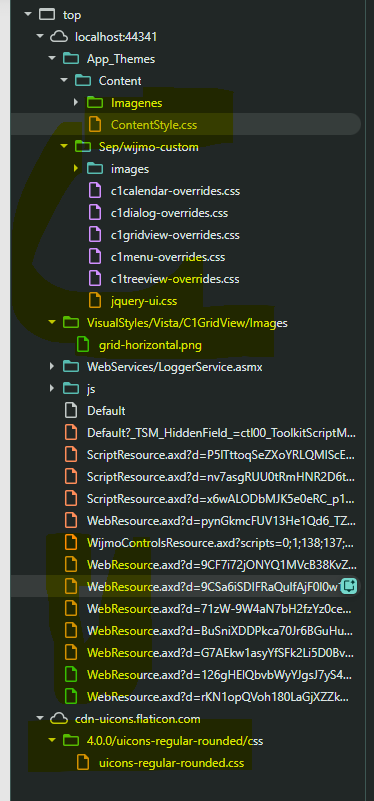
    My webapp use

    1. ContentStyle.css — vía ASP.NET Themes

    App_Themes/Content/ContentStyle.css

    Applies by ASPX pages using Theme=“Content” StylesheetTheme=“Content” (directive aspx)

    1. Sep/wijmo-custom/*.css — in ContentMasterPage.master ( ):
    1. VisualStyles/Vista/C1GridView/Images/grid-horizontal.png

    2. WebResource.axd — handler HTTP estándar ASP.NET : C1.Web.Wijmo.Controls.48 usan ClientScriptManager.GetWebResourceUrl()

    3. CDN Flaticon —

    App_Themes\Content

    ContentStyle.zip

  • Posted 23 September 2026, 10:45 am EST - Updated 23 September 2026, 10:50 am EST

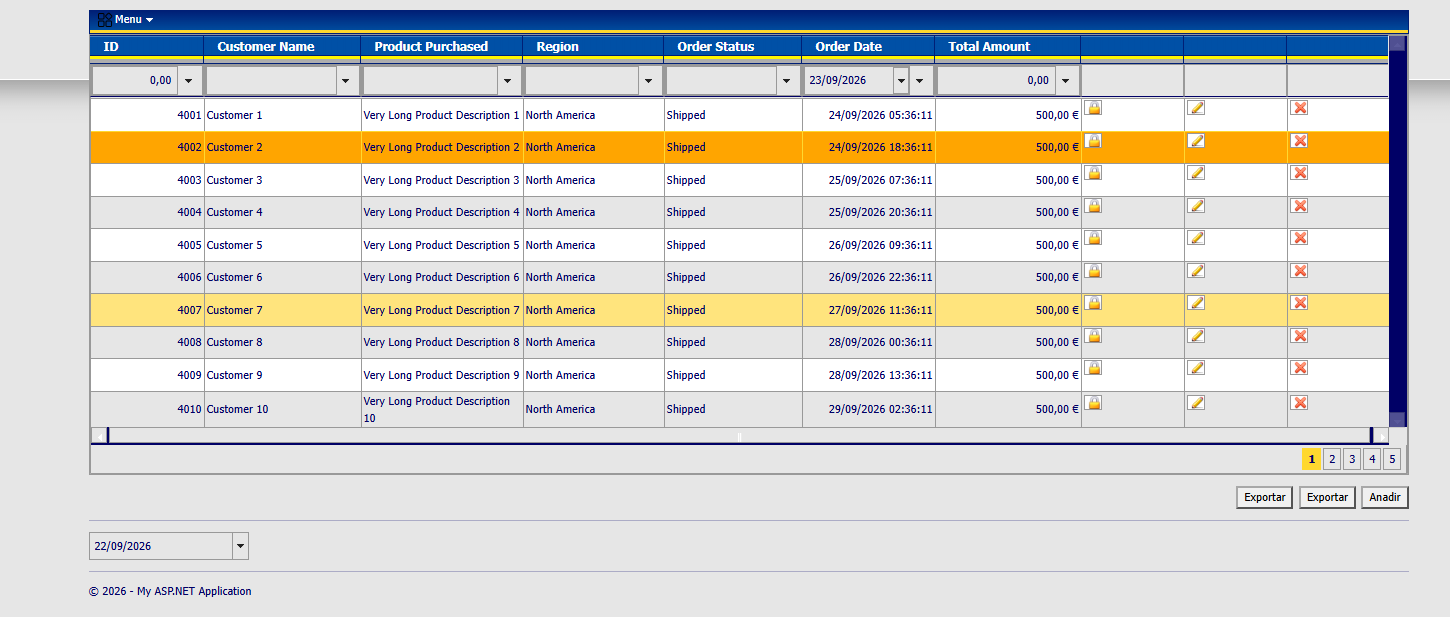
    I try reproduce for gridview:

    Column (Header text) centered vertical aprox (about background image, color blue)

    Row Hover, color text is right

    ONLY Icons not transparent, and has a border…

    I have AppTheme ContentStyle.css, a jquer-ui.css, css overrides, flaticons…

    I attached csproj base in your sample

    GridView_Pagination.zip

  • Posted 24 September 2026, 1:15 am EST

    Hello Enrique,

    → ONLY Icons not transparent, and has a border…

    In ContentStyle.css at line 1164, you have the following CSS:

    input
    {
    	background-color:#fff;
    	border:1px solid #999999;
    	/*margin-top:3px;*/
    	margin-bottom:10px;
    	font-family:Tahoma, Geneva, sans-serif; font-size:11px; color:#666;
    	height:15px;
    	padding-top:0px;
    	padding-left:3px;
    }
    

    You have set ‘background-color’ and ‘border’ which causes this behavior. Comment line 116 and 1167 to resolve the issue.

    Regards,

    Uttkarsh.

  • Posted 24 September 2026, 3:44 am EST

    Great !! thanks, friend !!

    Specify

    .wijmo-wijgrid-innercell input[type=“image”] (especificidad 0,0,1,2) vs input (0,0,0,1).

    wijmo-wijgrid input[type="image"] {
    	background-color: transparent;
    	border: 0;
    	height: auto;
    	padding: 0;
    	margin: 0;
    }
    
    .wijmo-wijgrid input[type="image"]:focus {
    		background: transparent;
    		border: 0;
    }
Need extra support?

Upgrade your support plan and get personal unlimited phone support with our customer engagement team

Learn More

Forum Channels