DataFormat and Align for Columns GridView 2025v2 399

Posted by: enrique.pv-ext on 6 February 2026, 4:53 am EST

  • Posted 6 February 2026, 4:53 am EST - Updated 6 February 2026, 5:05 am EST

    Hi,

    Migrate from 2010v1 to 2025v2 399 in ASP.NET WebForms NET Framework 4.8.1.

    Using C1GridView from C1.Web.Wijmo.Controls.48.dll

    Old version 2010v1
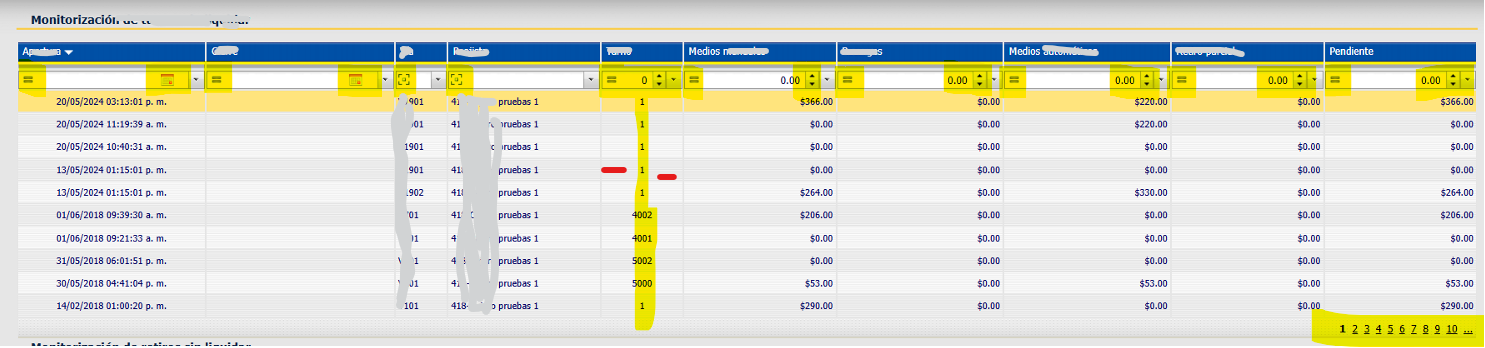
    New version 2025v2 399

    A column, in old version, value is 4002, but in new version is 4,002.

    And in new version, the column is not appears centered.

    Paging, in old version, align to Right, but in new version is Left.

    The code not changes, only types about GridView.

    HelperUtil.ConfigureC1BoundField(C1GridViewPending, (string)_textsShown[14], "MYCOL_NUMBER", "", "GridNumericValue", 30, true);
    	public static void ConfigureC1BoundField(C1GridView grid, string HeaderText, string DataField, string DataFormatString, string CssClass, int Width, bool isVisible)
    	{
    		var newBoundColumn = new C1BoundField();
    		newBoundColumn.HeaderText = HeaderText;
    		newBoundColumn.DataFormatString = DataFormatString;
    		newBoundColumn.Visible = isVisible;
    		newBoundColumn.DataField = DataField;
    		newBoundColumn.SortExpression = DataField;
    		newBoundColumn.ItemStyle.CssClass = CssClass;
    		if (Width != -1)
    		{
    			var unit = new Unit(Width, UnitType.Pixel);
    			newBoundColumn.ItemStyle.Width = unit;
    		}
    		newBoundColumn.HeaderStyle.CssClass = "GridText";
    		grid.Columns.Add(newBoundColumn);
    	}

    Any suggestions ?

  • Posted 9 February 2026, 7:12 am EST

    Hello,

    → A column, in old version, value is 4002, but in new version is 4,002.

    Please change the format of the number using ItemTemplate as follows:

    <cc1:C1TemplateField DataField="ID" HeaderText="ID" SortExpression="ID" >
        <ItemTemplate>
            <%# Eval("ID") %>
        </ItemTemplate>
    </cc1:C1TemplateField>

    → And in new version, the column is not appears centered.

    To center columns of type number/currency/datetime, please use the following CSS

    /*number cell*/
    .my-grid .wijmo-wijgrid tr.wijmo-wijgrid-row td.wijdata-type-number {
        text-align: center ;
    }
    /*currency cell*/
    .my-grid .wijmo-wijgrid tr.wijmo-wijgrid-row td.wijdata-type-currency {
        text-align: center ;
    }
    /*datetime cell*/
    .my-grid .wijmo-wijgrid tr.wijmo-wijgrid-row td.wijdata-type-datetime {
        text-align: center ;
    }

    → Paging, in old version, align to Right, but in new version is Left.

    To right align the pager buttons, please use the following CSS:

    /*pager*/
    .my-grid .wijmo-wijpager .ui-list {
        float: right;
    }

    Please refer to the attached sample for implementation. (see GridView_Sample.zip)

    Regards,

    Uttkarsh.

  • Posted 17 February 2026, 11:54 am EST - Updated 17 February 2026, 12:05 pm EST

    I use new C1BoundField(); for create columns, by code, not markup html.

    I try

    // “n” -displays numeric values in number format.
     return "n0";

    but I still getting 4,002 (with comma separator).

    code generated:

    <td class="GridNumericValue wijgridtd wijdata-type-number" style="width:30px;" role="gridcell" headers="Turno"><div class="wijmo-wijgrid-innercell ">4,001</div></td>
    

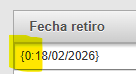
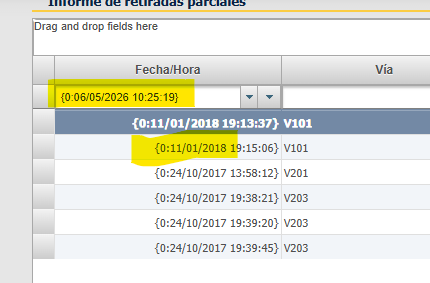
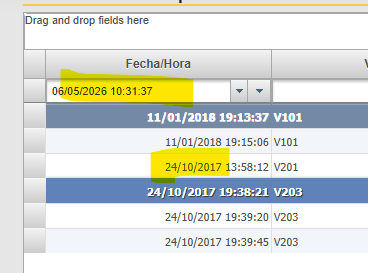
    I use too a Date Column, its appears like {0:17/02/2026 16:48:56} (in Header below)

  • Posted 18 February 2026, 2:22 am EST

    Hello Enrique,

    I’m not entirely sure how you might be implementing the C1BoundField at your end. Could you please update the sample we attached earlier to include your implementation if the below suggestions do not fix the behavior at your end?

    1. Number Format: instead of returning “n0”, return “{0:0}”
    2. DateTime Column: We are not sure what the issue is but as per understanding you want to display only the date part in the date-time column. If so, you can use “{0:dd/MM/yyyy}” format.

    Please make sure the data your pass to the grid have their fields’ DataType set correctly.

    If you still face issues, please update the sample we attached earlier to include all the issues you are facing. Without a sample replicating the issues, it would be very difficult for us to investigate and provide you a solution.

    Regards,

    Uttkarsh.

  • Posted 18 February 2026, 4:28 am EST - Updated 18 February 2026, 4:34 am EST

    Using “{0:0}", I get error: Uncaught Bad number format specifier

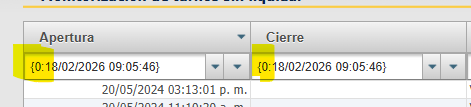
    DateTime Column using format, it appears:

    “{0:dd/MM/yyyy}”

    “{0:dd/MM/yyyy HH:mm:ss}”

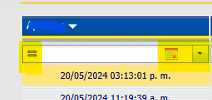
    DateTime Column in old version 2010v1:

    My code for creating Columns using code:

       public static void ConfigureC1BoundField(C1GridView grid, string HeaderText, string DataField, string DataFormatString, string CssClass, int Width, bool isVisible)
       {
           var newBoundColumn = new C1BoundField();
           newBoundColumn.HeaderText = HeaderText;
           newBoundColumn.DataFormatString = DataFormatString;
           newBoundColumn.Visible = isVisible;
           newBoundColumn.DataField = DataField;
           newBoundColumn.SortExpression = DataField;
           newBoundColumn.ItemStyle.CssClass = CssClass;
           if (Width != -1)
           {
               var unit = new Unit(Width, UnitType.Pixel);
               newBoundColumn.ItemStyle.Width = unit;
           }
           newBoundColumn.HeaderStyle.CssClass = "GridText";
           grid.Columns.Add(newBoundColumn);
       }

    I`ll try update the sample.

  • Posted 19 February 2026, 4:53 am EST

    Hello Enrique,

    We have created a sample as per your implementation and requirement.

    Please check it out and let us know if it helps.

    If you still face issues, please update this sample (or the sample which we shared earlier in this thread) such that it reproduces your issues. It’ll help us investigate and assist you in the best way possible.

    Sample: GridView_Sample_Mod.zip

    Regards,

    Uttkarsh.

Need extra support?

Upgrade your support plan and get personal unlimited phone support with our customer engagement team

Learn More

Forum Channels