Posted 3 March 2026, 8:17 am EST - Updated 3 March 2026, 8:23 am EST
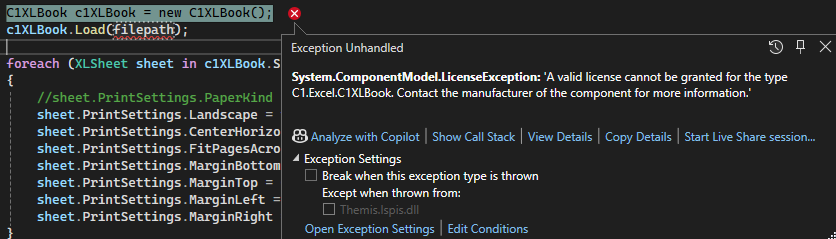
C1XLBook licence error with version 2052v21(755)
Posted by: hrvoje.zirdum on 3 March 2026, 8:17 am EST
-

hrvoje.zirdum
-

prabhat.sharma

Posted 5 March 2026, 4:40 am EST
Hello Hrvoje,
Thank you for reaching out to Mescius Support.
You must have already known about the recent improvements made in our licensing, so please make sure to regenerate the latest valid license as suggested here:
https://developer.mescius.com/componentone/docs/license/online-license/activating-serial-key#reactivate-a-serial-key-using-the-c1controlpanelAlso, this is a public forum, so if you still face the issue, please create a new case on our private portal “My Support” and share the following details :
https://developer.mescius.com/my-account/my-support- Are you facing this issue with the new application or the existing application?
- Share the screenshot of the activated license in your license manager.
- Share the stripped-down project in which you are facing this issue along with the license file used in it.
Regards,
Prabhat Sharma. -

wknauf
Posted 5 March 2026, 4:40 am EST
Let’s start with a simple sample:
C1ExcelTest.zip
Could you download this project and check whether you can build and start it without errors? Click the button “Test” to load a C1XLBook (if successful, no error should occur).At first build, there should be this output:
1>  SA3Client[1.3.0](update)
1>  Package ID      Latest Version      Authors        Downloads      Verified
1>  --------------------------------------------------------------------------
1>  sa3client       1.3.0               sa3client      11647
1>  Product 'ComponentOne (C1...)' added.
1>  Starting license compilation...
1>  Searching for a license for 'C1...'.
1>  Compiling license: C1...
1>  Finished compiling licenses.
If everything works, there is probably an issue with your project. If it also fails, there might a problem with your license. But I am not from Mescius, so I cannot really help with licensing problems.
Best regards
Wolfgang
-
hrvoje.zirdum
Posted 5 March 2026, 9:37 am EST - Updated 5 March 2026, 9:42 am EST
Thank you Prahbat and Wolfgang for your suggestions.
It was strange because the build completed without errors, but while the application was running, a license error would occur when C1Book was instantiated.First, let me respond to Wolfgang:
I tried your project and everything was fine. The project did not throw an error when clicking the button for C1Book.Response to Prahbat:
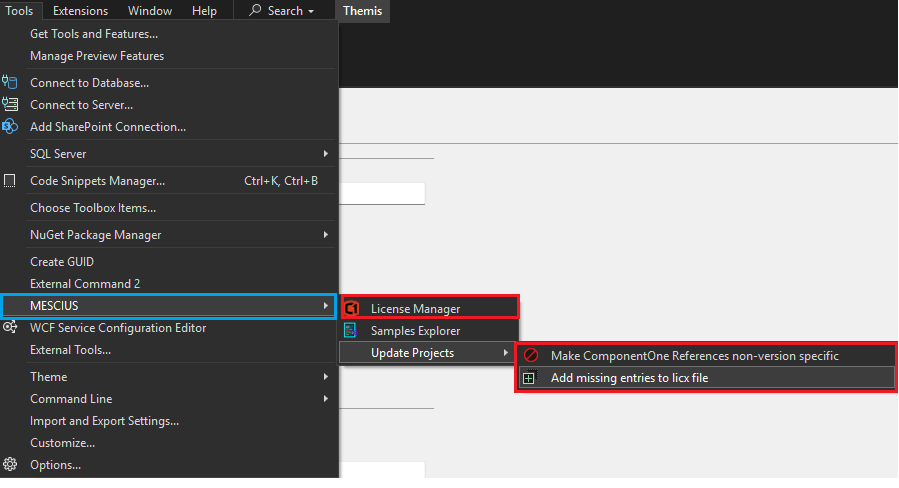
Earlier I had already updated the license. Now I did it again according to your suggestion through Visual Studio → Tools → Mescius, as follows:
Ran “License Manager”
Ran “Make ComponentOne References non-version specific”
Ran “Add missing entries to licx files”After that, I rebuilt the solution and ran the application again, and there was no longer a license error with C1Book.
Everything is fine now. Thank you for your help.
Regards,
Hrvoje