
Pipelines CI using Pipeline license vs Runtime sa3licx

Posted by: enrique.pv-ext on 15 October 2026, 10:17 am EST

  • Posted 15 October 2026, 10:17 am EST - Updated 15 October 2026, 10:23 am EST

    hi misters,

    Pipelines CI (or CD) using Pipeline license (activation offline) vs Runtime license (sa3licx file)

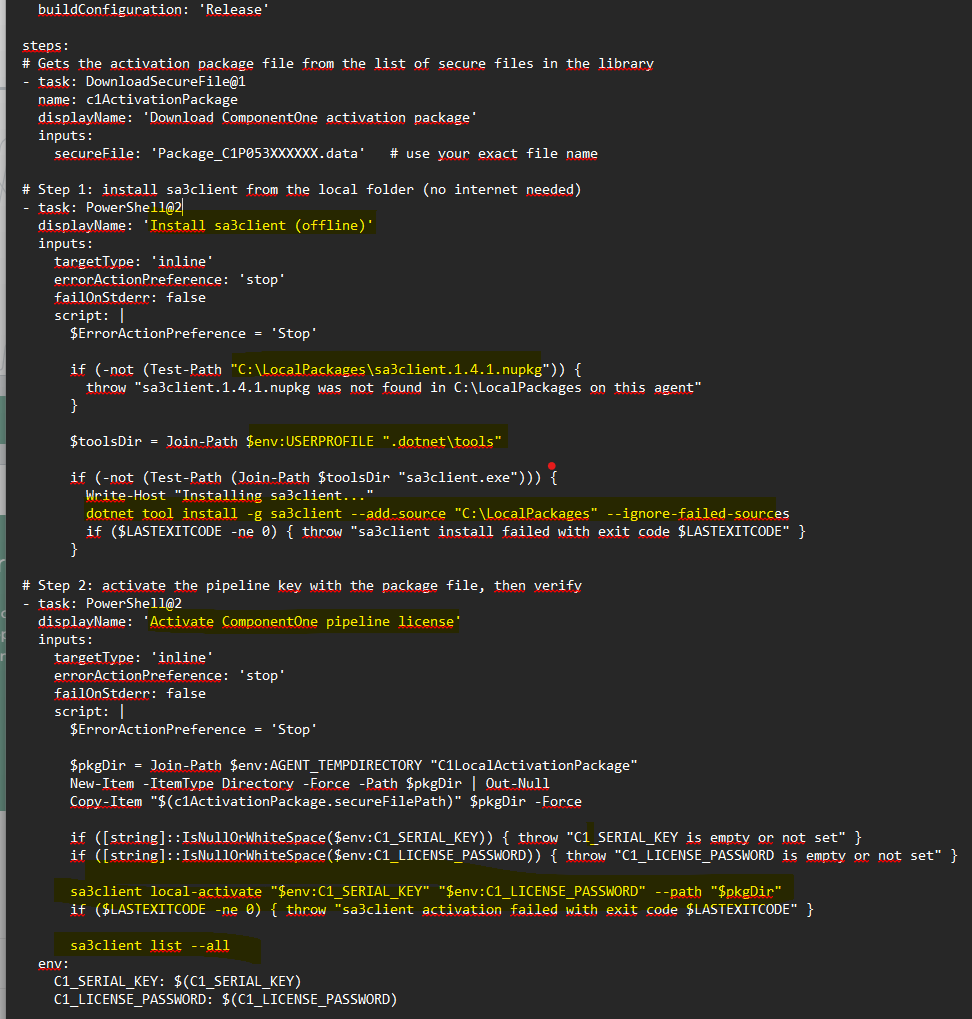
    you attached a sample YAML for our setup (one server, two agents running as Network Service).

    I haven’t tested it, as it follows the general pattern for Azure DevOps pipelines.

    c1-pipeline-license-activation.zip

    I have activate the pipeline license in CICD server, once, Not using in build CI for activate again in each build.

    Install for each agent: the license is stored at machine level in C:\ProgramData\SA3, so one activation on CI-SRV01 covers AG01 and AG02. The sa3client tool is installed per account profile. Both of your agents run as Network Service, so they share one install. The YAML skips the install if the tool is already there.

    YOUR Pipeline
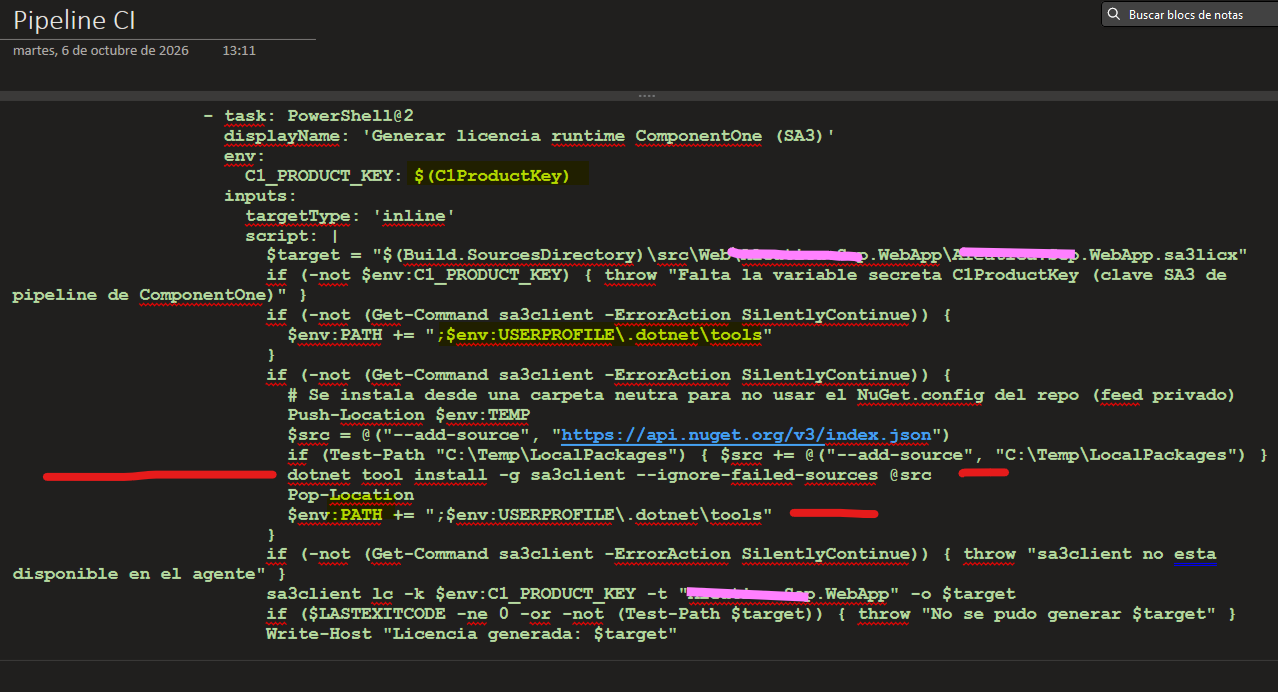
    Pipeline CI, from my partner for licensing sa3licx
    please any clarifications about it ? very confusing now, please, help me, my friends ? very clear the explains, please

  • Posted 16 October 2026, 6:59 am EST

    Hello Enrique,

    This (the image you shared) is a single PowerShell step from your partner’s pipeline (the title is Spanish for “Generate ComponentOne runtime license (SA3)”). It makes sure 'sa3client is available and then generates the ‘.sa3licx’ file for the web app. In order:

    1. Passes the key in securely. The secret variable ‘C1ProductKey’ is mapped to the environment variable ‘C1_PRODUCT_KEY’.
    2. Sets the output path. ‘$target’ points to ‘\src\Web.…<App>.WebApp.sa3licx’, which is inside the web project folder.
    3. Checks the key exists. If the variable is empty, it stops with “missing secret variable C1ProductKey (ComponentOne SA3 pipeline key)”.
    4. Looks for ‘sa3client’. If the command isn’t found, it adds ‘%USERPROFILE%.dotnet\tools’ to PATH for this step, in case the tool is already installed there.
    5. Installs it if still missing. It switches to the TEMP folder first, so the repo’s ‘NuGet.config’ (a private feed, per the comment) isn’t used. It then runs ‘dotnet tool install -g sa3client --ignore-failed-sources’, with nuget.org as the source plus ‘C:\Temp\LocalPackages’ if that folder exists. Because failed sources are ignored, the local folder is used when nuget.org is unreachable. After the install it adds the tools folder to PATH again.
    6. Final availability check. If ‘sa3client’ still isn’t found, it stops with “sa3client is not available on the agent”.
    7. Generates the license. It runs ‘sa3client lc -k -t “” -o ’. If the exit code is not 0 or the file doesn’t exist, it fails with “could not generate $target”. Otherwise it logs “License generated”.

    This step doesn’t activate anything. It only creates the file, and the machine’s existing activation is what makes that possible.

    The steps seem correct to us. Could you please let us know the exact issue you are facing with it?

    If you use “Option B”, then you can remove step 7 of generating the sa3licx file manually.

    Regards,

    Uttkarsh.

Need extra support?

Upgrade your support plan and get personal unlimited phone support with our customer engagement team

Learn More

Forum Channels