Posted 15 October 2026, 9:56 am EST - Updated 15 October 2026, 10:01 am EST
Confusing…
The .gclicx file is no longer required and will not be regenerated. OK
The .sa3licx file is the run-time license file of your application. OK
The .sa3licx file , its content does not change with each build. OK
Developer license vs Runtime license is the same ?
Git ignore sa3licx or sa3licx (each developer) in Git ?
"When you run git pull or check out a branch that includes this change, Git will delete those files from your local workspace. This only happens the first time. After that, .gitignore will exclude them and Git will no longer manage them.
You can keep the .sa3licx file in Git. It is embedded in the application as a resource. Your CI/CD pipeline will use it during the build, so having it in source control saves you from generating the license file manually on the build server each time."
My partner gitignore the sa3licx.
Before we decide how to handle the .sa3licx file in Git, we need to clarify one point.
Question: Does the .sa3licx file contain data specific to the developer license that generated it? If a developer commits it and the CI server builds with it, which license ends up embedded in the DLL: the developer’s or the pipeline’s?
For context, here are the two approaches we are comparing:
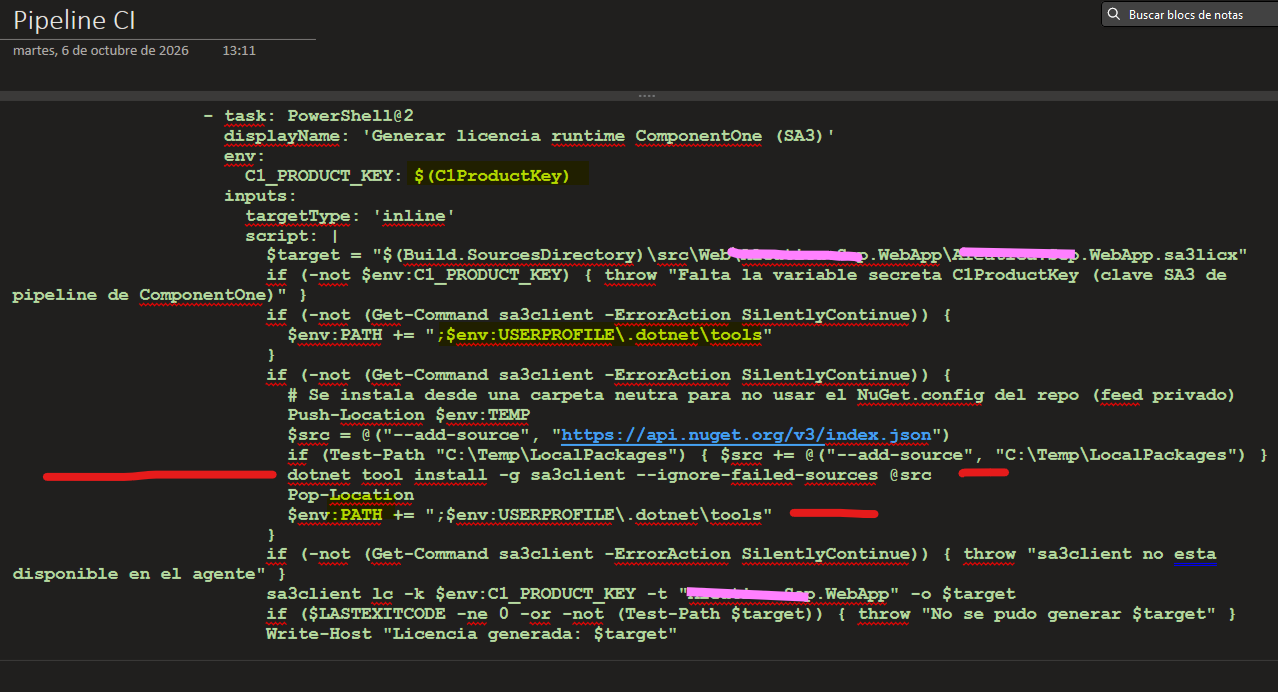
Option A: add .sa3licx to .gitignore and generate it in the pipeline ( sa3client lc with the pipeline key)
Pros:
• The DLL is always built with the pipeline license, never with an individual developer’s license.
• No merge conflicts between branches, since Visual Studio rewrites the file on each machine.
• No license material in the repository, so nothing can expire or be revoked by accident.
• New team members and branches work out of the box once they generate their own file locally.
Cons:
• The pipeline depends on sa3client being installed and on the key being available as a secret variable.
• Local builds fail unless each developer generates the file first (or the .csproj reference is made conditional).
• An extra step is needed in every build.
Option B: keep .sa3licx versioned in Git
Pros:
• The CI does not need sa3client or an extra generation step.
• Fewer moving parts in the pipeline.
• A fresh clone builds locally without generating the file.
Cons:
• Visual Studio rewrites the file on each developer machine, which causes constant local changes and merge conflicts across branches.
• If a developer commits their own file, the CI may embed that developer’s license in the production DLL.
• If that license expires or is revoked, builds could show the evaluation message even though the pipeline license is valid.
• The file is tied to the machine or license that generated it, so it is hard to guarantee which one is in the repo at any commit.
Question: Which approach does MESCIUS recommend for a WebForms (.NET Framework) project with several developers, feature branches, and a pipeline license on the CI/CD server? Is sa3client lc the supported way to generate the file in the pipeline?
Thank you for your help.
pipeline CI using sa3client and generate sa3licx in CI