GroupInfo C1GridView 2025v2 399

Posted by: enrique.pv-ext on 28 May 2026, 6:13 am EST

  • Posted 28 May 2026, 6:13 am EST - Updated 29 May 2026, 2:51 am EST

    Hi,

    Migrate from 2010v1 to 2025v2 399 in ASP.NET WebForms NET Framework 4.8.1.

    Using C1GridView from C1.Web.Wijmo.Controls.48.dll

    EmptyDataText …

    Mensaje de error del analizador: El tipo ‘C1.Web.Wijmo.Controls.C1GridView.C1GridView’ no tiene ninguna propiedad pública cuyo nombre sea ‘rowheader’.

    Legacy code:

                 <C1GridView:C1GridView ID="PartialWithdrawGrid" runat="server"
                     AutogenerateColumns="False"
                     EmptyDataText="El operador elegido no ha hecho retiradas parciales"
                     DataKeyNames="ShiftNumber,PlaceId,DateTime,ManuallyAdded,BEGIN_DATE_TIME_SHIFT,OPERATOR_ID"
                     CellPadding="2"
                     OnGroupAggregate="PartialWithdrawGrid_GroupAggregate"
                     Width="100%">
                     <rowheader></rowheader>
                     <Columns>
                         <C1GridView:C1TemplateField Visible="False">
                             <GroupInfo FooterText="Total:" Position="Footer">
                                 <footerstyle backcolor="#0050A6" forecolor="White" font-bold="True" />
                                 <headerstyle backcolor="#0050A6" />
                             </GroupInfo>
                             <ItemStyle Width="0px" />
                         </C1GridView:C1TemplateField>

    How-to get the total in 2025v2 399, not applies GroupAggregate+C1GroupTextEventArgs

            protected void PartialWithdrawGrid_GroupAggregate(object sender, C1GroupTextEventArgs e)
            {
                decimal sum = 0;
    
                for (int i = e.StartItemIndex; i <= e.EndItemIndex; i++)
                {
                    string s = ((C1GridView)sender).Rows[i].Cells[6].Text;
    
                    decimal val;
                    decimal.TryParse(s, System.Globalization.NumberStyles.Any, null, out val);
    
                    CheckBox cb = (CheckBox)((C1GridView)sender).Rows[i].Cells[1].FindControl("CheckBoxGrid");
                    if (cb.Checked)
                    {
                        sum += val;
                    }
                }
    
                Session["PartialWithdrawGridTotal"] = sum.ToString();
                HiddenPartialWithdrawalTotal.Value = sum.ToString();
                //txtTotal1.Text = sum.ToString("F2");
                e.Text = string.Format("{0:C}", sum);
            }
    

    (very spaguetty) legacy code in another aspx page:

     <cc1:C1GridView ID="CatBreakDownGrid" runat="server" 
         AutoGenerateColumns="False"                 
         DataKeyNames="ID, VALUE, TIMESTAMP"
         OnGroupAggregate="CatBreakDownGrid_GroupAggregate"
         Width="100%" 
         OnRowDataBound="CatBreakDownGrid_RowDataBound" 
         EmptyDataText="No hay datos" >
         <Columns>
             <cc1:C1TemplateField Visible="False">
                 <GroupInfo FooterText="Total:" Position="Footer">
                 <FooterStyle BackColor="#0050A6" ForeColor="White" Font-Bold="True" />
                 <HeaderStyle BackColor="#0050A6" />
                 </GroupInfo>                                        
                 <ItemStyle Width="0px" />                                        
             </cc1:C1TemplateField> 
             <cc1:C1BoundField DataField="ID" HeaderText="ID" Visible="false" ></cc1:C1BoundField>

    How-to get the total in 2025v2 399, not applies GroupAggregate+C1GroupTextEventArgs

        protected void CatBreakDownGrid_GroupAggregate(object sender, C1GroupTextEventArgs e)
        {
            Thread.CurrentThread.CurrentCulture = Util.GetCulture();
            decimal sum = 0;
            for (int i = e.StartItemIndex; i <= e.EndItemIndex; i++)
            {
                //string s = ((Label)((C1GridView)sender).Rows[i].Cells[0].FindControl("lblAmount")).Text;
                string s = ((TextBox)CatBreakDownGrid.Rows[i].Cells[0].FindControl("lblAmount")).Text;
    
                decimal val;
                decimal.TryParse(s, System.Globalization.NumberStyles.Any, null, out val);
    
                sum += val;
            }
    
            //string currencySymbol = "<span>" + Util.GetCulture().NumberFormat.CurrencySymbol + "</span>&nbsp;";
            //e.Text = currencySymbol + "<span id=\"" + this.ClientID + "_CatBreakDownGridTotal\">" + string.Format("{0:N}", sum) + "</span>";
            string currencySymbol = "<span style='max-width:85px;display:inline-block;overflow:hidden'>" + Util.GetCulture().NumberFormat.CurrencySymbol + "</span>&nbsp;";
            e.Text = currencySymbol + "<span style='max-width:85px;display:inline-block;overflow:hidden' id=\"" + this.ClientID + "_CatBreakDownGridTotal\">" + string.Format("{0:N}", sum) + "</span>";
    
    
            txtCatBreakDownTotal.Text = sum.ToString("N", new CultureInfo("en-US"));
        }

    any sugggestions about GroupInfo for 2025v2 399 ?

    and rowheader ?

  • Posted 1 June 2026, 3:46 am EST

    Hi Enrique,

    For your two issues:

    1. ‘rowheader’ parser error

      This element no longer exists in 2025v2. Simply remove the lines from your markup — there is no replacement tag needed.

      If there is any use case for this element in your application, please share details along with expected and current behavior screenshots.

    2. GroupInfo + GroupAggregate / totals

      This was addressed in a related thread here: https://developer.mescius.com/forums/webforms-edition/groupaggregate-and-c1grouptexteventargs-for-c1gridview-2025v2-399

    The key points:

    • OnGroupAggregate (server-side event) and C1GroupTextEventArgs no longer exist in 2025v2.
    • Replace with the client-side OnClientGroupAggregate event, and set the column’s Aggregate property to Custom.
    • The linked thread includes a working sample (GridView_Grouping.zip) that demonstrates how to compute and display a group total using e.groupingStart, e.groupingEnd, and e.text in JavaScript.

    For your GroupInfo child element (footer text, styles), please test with the sample to confirm it still renders correctly. If the footer styling doesn’t appear, the group row text — including any custom HTML — can be set entirely through the OnClientGroupAggregate callback’s e.text property.

    Regards,

    Uttkarsh.

  • Posted 3 June 2026, 3:36 am EST - Updated 3 June 2026, 3:41 am EST

    I try your sample:

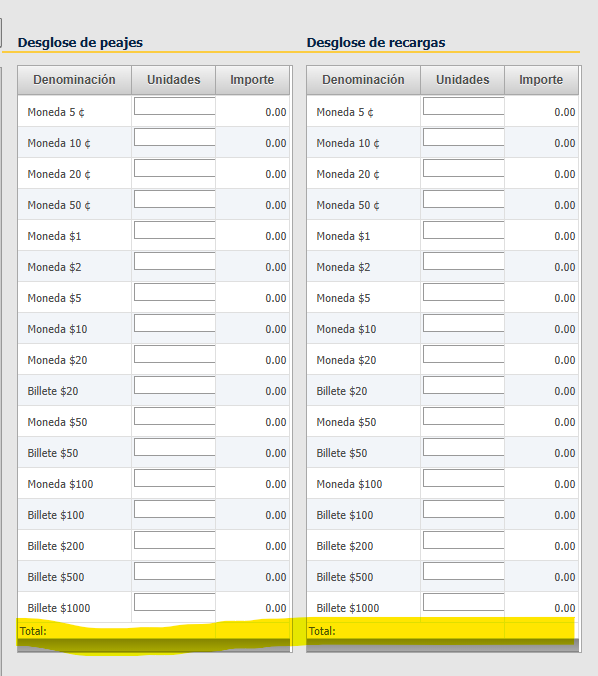
    I need like this: (total footer)

    legacy code:

    <cc1:C1TemplateField Visible="False">
              <GroupInfo FooterText="Total:" Position="Footer">
                  <%--<footerstyle backcolor="#0050A6" forecolor="White" font-bold="True" />
                  <headerstyle backcolor="#0050A6" />--%>
              </GroupInfo>
              <ItemStyle Width="0px" />
          </cc1:C1TemplateField>

    all columns for my GridView:

      <Columns>
          <cc1:C1TemplateField Visible="False">
              <GroupInfo FooterText="Total:" Position="Footer">
                  <%--<footerstyle backcolor="#0050A6" forecolor="White" font-bold="True" />
                  <headerstyle backcolor="#0050A6" />--%>
              </GroupInfo>
              <ItemStyle Width="0px" />
          </cc1:C1TemplateField>
          <cc1:C1TemplateField HeaderText="Medio de pago">
              <ItemTemplate>
                  <asp:LinkButton ID="paymentModeButton" runat="server" Text='<%# Bind("DESCRIPTION") %>'
                      ToolTip="Pulsa aquí para ver/introducir los detalles" CommandName="PaymentMode"
                      CausesValidation="false" CommandArgument='<%# Bind("ID") %>'></asp:LinkButton>
              </ItemTemplate>
              <ItemStyle Width="100px" CssClass="GridText" />
          </cc1:C1TemplateField>
          <cc1:C1BoundField HeaderText="Código saca" DataField="BAG_ID">
              <ItemStyle Width="80px" CssClass="GridText" />
          </cc1:C1BoundField>
          <cc1:C1BoundField HeaderText="Importe" DataField="AMOUNT" DataFormatString="c0"
              Aggregate="Custom" NullDisplayText="0,00">
              <ItemStyle CssClass="GridNumber" Width="70px" />
          </cc1:C1BoundField>
          <cc1:C1CommandField
              ShowDeleteButton="True"
              ButtonType="Image"
              DeleteText="Borrar"
              DeleteImageUrl="~/App_Themes/Content/Imagenes/delete.gif">
              <ItemStyle Width="20px" />
          </cc1:C1CommandField>
      </Columns>

    old legacy GroupAggregate event:

    protected void PaymentModeGrid_GroupAggregate(object sender, C1GroupTextEventArgs e)
    {
        Thread.CurrentThread.CurrentCulture = Util.GetCulture();
        decimal sum = 0;
        for (int i = e.StartItemIndex; i <= e.EndItemIndex; i++)
        {
             string s = ((C1GridView)sender).Rows[i].Cells[3].Text;
             decimal val;
             decimal.TryParse(s, System.Globalization.NumberStyles.Any, null, out val);
            sum += val;
         }
         Session["TotalLiquidatedAmount"] = sum.ToString();
         e.Text = string.Format("{0:C}", sum);
    }

    how to do it using 2025v2 399 version ? for only Total column footer ?

  • Posted 4 June 2026, 6:13 am EST

    Hello Enrique,

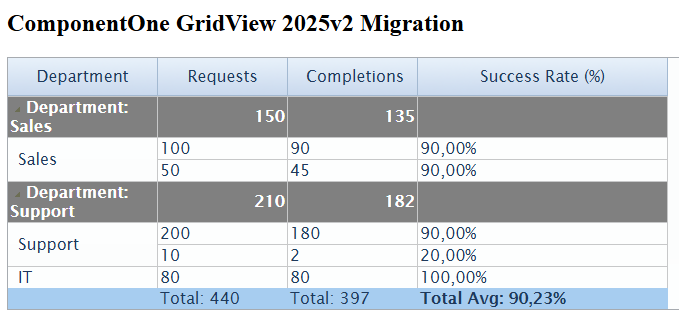
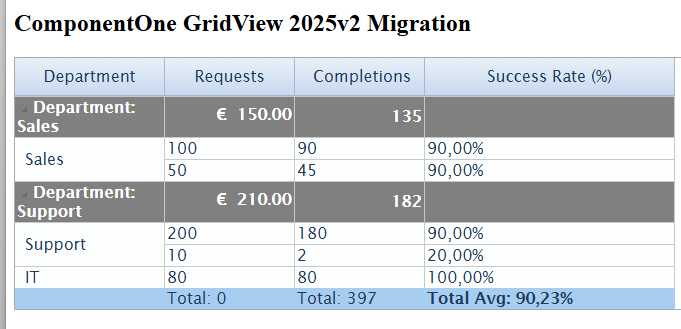
    It seems you intend to display “Total:” literal string in the “Department” column’s footer and total sum in other columns’ footer.

    If so, we have updated the sample implementing this requirement. There are two ways:

    1. Set the FooterText property of “Department” C1BoundField coulmn:
    <wijmo:C1BoundField DataField="Department" HeaderText="Department" Width="150px" FooterText="Total:">
        <ItemStyle CssClass="align-left" />
        <FooterStyle CssClass="align-left" />
    </wijmo:C1BoundField>
    1. Instead of using C1BoundField column, use C1TemplateField and use FooterTemplate:
    <wijmo:C1TemplateField HeaderText="Department">
        <ItemStyle HorizontalAlign="Left" CssClass="align-left"/>
        <ItemTemplate>
            <%# Eval("Department") %>
        </ItemTemplate>
        <FooterStyle CssClass="align-left"/>
        <FooterTemplate>
            <b>Total:</b>
        </FooterTemplate>
    </wijmo:C1TemplateField>

    We have attached a sample for second method: FlexGrid_Sample.zip

    If this is not what your requirement is, please share more details such as exact layout of footer you want.

    Regards,

    Uttkarsh.

  • Posted 5 June 2026, 4:32 am EST

    Sorry, I explain it bad.

    My legacy code:

    		<cc1:C1GridView ID="CashBreakDownControlGrid" runat="server"
    			DataKeyNames="ID, VALUE, TIMESTAMP"
    			AutogenerateColumns="False" Width="100%" 			EmptyDataText="No hay datos" ClientIDMode="AutoID" ShowFooter="True"
    			OnRowDataBound="CashBreakDownGrid_RowDataBound">
    			<Columns>
    
    				<cc1:C1TemplateField Visible="False" Aggregate="Sum">
    					<GroupInfo FooterText="Total:" Position="Footer" OutlineMode="StartCollapsed">
    					</GroupInfo>
    					<ItemStyle Width="0px" />
    				</cc1:C1TemplateField>
    				<cc1:C1BoundField DataField="ID" HeaderText="ID" Visible="false"></cc1:C1BoundField>
    				<cc1:C1TemplateField HeaderText="Denominación">
    					<ItemTemplate>
    						<div style="text-align: left">
    							<asp:Label ID="lblDenomination" runat="server" Text='<%# Bind("TEXT") %>'></asp:Label>
    						</div>
    					</ItemTemplate>
    				</cc1:C1TemplateField>
    				
    				<cc1:C1TemplateField HeaderText="Unidades">
    					<ItemTemplate>
    						<asp:HiddenField ID="HiddenValue" runat="server" ClientIDMode="AutoID" Value='<%# string.Format(Util.GetCulture(), "{0:N}", DataBinder.Eval(Container.DataItem, "VALUE")) %>' />
    						<asp:TextBox ID="txtUnits" runat="server" ClientIDMode="AutoID" Text='<%# Bind("UNITS") %>' Width="100%" CssClass="GridNumber"></asp:TextBox>
    					</ItemTemplate>
    					<ItemStyle CssClass="GridNumber" Width="60px" />
    				</cc1:C1TemplateField>
    				
    				<cc1:C1TemplateField HeaderText="Importe" Aggregate="Custom">
    					<ItemTemplate>
    						<div style="text-align: right; overflow: hidden;">
    							<asp:Label ID="lblAmount" runat="server" ClientIDMode="AutoID"
    								Text='<%# string.Format(Util.GetCulture(), "{0:N}", DataBinder.Eval(Container.DataItem, "AMOUNT")) %>' Style="text-align: right; max-width: 80px; display: inline-block"></asp:Label>
    							<asp:HiddenField ID="HiddenAmount" runat="server" ClientIDMode="AutoID"
    								Value='<%# string.Format(Util.GetCulture(), "{0:N}", DataBinder.Eval(Container.DataItem, "AMOUNT")) %>' />
    						</div>
    					</ItemTemplate>
    					<ItemStyle CssClass="GridNumber" Width="100px" />
    				</cc1:C1TemplateField>
    			</Columns>
    		</cc1:C1GridView>
    
    		<asp:TextBox ID="txtCashBreakDownTotal" ClientIDMode="AutoID" runat="server" Style="visibility: hidden; width: 0px; height: 0px; padding: 0px 0px 0px 0px; margin: 0px 0px 0px 0px"></asp:TextBox>
    		

    event Group

     protected void CashBreakDownGrid_GroupAggregate(object sender, C1GroupTextEventArgs e)
     {
         var start = e.StartItemIndex; ;
         var end = e.EndItemIndex;
    
         decimal sum = 0;
         for (int i = start; i <= end; i++)
         {
             string s = ((Label)((C1GridView)sender).Rows[i].Cells[0].FindControl("lblAmount")).Text;
             decimal val;
             decimal.TryParse(s, System.Globalization.NumberStyles.Any, null, out val);
             sum += val;
         }
    
         var texto = currencySymbol + "<span style='max-width:85px;display:inline-block;overflow:hidden' id=\"" + this.ClientID + "_CashBreakDownGridTotal\">" + string.Format("{0:N}", sum) + "</span>";
    
         e.Text = texto;
         txtCashBreakDownTotal.Text = sum.ToString("N", new CultureInfo("en-US"));
     }

    any suggestions for my legacy code for use Group Aggregrate for HeaderText=“Importe” , AMOUNT, and get the total for all rows for AMOUNT ?

  • Posted 9 June 2026, 2:05 am EST

    Hello Enrique,

    We’ve put together a sample with an implementation similar to yours. However, we’d like to make sure it matches your setup as closely as possible before going further.

    Could you please clarify the following:

    1. Does the sample reflect your implementation accurately, or are there differences in how your grid is structured?
    2. Does the dummy data we used align with your actual data? Is your data binding in code-behind set up similarly to ours?
    3. Could you share a screenshot of what your working legacy grid looks like?

    With this information we’ll be able to align the sample more closely with your exact setup.

    Sample: FlexGrid_Sample_Mod.zip

    Regards,

    Uttkarsh.

  • Posted 9 June 2026, 4:55 am EST - Updated 10 June 2026, 2:03 am EST

    thanks all!!

    I try your sample.

    Now, using this data:

       // All rows same category = one group = one Total footer
       dt.Rows.Add("ALL", "Moneda 5¢", 1, 5.00m);
       dt.Rows.Add("ALL", "Moneda 10¢", 2, 20.00m);
       dt.Rows.Add("ALL", "Moneda 20¢", 0, 0.00m);
       dt.Rows.Add("ALL", "Moneda 50¢", 0, 0.00m);
       // more...

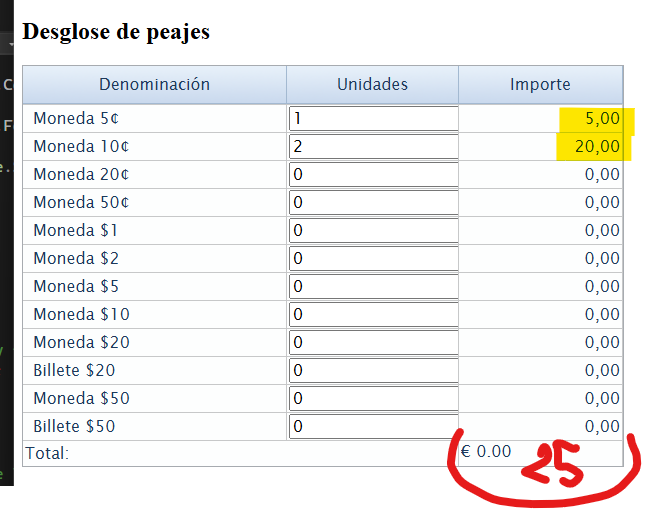
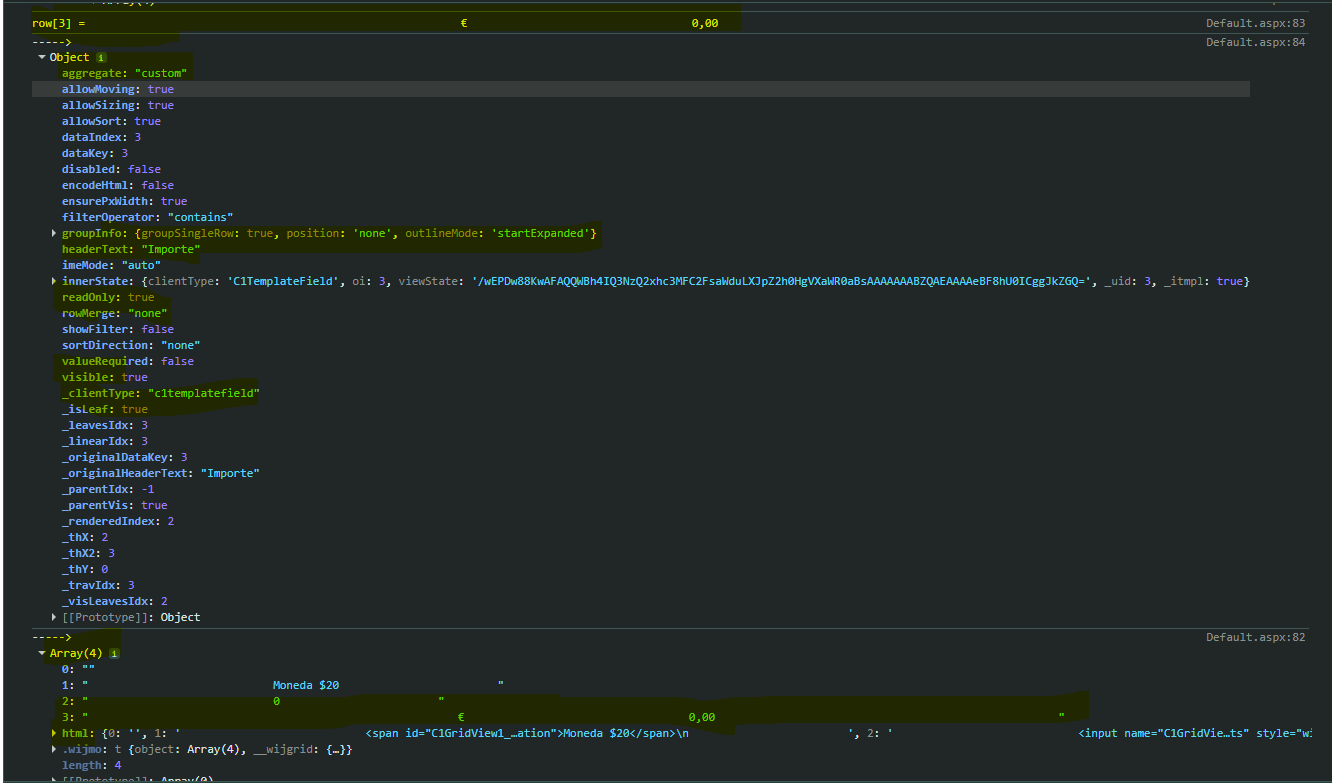
    I get total = 0, should be total = 25.

    AMOUNT - Importe column cannot sum for the total ?

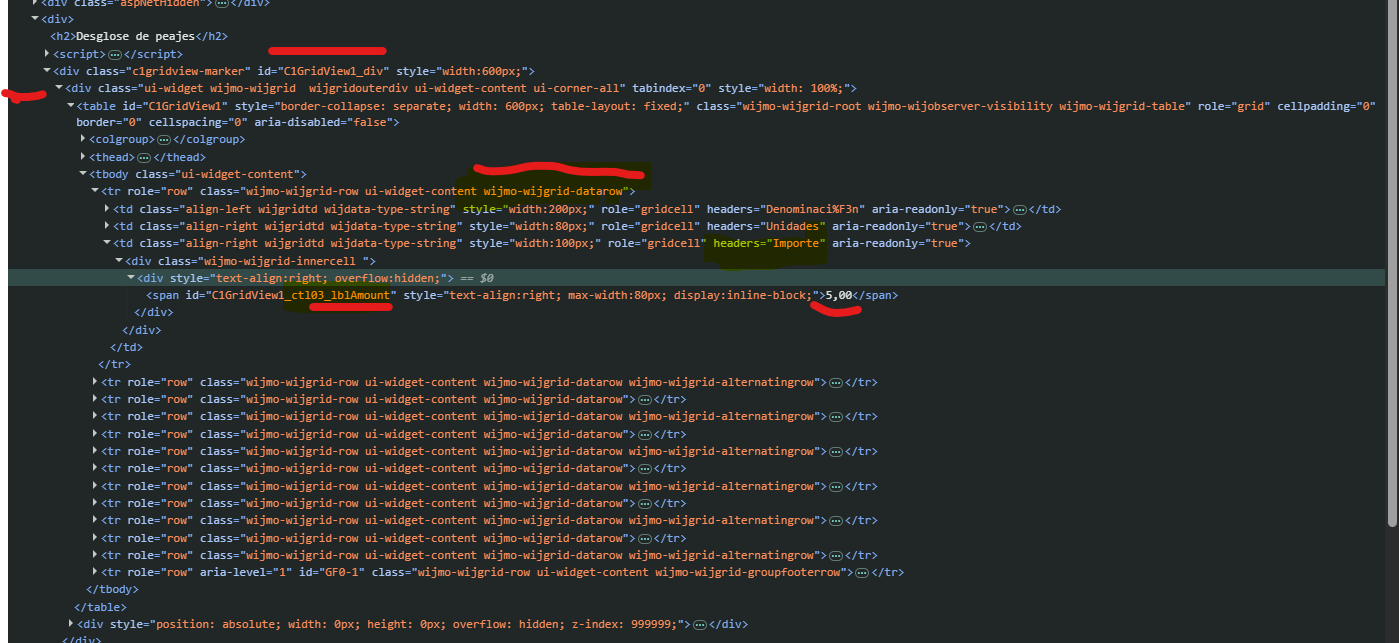
    dataRows.length is 0

    row is undefined: row = dataRows[i];

        let dataRows = gridTable.querySelectorAll('tr.wijmo-wijgrid-datarow');
    
        console.log('aggregate: ' + dataRows.length);
        for (let i = e.groupingStart; i <= e.groupingEnd; i++) {
    					console.log('aggregate ' + i);
            let row = dataRows[i];
    					console.log('aggregate ' + row);

    any suggestions ?please

  • Posted 10 June 2026, 8:02 am EST

    Hello Enrique,

    We’re looking into the sample and will get back once we have more information.

    Regards,

    Uttkarsh.

  • Posted 11 June 2026, 12:34 am EST

    Hello Enrique,

    Please refer to the attached working sample displaying “Importe” column’s customer aggregate in footer.

    Sample: FlexGrid_Sample_Mod2.zip

    Please let us know if it works for you.

    Regards,

    Uttkarsh.

Need extra support?

Upgrade your support plan and get personal unlimited phone support with our customer engagement team

Learn More

Forum Channels