Filter DAteTime Column, Format error Filtering C1GridView 2026v1 413

Posted by: enrique.pv-ext on 20 October 2026, 9:57 am EST

  • Posted 20 October 2026, 9:57 am EST - Updated 20 October 2026, 10:13 am EST

    Hi,

    Migrate from 2010v1 to 2026v1 413 in ASP.NET WebForms NET Framework 4.8.1.

    Using C1GridView from C1.Web.Wijmo.Controls.48.dll

    For using filteringcolumns DateTime in GridView

    default value in filter, today (it appears not filter by date)

    I select filter and press Enter
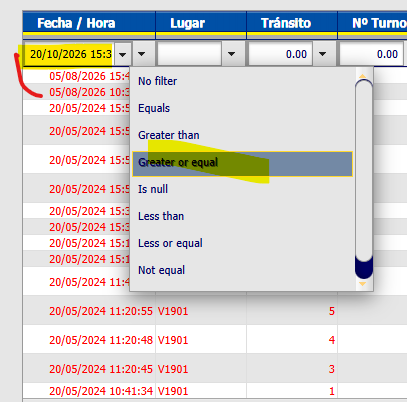
    I get error about FilterVAlue, it 'is en-us value !!!
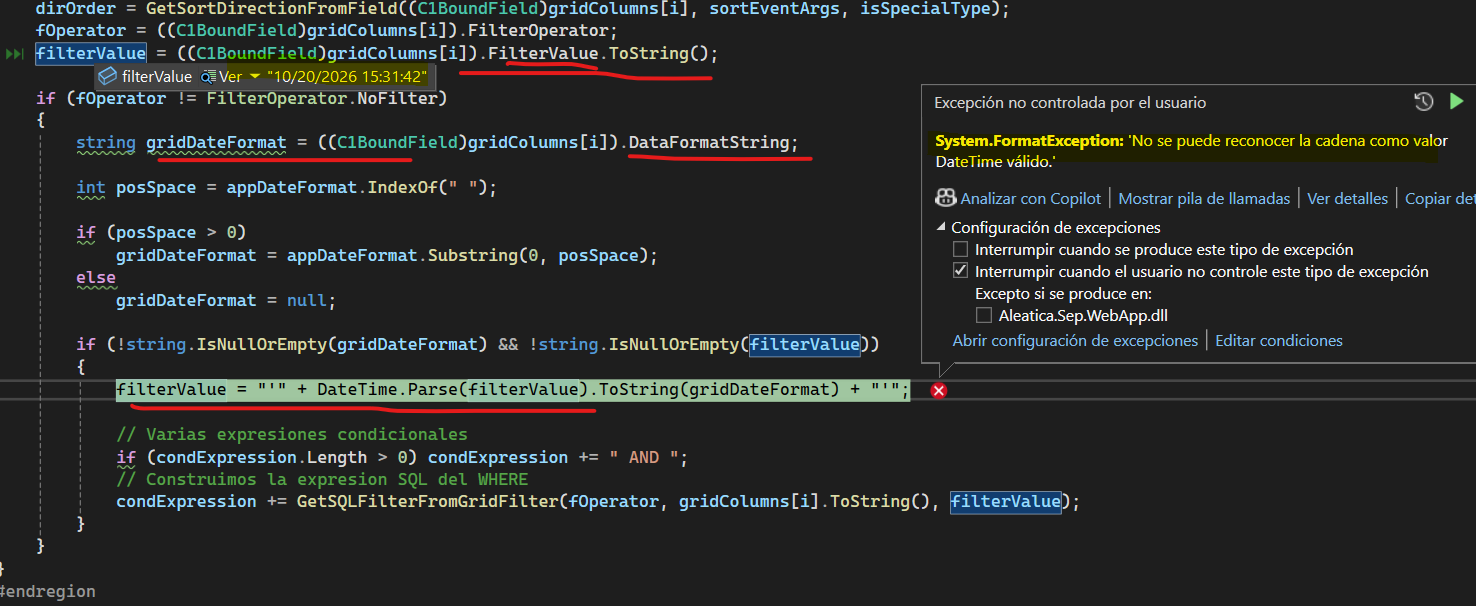
    protected void C1GridTrips_Filtering(Object sender, C1GridViewFilterEventArgs e)
    {
    
        C1GridTrips.DataSource = Web.Util.GetGridFilterByFieldType(
            C1GridTrips.Columns, ((DataView)Context.Cache["CenterTrips"]).Table,
            GetConfigurationParameter(ConfigurationParamType.DefaultDatetimeFormatString), null);
           Web.Util.reStartGridFieldsAndBind(C1GridTrips);
    }

    DateTime.Parse(filterValue).ToString(gridDateFormat) fails now !!

    in another filter, c hanges format in datetime filter column !! to format en-us
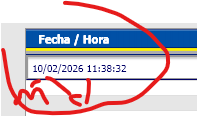
    please, any suggestions ?? help me, friends !!

    Title: C1GridView (Wijmo, 4.8.20261.413) returns date-column FilterValue in en-US format (MM/dd/yyyy HH:mm:ss) even though the thread culture is es-MX/es-ES. This worked in the legacy C1GridView.

    Hi,

    We are migrating an ASP.NET WebForms (.NET Framework 4.8) application from the legacy C1.Web.UI.Controls.C1GridView to C1.Web.Wijmo.Controls.C1GridView (C1.Web.Wijmo.Controls.48, version 4.8.20261.413). After the migration, filtering on date columns throws an exception. We would like to understand how the grid serializes the filter value of date columns.

    Environment

    • ASP.NET WebForms, .NET Framework 4.8, UpdatePanel/ScriptManager (partial postbacks)

    • Web.config :

    • Windows regional settings: Spanish (Spain)

    • The page may also set Thread.CurrentThread.CurrentCulture to es-ES (LCID 3082) from the user profile

    • In both cases, the date format is dd/MM/yyyy

    Grid definition

    
    <cc1:C1GridView ID="C1GridTrips" runat="server" AllowPaging="True" AllowSorting="True"
        ShowFilter="True" AutogenerateColumns="false"
        OnFiltering="C1GridTrips_Filtering" ...>
      <Columns>
        <cc1:C1BoundField DataField="FECHA" SortExpression="FECHA" SortDirection="Descending"
                          DataFormatString="dd/MM/yyyy HH:mm:ss">
          <ItemStyle Width="120px" HorizontalAlign="Center" CssClass="GridDate" />
        </cc1:C1BoundField>
        ...

    The FECHA column is bound to a DateTime column in a DataTable .

    The same DataFormatString is also assigned in code-behind (without the {0:} wrapper) from a configuration value ( dd/MM/yyyy HH:mm:ss ).

    What we do in the Filtering handler

    We read the column filter values and build a DataView filter / SQL-like expression:

    protected void C1GridTrips_Filtering(object sender, C1GridViewFilterEventArgs e)
    {
        C1GridTrips.DataSource = Util.GetGridFilterByFieldType(
            C1GridTrips.Columns, ((DataView)Context.Cache["CenterTrips"]).Table,
            GetConfigurationParameter(ConfigurationParamType.DefaultDatetimeFormatString), null);
        Util.reStartGridFieldsAndBind(C1GridTrips);
    }

    Inside the helper, for each GridDate column:

    var col = (C1BoundField)gridColumns[i];
    FilterOperator fOperator = col.FilterOperator;
    string filterValue = col.FilterValue.ToString();
    
    if (fOperator != FilterOperator.NoFilter && !string.IsNullOrEmpty(filterValue))
    {
        // appDateFormat = "dd/MM/yyyy HH:mm:ss" -> "dd/MM/yyyy"
        filterValue = "'" + DateTime.Parse(filterValue).ToString("dd/MM/yyyy") + "'";
        ...
    }

    Problem

    col.FilterValue returns the date as 10/20/2026 14:49:38 (month first, en-US/invariant style) instead of 20/10/2026 14:49:38 . DateTime.Parse(filterValue) uses the thread culture (es-MX/es-ES), so it throws:

    System.FormatException: No se puede reconocer la cadena como valor DateTime válido.

    On the client this surfaces as Sys.WebForms.PageRequestManagerServerErrorException .

    If the day is 12 or less, the parse does not throw, but month and day are silently swapped.

    What we checked

    • We found no code in the application that sets the culture to en-US. Web.config and the thread culture are both Spanish (dd/MM/yyyy).

    • The date-filter code in our helper is identical to the version used with the legacy C1GridView (checked in source control). Only the control changed.

    • With the legacy control, FilterValue arrived in the culture format (dd/MM/yyyy). With the Wijmo control it arrives in en-US format.

    • Numeric filters seem to follow the same pattern. Some older code already parses numeric FilterValue with CultureInfo.InvariantCulture .

    Questions

    1. Is it by design that C1BoundField.FilterValue for date columns is serialized with InvariantCulture / en-US ( MM/dd/yyyy HH:mm:ss ) in the Wijmo C1GridView, regardless of the thread culture?
    2. Is that format guaranteed, or could it depend on DataFormatString , DataType , the client-side Globalize culture, or the C1GridView Culture setting? Is there a property to make the server receive a culture-specific value?
    3. Would you recommend parsing with DateTime.ParseExact(value, “MM/dd/yyyy HH:mm:ss”, CultureInfo.InvariantCulture) , or is there a better way to get a typed DateTime (for example from C1GridViewFilterEventArgs , or a different DataType setting)?
    4. Does the DataFormatString value matter here? We use “dd/MM/yyyy HH:mm:ss” without the {0:…} wrapper. Should it be “{0:dd/MM/yyyy HH:mm:ss}” for the Wijmo grid, and could that change what is sent to the server?
    5. Is there a documented breaking-change note about FilterValue formatting when migrating from the legacy C1GridView to the Wijmo C1GridView?

    Thanks in advance. Any guidance or a minimal sample would be very helpful.

  • Posted 21 October 2026, 6:54 am EST

    Hello Enrique,

    We tried to reproduce the behavior using the code you shared, but it is working as expected at our end. Please refer to the attached video for reference (filterBehavior.zip).

    Could you please modify the attached sample (GridView_DateTime_Filtering.zip) to reproduce the exact issue and share it with us along with the steps to replicate it? This will help us investigate the behavior further at our end.

    Regards,

    Uttkarsh

  • Posted 22 October 2026, 4:22 am EST - Updated 22 October 2026, 4:40 am EST

    Filter_DateTime.zip

    Filter_DateTime2.zip

    Filter_DateTime3.zip

    and projects

    GridView_DateTime_Filtering__using2026v1.413.zip

    using

    <system.web>
        <globalization culture="es-MX" uiCulture="es-MX" fileEncoding="UTF-8" requestEncoding="UTF-8" />

    the same problem with filter Value

    GridView_DateTime_Filtering_esMX.zip

    ┌─────────┬────────────────────────────┬────────────┐

    │ Origen │ Propiedad │ Valor │

    ├─────────┼────────────────────────────┼────────────┤

    │ Windows │ Get-Culture │ es-ES │

    ├─────────┼────────────────────────────┼────────────┤

    │ Windows │ Get-UICulture │ es-ES │

    ├─────────┼────────────────────────────┼────────────┤

    │ Windows │ Get-WinSystemLocale │ es-ES │

    ├─────────┼────────────────────────────┼────────────┤

    │ Windows │ Get-WinUserLanguageList[0] │ es-ES │

    ├─────────┼────────────────────────────┼────────────┤

    │ .NET │ CurrentCulture │ es-ES │

    ├─────────┼────────────────────────────┼────────────┤

    │ .NET │ CurrentUICulture │ es-ES │

    ├─────────┼────────────────────────────┼────────────┤

    │ .NET │ InstalledUICulture │ en-US │

    ├─────────┼────────────────────────────┼────────────┤

    │ .NET │ ShortDatePattern │ dd/MM/yyyy │

    └─────────┴────────────────────────────┴────────────┘

    Windows está en es-ES en todo, salvo InstalledUICulture , que da en-US . Esa propiedad refleja el idioma con el que se instaló Windows, no el actual. Esto confirma que la configuración regional de Windows no explica el formato en-US del filtro. El origen es el componente C1

    Windows is configured as es-ES everywhere, except for InstalledUICulture, which reports en-US. That property reflects the language that Windows was originally installed with, not the current system language.

    This confirms that the Windows regional settings do not explain why the filter is using the en-US format.

    The source of the issue appears to be the C1 component itself.

  • Posted 23 October 2026, 1:36 am EST

    Hello Enrique,

    Thank you for sharing details. We’re able to reproduce the behavior at our end.

    In the Filtering event, C1BoundField.FilterValue reaches the server as a string in a fixed US-style format (MM/dd/yyyy HH:mm:ss, for example 10/22/2026 10:02:12), even though the grid and your application use es-MX. DateTime.Parse uses the thread culture (es-MX, dd/MM/yyyy), so it reads 10/22/2026 as month 22 and throws the exception. For dates where both numbers are 12 or lower, such as 06/05/2026, the parse succeeds with day and month swapped, which gives wrong filter results without any error.

    The globalization setting in web.config does not change this, because the format of this value is not controlled by the server culture.

    We have escalated the behavior to the development team for further insights and will get back once we have more information. [Internal Tracking ID: C1WEB-30807]

    In the meantime, parse the value with an exact format and the invariant culture as a workaround:

    var col = (C1BoundField)C1GridTrips.Columns[0];
    if (col.FilterOperator == FilterOperator.NoFilter || col.FilterValue == null)
        return;
    
    DateTime dt;
    if (!DateTime.TryParseExact(col.FilterValue.ToString().Trim(),
            "MM/dd/yyyy HH:mm:ss", CultureInfo.InvariantCulture,
            DateTimeStyles.None, out dt))
    {
        return;
    }
    
    string filterValue = "'" + dt.ToString("dd/MM/yyyy", CultureInfo.InvariantCulture) + "'";
    

    Regards,

    Uttkarsh.

  • Posted 26 October 2026, 1:16 am EST

    Hello Enrique,

    We have heard back from the development team. Below is an explanation of how FilterValue works for date columns and the recommended way to handle it.

    1. Is the invariant-style MM/dd/yyyy HH:mm:ss string in FilterValue by design?

    Yes. FilterValue is always a string, and for date columns the grid stores it in a fixed US-style format (MM/dd/yyyy HH:mm:ss) that doesn’t change with the page culture. This is intentional, as it lets the grid build its internal filter expression the same way regardless of locale.

    2. Is there a supported way to get a typed DateTime (or the culture-formatted string) in the Filtering event?

    There is no typed DateTime property. FilterValue is a plain string, so you need to parse it yourself. The key point is to parse with CultureInfo.InvariantCulture, not with the current thread culture, because the string is always in the invariant format. A plain TryParse with InvariantCulture is enough, as it doesn’t tie you to an exact pattern the way ParseExact does.

    Here is an updated C1GridTrips_Filtering method. Add “using System.Web;” at the top.

    protected void C1GridTrips_Filtering(object sender, C1GridViewFilterEventArgs e)
    {
        const string field = "FECHA";
    
        // Values the grid will apply; FilterValue is always an invariant-culture string.
        string filterValue = e.Values[field] as string;
        FilterOperator op = e.Operators[field] != null
            ? (FilterOperator)e.Operators[field]
            : FilterOperator.NoFilter;
    
        var sb = new StringBuilder();
        sb.AppendLine("Operator: " + op);
        sb.AppendLine("FilterValue (invariant): [" + filterValue + "]");
        sb.AppendLine("Thread culture: " + CultureInfo.CurrentCulture.Name +
                      " (short date " + CultureInfo.CurrentCulture.DateTimeFormat.ShortDatePattern + ")");
    
        if (op != FilterOperator.NoFilter && !string.IsNullOrEmpty(filterValue))
        {
            DateTime value;
            if (DateTime.TryParse(filterValue, CultureInfo.InvariantCulture, DateTimeStyles.None, out value))
            {
                sb.AppendLine("Parsed (invariant): " + value.ToString("yyyy-MM-dd HH:mm:ss"));
                sb.AppendLine("Display (" + CultureInfo.CurrentCulture.Name + "): " + value.ToString(CultureInfo.CurrentCulture));
            }
            else
            {
                sb.AppendLine("Could not parse filter value.");
            }
        }
    
        lblFilterInfo.Text = HttpUtility.HtmlEncode(sb.ToString()).Replace(Environment.NewLine, "<br/>");
    }
    

    3. The posted value ends in Z, but the time part matches the local time the user entered. Is the value meant to be UTC or local?

    It is the local time the user entered. The trailing “Z” is just part of the grid’s internal serialization format and does not mean UTC. The grid sends the wall-clock time the user picked, and the server reads it back as-is with no timezone conversion.

    4. Contains is the operator on a datetime column. Is Equal or a range the recommended operator for date filtering?

    Contains is the default operator shown for every filter column. For date columns, the grid already treats Contains, NotContain, BeginsWith, and EndsWith as “Equals” behind the scenes, so the filtering itself works, but the label in the UI is misleading.

    Note that Equals matches the exact date and time (down to the second). If you want to match an entire day regardless of time, use a range instead: GreaterOrEqual for the start and Less for the next day. You can also use FilterOperator.Custom with a FilterCustomOperator expression in the Filtering handler, like this:

    [{0}] >= #{1}# AND [{0}] < #...next day...#
    

    To keep the UI accurate, set FilterOperator=“Equals” (or a range operator) on the date column in markup, so the filter box doesn’t show “Contains”.

    Please let us know if you have any further questions.

    Regards,

    Uttkarsh

  • Posted 27 October 2026, 6:20 am EST - Updated 27 October 2026, 6:26 am EST

    Great, I use this:

            private static string GetFilterValueFixingDateFormatCulture(C1BoundField columnDate, string appDateFormat)
            {
                var filterValue = columnDate.FilterValue.ToString();
                var gridDateFormat = columnDate.DataFormatString;
    
                int posSpace = appDateFormat.IndexOf(" ");
    
                if (posSpace > 0)
                    gridDateFormat = appDateFormat.Substring(0, posSpace);
                else
                    gridDateFormat = null;
    
    
                if (string.IsNullOrEmpty(gridDateFormat) || string.IsNullOrEmpty(filterValue)) return null;
    
                // ERROR CULTURE: filterValue = "'" + DateTime.Parse(filterValue).ToString(gridDateFormat) + "'";
    
                // El grid envía el valor en cultura invariante (MM/dd/yyyy HH:mm:ss)
                if (!DateTime.TryParse(filterValue, CultureInfo.InvariantCulture, DateTimeStyles.None, out DateTime dt))
                    return null; //continue; // valor no reconocido: ignoramos el filtro
    
                filterValue = "'" + dt.ToString(gridDateFormat, CultureInfo.InvariantCulture) + "'";
                return filterValue;
            }

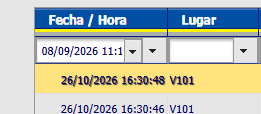
    I choose 08/09/2026 — 8 september

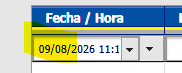
    but finally , in column calendar-date , changes the value !!

    It’s appear, after call filtering events, the value 09/08/2026 — 9 august

    any suggestions ?

  • Posted 27 October 2026, 6:42 am EST

    Hello Enrique,

    Thanks for the details. We can reproduce the same behavior at our end and have passed it to the development team for their input.

    Our current understanding is that the grid keeps the filter value internally as an ‘MM/dd/yyyy HH:mm:ss’ string. When the grid re-renders after the postback, that string seems to be placed in the filter box without being converted to the grid culture. The client then reads it as dd/MM, which swaps the day and month.

    We will update you here once we hear back from the team.

    Regards,

    Uttkarsh

  • Posted 27 October 2026, 6:50 am EST

    older

    C1.Web.UI.Controls.C1GridView.C1BaseFieldCollection

    gridColumns[i].ToString(), gets Datafield value

    new

    C1.Web.Wijmo.Controls.C1GridView.C1BaseFieldCollection

    gridColumns[i].ToString() gets string ‘C1.Web.Wijmo.Controls.C1GridView.C1BoundField’

    ERROR !!!! 
    condExpression += GetSQLFilterFromGridFilter(fOperator, gridColumns[i].ToString(), filterValue);

    Changes behavoir for gridColumns[i].ToString()

  • Posted 27 October 2026, 11:46 pm EST

    Hello Enrique,

    Thanks for sharing this. In the Wijmo C1GridView, gridColumns[i].ToString() returns the type name of the column (C1.Web.Wijmo.Controls.C1GridView.C1BoundField), not the data field name. That is why the expression you build in GetSQLFilterFromGridFilter fails.

    To get the data field, cast the column and read DataField:

    var col = (C1BoundField)C1GridTrips.Columns[0];
    string dataField = col.DataField;
    

    In your helper, that means replacing gridColumns[i].ToString() with ((C1BoundField)gridColumns[i]).DataField in the call to GetSQLFilterFromGridFilter. You already cast gridColumns[i] to C1BoundField earlier in the loop, so you can reuse that col variable.

    If it still does not work, please share complete code along with “GetSQLFilterFromGridFilter()” method and share your use-case. We’ll suggest best way to implement your use-case with C1GridView.

    Regards,

    Uttkarsh

  • Posted 28 October 2026, 6:09 am EST

    Hello Enrique,

    Regarding the date and month swapping after a filter postback, our team believes the cause is the DataFormatString=“dd/MM/yyyy HH:mm:ss” property on the grid’s C1BoundField. As a workaround for now, please change it to DataFormatString=“dd-MM-yyyy HH:mm:ss”, so the date separator is a hyphen instead of a slash.

    We have also created a bug ticket to investigate why the “/” separator does not work as expected.

    Regards,

    Uttkarsh

  • Posted 28 October 2026, 6:48 am EST

    Thanks, I’ll try it but not works for me:

      <cc1:C1BoundField HeaderText="Fecha / Hora" DataField="DateTimeTrip"
          HtmlEncode = "true"  DataFormatString="dd-MM-yyyy HH:mm:ss"
          SortExpression="DateTimeTrip" >
          <ItemStyle CssClass="GridDate" Width="150px" />
      </cc1:C1BoundField>

    I get the same error (changes format …)

  • Posted 28 October 2026, 7:25 am EST - Updated 28 October 2026, 7:30 am EST

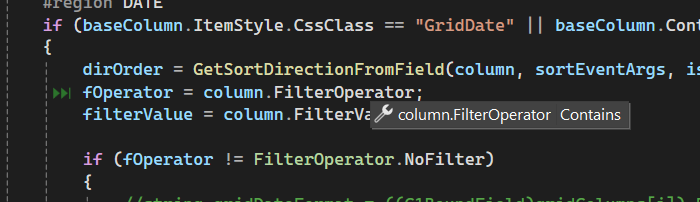
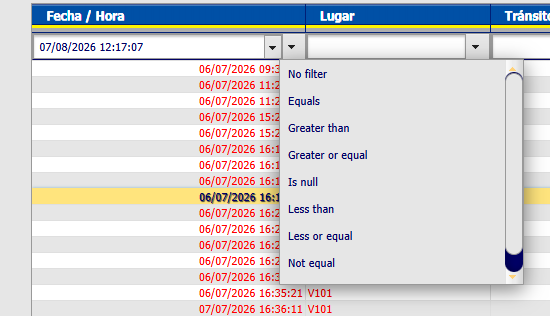
    I get FilterOperator Contains for Date column, why ?

    Contains not appears in list for filter Date:

    any suggestions ?

  • Posted 28 October 2026, 11:41 pm EST

    Hello Enrique,

    → Thanks, I’ll try it but not works for me:

    We’re sorry but it is working correctly at our end. (see behavior.zip and GridView_DateTime_Filtering.zip)

    Could you please let us know if we’re missing anything here? Also confirm if our sample replicates the behavior. If it does not, please modify it to reproduce the behavior for us to investigate.


    → I get FilterOperator Contains for Date column, why ?

    → Contains not appears in list for filter Date:

    We have answered these in the response posted on “26 October 2026, 1:16 am EST”. Please find the same below:

    Contains is the default operator shown for every filter column. For date columns, the grid already treats Contains, NotContain, BeginsWith, and EndsWith as “Equals” behind the scenes, so the filtering itself works, but the label in the UI is misleading.

    Note that Equals matches the exact date and time (down to the second). If you want to match an entire day regardless of time, use a range instead: GreaterOrEqual for the start and Less for the next day.

    To keep the UI accurate, set FilterOperator=“Equals” (or a range operator) on the date column in markup, so the filter box doesn’t show “Contains”.

    Regards,

    Uttkarsh.

  • Posted 29 October 2026, 4:13 am EST

    is this required ?

    <script src="https://cdn.wijmo.com/external/cultures/globalize.culture.es-MX.js"></script>
        <script>
            Globalize.culture("es-MX");
        </script>

    and

     CultureCalendar="es-MX"

    for GridView ?

  • Posted 29 October 2026, 5:03 am EST

    please, can you put the link to response posted on “26 October 2026, 1:16 am EST” ?

       protected void BlackOutsGrid_Filtering(object sender, C1GridViewFilterEventArgs e)
       {
           BlackOutsGrid.DataSource = Ohl.Concesiones.Sep.Web.Util.GetGridFilterByFieldType(BlackOutsGrid.Columns, tripblackouts, GetConfigurationParameter(ConfigurationParamType.DefaultDatetimeFormatString), null);
           Ohl.Concesiones.Sep.Web.Util.reStartGridFieldsAndBind(BlackOutsGrid);
       }
    

    reStartGridFieldsAndBind

    [code]

    ///


    /// This method must be called to do each C1GridView.DataBind();

    ///


    /// C1GridView that filter will be restarted and bind

    public static void reStartGridFieldsAndBind(C1GridView grid)

    {

    ArrayList filterValues = new ArrayList();

    ArrayList sortedValues = new ArrayList();

            int index = 0;
            int index2 = 0;
    
            foreach (C1Field column in grid.Columns)
            {
                if (column is C1BoundField)
                {
                    if (column.ItemStyle.CssClass == "GridDate")
                    {
                        var col = (C1BoundField)column;
                        //var format = CommonServices.GenericService.Instance.GetConfigurationParameter(ConfigurationParamType.DefaultDatetimeFormatString);
                        var filterValue = GetFilterValueFixingDateFormatCulture(col);
                        filterValues.Add(filterValue);
                        ((C1BoundField)column).FilterValue = "";
                    }
    
                    if ((column.ItemStyle.CssClass == "GridNumber")) // || column.ItemStyle.CssClass == "GridDate"))
                    {
                        filterValues.Add(((C1BoundField)column).FilterValue);
                        ((C1BoundField)column).FilterValue = "";
                    }
    
                    sortedValues.Add(((C1BoundField)column).SortDirection);
                    ((C1BoundField)column).SortDirection = C1SortDirection.None;
                }
            }
    
            grid.DataBind();
    
            foreach (C1Field column in grid.Columns)
            {
                if (column is C1BoundField)
                {
                    if ((column.ItemStyle.CssClass == "GridDate"))
                    {
                        ((C1BoundField)column).FilterValue = filterValues[index].ToString();
                        index++;
                    }
    
                    if ((column.ItemStyle.CssClass == "GridNumber")) // || column.ItemStyle.CssClass == "GridDate"))
                    {
                        ((C1BoundField)column).FilterValue = filterValues[index].ToString();
                        index++;
                    }
    
                    ((C1BoundField)column).SortDirection = (C1SortDirection)sortedValues[index2];
                    index2++;
                }
            }
        }[/code]
    
  • Posted 29 October 2026, 6:20 am EST

    Hello Enrique,

    → Is this required?

    No, you can remove both. The format is still controlled by the ‘DataFormatString’ property. The client-side culture setting only affects how dates are displayed by default, which is “dd/MM/yyyy”. Since you are using the custom format “dd-MM-yyyy HH:mm:ss”, you don’t need to set the culture on the client side. ‘DataFormatString’ is enough on its own.

    → Link to the response posted on 26 October 2026, 1:16 am EST

    You can find it here: https://developer.mescius.com/forums/webforms-edition/filter-datetime-column-format-error-filtering-c1gridview-2026v1-413#87435

    Your query also includes a code snippet (BlackOutsGrid_Filtering() method). Could you please let us know if you have any specific questions regarding it?

    Regards,

    Uttkarsh

Need extra support?

Upgrade your support plan and get personal unlimited phone support with our customer engagement team

Learn More

Forum Channels