
c1TreeView CSS 2010v1 to 2025v2 399 in ASP.NET WebForms

Posted by: enrique.pv-ext on 21 September 2026, 8:51 am EST

  • Posted 21 September 2026, 8:51 am EST - Updated 21 September 2026, 8:56 am EST

    new ticket for separate concerns to avoid any misunderstandings about TreeView Styles CSS

    Reference https://developer.mescius.com/forums/webforms-edition/styles-css-2010v1-to-2025v2-399-in-asp-net-webforms

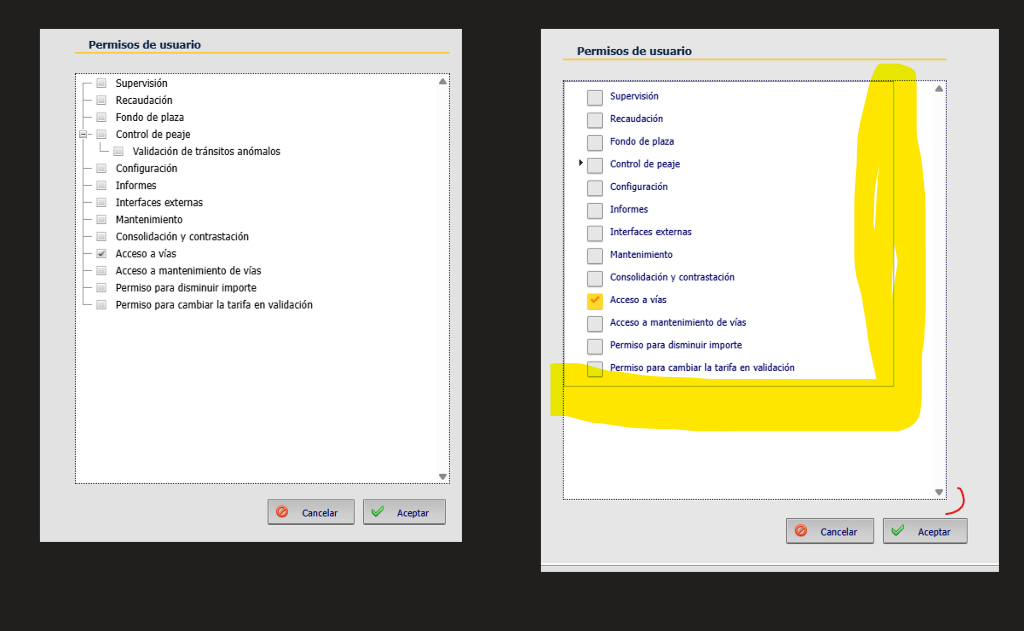
    Comparing the legacy and migrated TreeViews, I notice a slight difference.

    The TreeView border shouldn’t appear.
  • Posted 22 September 2026, 5:49 am EST

    Hello Enrique,

    We’re not entirely sure how the layout is being implemented on your end. Please share your implementation and modify attached sample to replicate the layout for our investigation.

    Please refer to the sample attached as we do not observe such issue at our end.

    Sample: GridView_Dialog_TreeView.zip

    Regards,

    Uttkarsh.

  • Posted 23 September 2026, 11:11 am EST

    try reproduce for TreeView:

    I have AppTheme ContentStyle.css, a jquer-ui.css, css overrides, flaticons…

    not border ok, but lines not possible (escalated Mescius case)

    And align buttons with the treeview

    I attached csproj base in your sample

    GridView_Pagination.zip

  • Posted 24 September 2026, 2:57 am EST

    Hello Enrique,

    Yes, we have escalated your concern related to connecting lines in the following thread:

    https://developer.mescius.com/forums/webforms-edition/styles-css-2010v1-to-2025v2-399-in-asp-net-webforms

    We’ll update you there once we have further information from the dev team.

    If you have any other query or issue related to C1TreeView, please let us know.

    Regards,

    Uttkarsh.

Need extra support?

Upgrade your support plan and get personal unlimited phone support with our customer engagement team

Learn More

Forum Channels