C1Dialog Styles CSS 2010v1 to 2025v2 399 in ASP.NET WebForms

Posted by: enrique.pv-ext on 21 September 2026, 8:39 am EST

  • Posted 21 September 2026, 8:39 am EST - Updated 21 September 2026, 8:44 am EST

    new ticket for separate concerns to avoid any misunderstandings about C1Dialog Styles CSS

    Reference https://developer.mescius.com/forums/webforms-edition/styles-css-2010v1-to-2025v2-399-in-asp-net-webforms

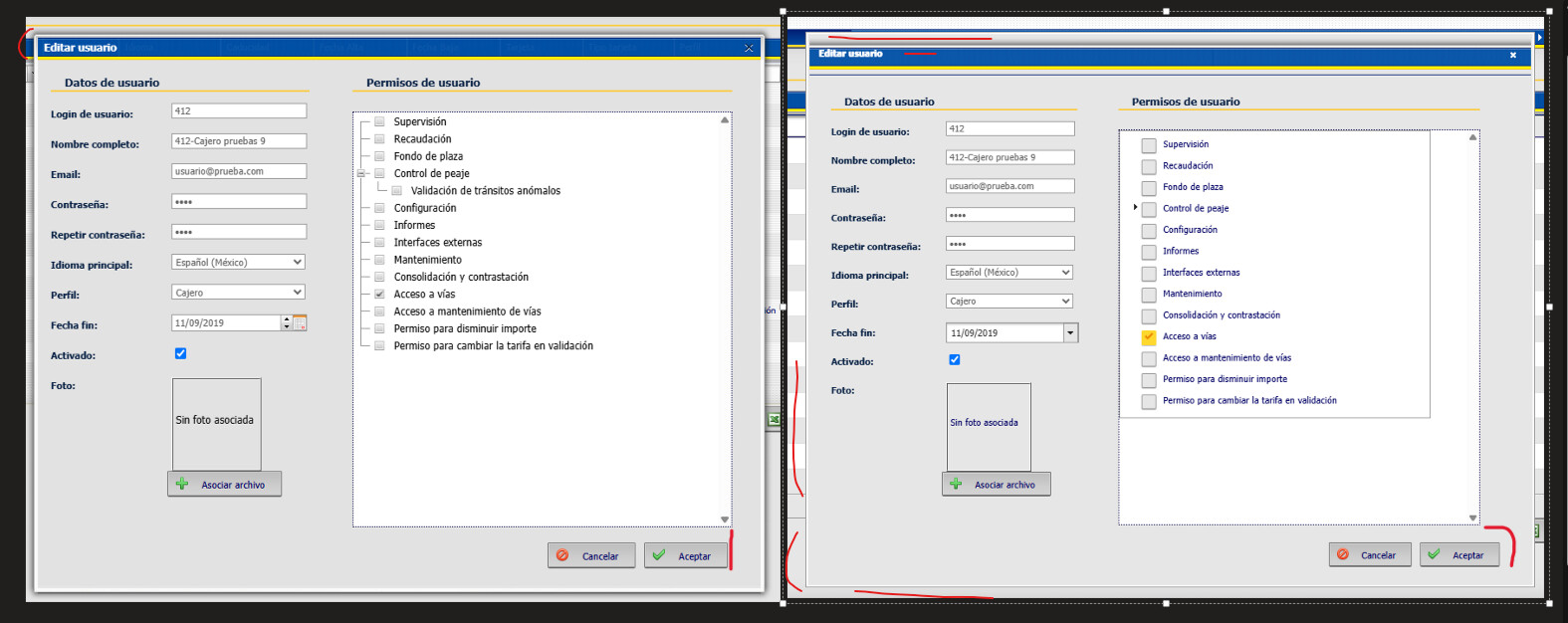
    Comparing the legacy window and the dialog, I notice a few differences.

    The title is not vertically centered against the blue background; there is a gap between it and the yellow line (which is part of the background image).

    The dialog (window) border is different in the migrated version.

    The buttons do not align with the page’s treeview.

  • Posted 22 September 2026, 5:24 am EST

    Hello Enrique,

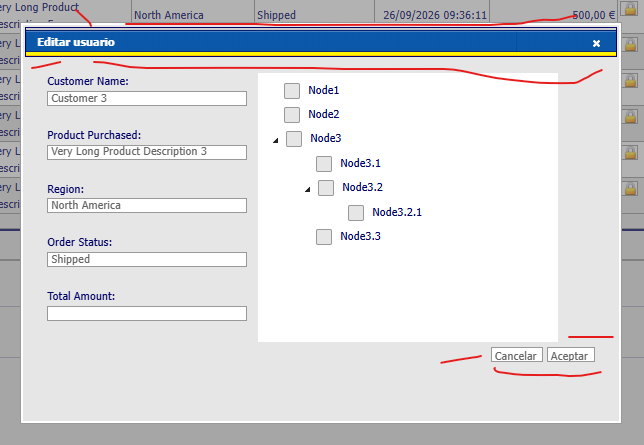
    We implemented Edit Dialog as per the image you shared but did not observe any borders. Furthermore, the placement of buttons depends on CSS in your project.

    Could you please share your implementation and modify the sample attached for us to investigate? Without exact implementation details, it’d be difficult for us to provide a solution.

    Sample: GridView_Dialog_Sample.zip

    Regards,

    Uttkarsh.

  • Posted 23 September 2026, 11:09 am EST - Updated 23 September 2026, 11:14 am EST

    try reproduce for Dialog:

    I have AppTheme ContentStyle.css, a jquer-ui.css, css overrides, flaticons…

    Maybe not border black (very thin) in the title

    And align buttons with the treeview

    I attached csproj base in your sample

    GridView_Pagination.zip

    THANKS A LOT, FRIENDS !!! good!!

  • Posted 24 September 2026, 2:51 am EST

    Hello Enrique,

    → Maybe not border black (very thin) in the title

    The gray border at the top comes from ‘VisualStyles\CustomVisualStyle2\C1Window\Images\window-horizontal.png’ image set as the background.

    It becomes more visible with a thin black border around it. This black border comes from the following CSS rule:

    jquery-ui.css : line 888

    .ui-widget-header {
    	border: 1px solid #006; /*<== this line renders navy blue border*/
    	background: #006;
    	color: #ffffff;
    	font-weight: bold;
    }
    

    You can override it to remove the border as follows:

    c1dialog-overrides.css : line 74

    .wijmo-wijdialog .ui-dialog-titlebar.ui-widget-header {
        background: transparent url('/VisualStyles/CustomVisualStyle2/C1Window/Images/window-horizontal.png') repeat-x scroll 0 -444px !important;
        min-height: 20px;
        border: none; /*<== add this line to remove border*/
    /*  border-color: #002076;
        padding-top: 13px;
        padding-bottom: 6px;*/
    }
    

    → And align buttons with the treeview

    This issue caused by the following CSS rule:

    c1treeview-overrides.css : line 74

    .wijmo-wijtree {
    	width: 89% !important; /*<== remove it to resolve the issue*/
    }
    

    Regards,

    Uttkarsh.

  • Posted 24 September 2026, 4:33 am EST

    thanks friends !! all is OK apply c1treeview-overrides.css

    how-to discover-troubleshooting the issues ? Chrome DevTools tool only ?

  • Posted 24 September 2026, 5:06 am EST

    Hello Enrique,

    Chrome DevTools is what we use most, but Firefox and Edge have similar built-in tools too. The Elements panel is the key one for CSS/HTML, it shows every rule matching an element and which one wins the cascade. That’s how we traced your title border issue.

    Open it by right-clicking any element and selecting “Inspect,” or Ctrl+Shift+I (Cmd+Option+I on Mac).

    Full docs here: https://developer.chrome.com/docs/devtools/

    Regards,

    Uttkarsh.

Need extra support?

Upgrade your support plan and get personal unlimited phone support with our customer engagement team

Learn More

Forum Channels