C!Calendar Styles CSS 2010v1 to 2025v2 399 in ASP.NET WebForms

Posted by: enrique.pv-ext on 18 September 2026, 6:48 am EST

  • Posted 18 September 2026, 6:48 am EST - Updated 18 September 2026, 6:53 am EST

    new ticket for separate concerns to avoid any misunderstandings about Calendar Styles CSS

    Reference https://developer.mescius.com/forums/webforms-edition/styles-css-2010v1-to-2025v2-399-in-asp-net-webforms

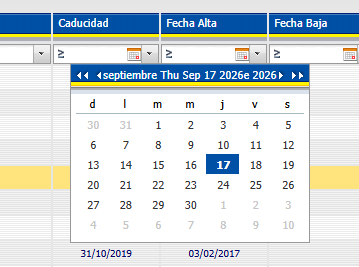
    how changes title format in C1Calendar Wijmo ?

    <td id="ContentPlaceHolder1_C1GridView1_c1gv_fltr_calendar_GroupTitle" class="GroupTitle" onclick="$find('ContentPlaceHolder1_C1GridView1_c1gv_fltr_calendar').onGroupTitleClicked(this, event)"> septiembre Fri Sep 18 2026e 2026 </td>

    any alternatives ?

  • Posted 21 September 2026, 6:23 am EST - Updated 21 September 2026, 6:28 am EST

    Hello Enrique,

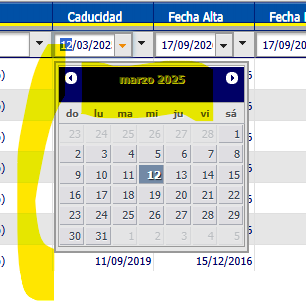
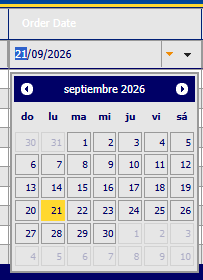
    Unfortunately, we couldn’t reproduce this. By default, the Calendar title is displayed in the “MMMM yyyy” format, as shown below:

    Could you please let us know if your setup differs in any way, such as a property or setting that changes the title format? We’ve also attached a sample for your reference, so please let us know if we’ve missed anything.

    Sample: GridView_Calendar.zip

    Regards,

    Uttkarsh.

  • Posted 21 September 2026, 7:59 am EST - Updated 21 September 2026, 8:04 am EST

    I’ll try find any setup different. Thanks.

    Another things:

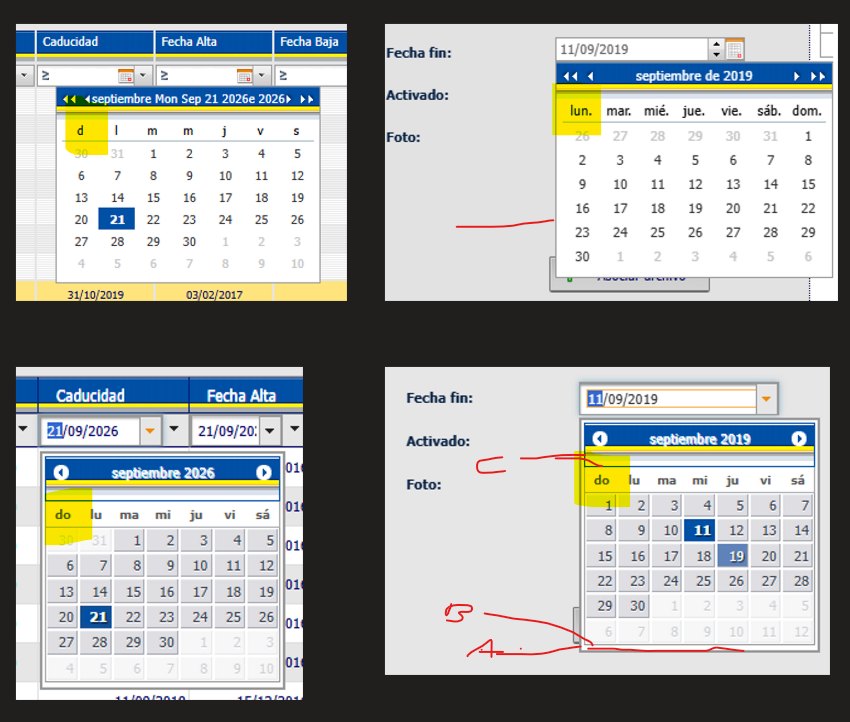
    Legacy, first day week is Lunes Lu (Monday).

    Migrated, first day week is Domingo Do (Sunday).

    and can be eliminated 2 borders (blue C and gray A). Only border B.

    thanks all!

  • Posted 21 September 2026, 10:26 am EST

    what is

        <script>
            Globalize.culture("es-ES").calendar.firstDay = 0; // 1 ??
        </script>
    

    C1InputDate applies dateformat ??

    what’s about

    TitleFormat=“dd ‘de’ MMMM ‘de’ yyyy”

    MonthViewTitleFormat=“MMMM ‘de’ yyyy”

    ??

    <cc4:C1InputDate ID="TextBoxDateAdd" runat="server" Width="155px"
        OnClientDateChanged="TextBoxDateAdd_OnClientDateChanged"
        Calendar="C1CalendarAdd"
        DateFormat=""
        Culture="es-ES"  />
    <cc3:C1Calendar ID="C1CalendarAdd" runat="server" Style="font-size: xx-small"
        Height="180px" Width="230px"
        PopupMode="True"
        WeekDayFormat="Abbreviated"
        AllowPreview="false"
        ShowWeekNumbers="false"
        Culture="es-ES"
        TitleFormat="dd 'de' MMMM 'de' yyyy"
        MonthViewTitleFormat="MMMM 'de' yyyy">
    </cc3:C1Calendar>
    
  • Posted 22 September 2026, 2:09 am EST

    Hello Enrique,

    → can be eliminated 2 borders (blue C and gray A). Only border B.

    We’re sorry but we do not have these borders at our end. Please refer to the image we attached earlier.

    For us to investigate it and share a solution, please share your implementation but modifying our sample. Then only we’ll be able to investigate the behavior properly.

    → Legacy, first day week is Lunes Lu (Monday).

    → Migrated, first day week is Domingo Do (Sunday).

    To display Sunday as the first day of the week, we used the following JS script:

    Globalize.culture("es-ES").calendar.firstDay = 0;  // '0' means Sunday
    

    You can remove it to display Monday (default value) as the first day of the week.

    → C1InputDate applies dateformat ??

    C1InputDate’s ‘Pickers-Calendar-TitleFormat’ property sets Title format of the dropdown Calendar

    Sample: GridView_Calendar_Input.zip

    Regards,

    Uttkarsh.

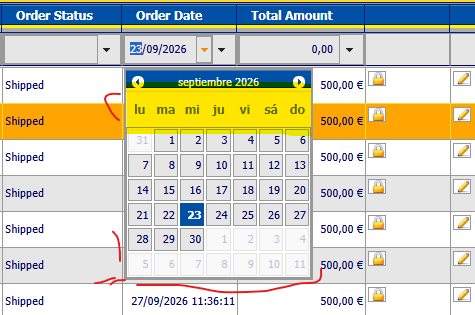
  • Posted 23 September 2026, 11:03 am EST - Updated 23 September 2026, 11:08 am EST

    I try reproduce for calendar:

    I have AppTheme ContentStyle.css, a jquer-ui.css, css overrides, flaticons…

    I want reduce height for header (days) — I mark background yellow

    Maybe the border gray (or similar) with minor px , little

    I attached csproj base in your sampleGridView_Pagination.zip

  • Posted 24 September 2026, 2:05 am EST

    Hello Enrique,

    → I want reduce height for header (days) — I mark background yellow

    You can use the following CSS to reduce the height of week row header:

    /*calendar week row height*/
    .wijmo-wijcalendar-table thead th.ui-datepicker-week-day {
        height: auto;
        padding: 2px 0;
        line-height: 14px;
    }
    
    .wijmo-wijcalendar-table thead th.ui-datepicker-week-day span {
        padding: 0;
        line-height: 14px;
    }
    

    → Maybe the border gray (or similar) with minor px , little

    The border comes from two of the following CSS rules:

    1. ContentStyle.css : line 1255
    tbody	
    {
    	font-family:Tahoma, Geneva, sans-serif; font-size:11px;
    	border:1px solid #999; /* <== this line renders border*/
    }
    
    1. jquery-ui.css : line 880
    .ui-widget-content {
    	border: 1px solid #999999; /*<== this line renders jquery default border*/
    	background: #e6e6e6;
    	color: #006;
    }
    

    To just reduce borders, comment line 1258 in ContentStyle.css.

    To completely remove borders, remove both of the above-mentioned border rules.

    Regards,

    Uttkarsh.

  • Posted 24 September 2026, 3:40 am EST

    Thanks !! great !!

    I apply rule more specify in overrides:

    /* Anula el border de "tbody" (ContentStyle.css:1255) SOLO dentro de la tabla del calendario Wijmo */
    .wijmo-wijcalendar-table tbody {
        border: none;
    }
    
    /* Anula el border de ".ui-widget-content" (jquery-ui.css:880) SOLO en el contenedor del calendario Wijmo */
    .wijmo-wijcalendar.ui-widget-content {
        border: none;
    }
Need extra support?

Upgrade your support plan and get personal unlimited phone support with our customer engagement team

Learn More

Forum Channels