Posted 19 August 2026, 4:43 am EST - Updated 19 August 2026, 5:36 am EST
function ensureSpreadJsChromeStyleTag(): void {
if (document.getElementById(SPREADJS_CHROME_STYLE_TAG_ID)) return;
const styleTag = document.createElement(‘style’);
styleTag.id = SPREADJS_CHROME_STYLE_TAG_ID;
styleTag.textContent = `
.gc-tabStripBackground {
background-color: var(–gc-tabstrip-bg) !important;
background-image: none !important;
}
.gc-tabStripResizeBarInner {
color: var(–gc-tabstrip-resize) !important;
}
.gc-tabStripNewTab-normal,
.gc-tabStripNewTab-hover,
.gc-tabStripNewTab-highlight {
border-color: var(–gc-tabstrip-newtab-icon) !important;
background-color: var(–gc-tabstrip-newtab-bg) !important;
background-image: none !important;
}
/* Sheet tab states */
.gc-tab-normal {
  background-color: var(--gc-tab-bg) !important;
  background-image: none !important;
  color: var(--gc-tab-fg) !important;
  border-bottom: 2px solid transparent !important;
}
.gc-tab-hover {
  background-color: var(--gc-tab-hover-bg) !important;
  background-image: none !important;
  color: var(--gc-tab-hover-fg) !important;
  border-bottom: 2px solid transparent !important;
}
.gc-tab-selected,
.gc-tab-activeNotSelected {
  background-color: var(--gc-tab-active-bg) !important;
  background-image: none !important;
  color: var(--gc-tab-active-fg) !important;
  border-bottom: 2px solid transparent !important;
}
.gc-tab-active {
  background-color: var(--gc-tab-active-bg) !important;
   background-image: none !important;
   color: var(--gc-tab-active-fg) !important;
   border-bottom: 2px solid #5F2BFF !important;
   border-top: 2px solid #5F2BFF !important;
 }

.gc-corner-normal {
  background-color: var(--gc-corner-bg) !important;
}
.gc-corner-hover {
  background-color: var(--gc-corner-hover-bg) !important;
}
.gc-corner-selected {
  background-color: var(--gc-corner-selected-bg) !important;
}
.gc-corner-triangle-normal,
.gc-corner-triangle-hover,
.gc-corner-triangle-selected {
  color: var(--gc-corner-triangle) !important;
}

.gc-horizontal-scrollbar,
.gc-vertical-scrollbar {
  background-color: var(--gc-scrollbar-bg) !important;
}

.gc-footer-corner {
  background-color: var(--gc-scrollbar-corner-bg) !important;
}
`;
document.head.appendChild(styleTag);
}
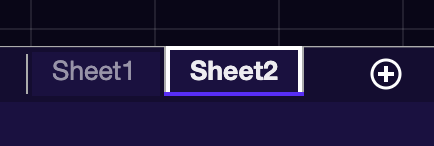
can we remove border-bottom and add border-top ? i’M USING THIS but border-top not getting applied.
Below is the expected result, i’m looking to get.