Any efficient way to change all icons of Pivot table?

Posted by: averma on 16 September 2026, 3:21 am EST

  • Posted 16 September 2026, 3:21 am EST - Updated 16 September 2026, 3:27 am EST

    We are using SpreadJS version 18.2.3 with the following packages:

    {

    “@mescius/spread-calc-engine”: “18.2.3”,

    “@mescius/spread-common”: “18.2.3”,

    “@mescius/spread-sheets”: “18.2.3”,

    “@mescius/spread-sheets-calc-engine”: “18.2.3”,

    “@mescius/spread-sheets-charts”: “^18.2.3”,

    “@mescius/spread-sheets-core”: “18.2.3”,

    “@mescius/spread-sheets-io”: “^18.2.3”,

    “@mescius/spread-sheets-pdf”: “^18.2.3”,

    “@mescius/spread-sheets-pivot-addon”: “^18.2.3”,

    “@mescius/spread-sheets-print”: “18.2.3”,

    “@mescius/spread-sheets-react”: “18.2.3”,

    “@mescius/spread-sheets-shapes”: “^18.2.3”,

    “@mescius/spread-sheets-statusbar”: “^18.2.3”

    }

    Question / Requirement

    We are currently using the Pivot Table functionality in SpreadJS and need to customize the icons displayed throughout the Pivot Table UI.

    Is there an efficient/supported way to change all Pivot Table icons globally rather than overriding each individual icon separately?

    For example, we would like to customize the icons used for:

    Expand / collapse

    Filter

    Sort

    Field buttons

    Row/column hierarchy indicators

    Other Pivot Table-specific icons

    Ideally, we are looking for a global configuration, theme, CSS/SVG override, or API that allows us to replace the Pivot Table icons in one place.

    Expected

    Something similar to a global icon configuration would be preferred, for example:

    // Example only

    pivotTable.setIcons({

    expand: customExpandIcon,

    collapse: customCollapseIcon,

    filter: customFilterIcon,

    sort: customSortIcon,

    });

    The above is only an example of the desired functionality; we would like to know the officially supported approach.

  • Posted 16 September 2026, 7:58 am EST - Updated 16 September 2026, 8:03 am EST

    Hi,

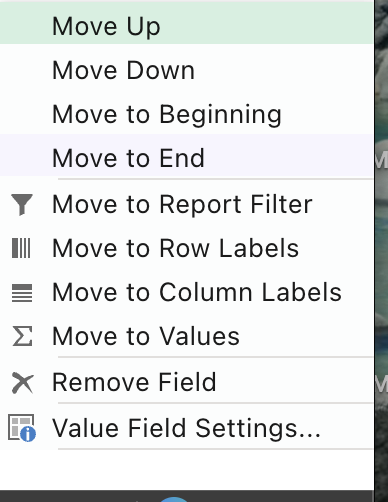
    As per our understanding, you wish to change the icons of the context menu items that appear on right-click inside the Pivot Table (Refresh, Sort, Filter, Expand/Collapse, Group/Ungroup, Value Field Settings, etc.).

    There is no single global setIcons() API for this, but since the context menu is regular HTML, you can inspect and change every item’s icon in one place through spread.contextMenu.menuData, once the workbook (and the pivot add-on, which contributes the pivot-specific items) has initialized.

    Step 1 — Inspect the current iconClass values

    After spread is initialized, log menuData to see the default class already assigned to each item:

    spread.contextMenu.menuData.forEach(function (item) {

    console.log(item.name, item.iconClass);

    });

    For example, the built-in “New Threaded Comment” item carries iconClass ‘gc-spread-insertThreadedComment’. The pivot-specific items (filter, sort, expand/collapse, group/ungroup, etc.) will each have their own default class in the same way — use this log to get the exact names for your build.

    Step 2 — Choose how you want to override them

    Option A: Keep the built-in class names and simply override them in your own CSS with your custom icon. No JavaScript changes needed beyond your stylesheet:

    .gc-spread-insertThreadedComment {

    background-image: url(“data:image/svg+xml;base64,…”) !important;

    background-repeat: no-repeat;

    }

    Option B: If you’d rather use your own class naming convention (e.g. “xyz”), set the iconClass property directly on the menuData items after initialization, then define that class in your CSS:

    spread.contextMenu.menuData.forEach(function (item) {

    if (item.name === ‘insertThreadedComment’) {

    item.iconClass = ‘xyz’;

    }

    });

    .xyz {

    background-image: url(“data:image/svg+xml;base64,…”);

    background-repeat: no-repeat;

    }

    Step 3 — Handle nested items

    Some pivot menu options are nested under a submenu (e.g. Filter > Label Filters / Value Filters). Walk item.subMenu recursively so nested items get the same treatment:

    function walkAndSetIcon(items, map) {

    items.forEach(function (item) {

    if (map[item.name]) {

    item.iconClass = map[item.name];

    }

    if (item.subMenu) {

    walkAndSetIcon(item.subMenu, map);

    }

    });

    }

    walkAndSetIcon(spread.contextMenu.menuData, {

    insertThreadedComment: ‘xyz’,

    filter: ‘xyz-filter’,

    sort: ‘xyz-sort’

    // add the remaining pivot item names from Step 1 here

    });

    This keeps every icon assignment in a single map, so future changes are made in one place rather than item by item.

    A couple of things worth noting:

    Refer to the attached gif:

    Thanks & Regards,

    Priyam

Need extra support?

Upgrade your support plan and get personal unlimited phone support with our customer engagement team

Learn More

Forum Channels