
How to Disable Auto-Suggestion in ColumnValueConverter Column

Posted by: anh.dt2 on 12 March 2026, 9:47 pm EST

  • Posted 12 March 2026, 9:47 pm EST - Updated 12 March 2026, 9:52 pm EST

    Hello Support Team,

    I am currently using ColumnValueConverter in a column, but I am experiencing an issue with auto-suggestion.

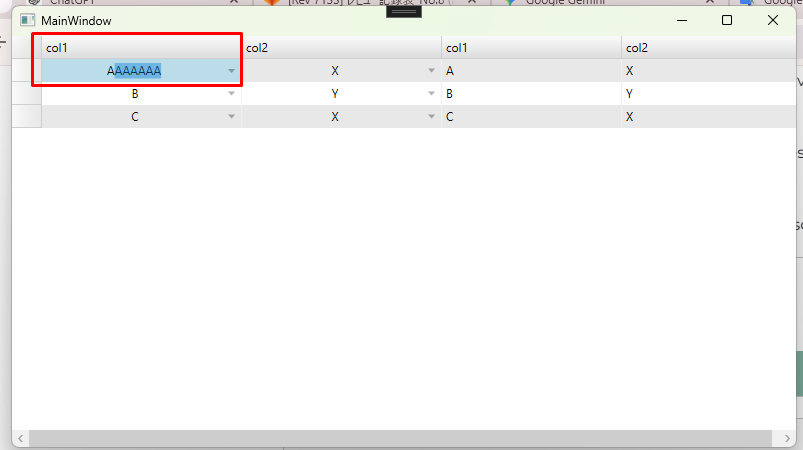
    For example, when I type “A”, the column automatically suggests “AAAAAAA”. I would like to disable this suggestion behavior so that the column only accepts the value I type without showing or applying automatic suggestions.

    Could you please guide me on how to turn off the auto-suggestion feature for a column that uses ColumnValueConverter?

    Thank you for your support.sampleWPF.zip
  • Posted 13 March 2026, 3:18 am EST

    Hi,

    Thank you for sharing the sample project. We investigated the scenario but could not find a direct way to disable this AutoComplete feature. We are getting in touch with the development team to see if they can suggest a possible solution. We will keep you updated as soon as we receive any further information from them.

    [Internal Tracking ID: C1XAML-39325]

    Best Regards,

    Kartik

Need extra support?

Upgrade your support plan and get personal unlimited phone support with our customer engagement team

Learn More

Forum Channels
