
FlexReport RTF fields have low quality when exported to PDF

Posted by: c.gutschmidt on 17 February 2026, 12:26 pm EST

    • Post Options:
    • Link

    Posted 17 February 2026, 12:26 pm EST - Updated 17 February 2026, 12:31 pm EST

    We have a .NET Framework Project using FlexReport version 4.8.20251.721.

    On our FlexReport there are multiple fields containing RTF text.

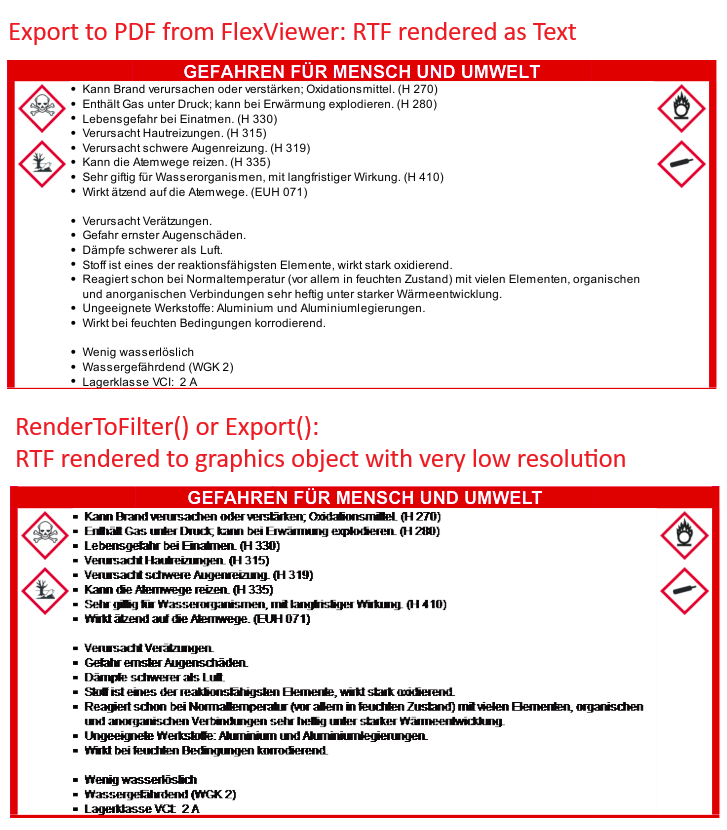
    When the Report is displayed in FlexViewer everything looks OK. When we use the Export function from within the FlexViewer, the resulting PDF is OK, too.

    When we directly export from code to a PDF (using functions report.RenderToFilter() or report.Export()) the RTF fields aren’t rendered properly. They aren’t rendered as text but are rendered as a low resolution graphics object (bitmap probably) to the PDF. All the plain-text fields look OK. Only RTF fields are affected.

    How can I achieve the same output using code as I can pressing the button in FlexViewer?

    The goal is to automatically output multiple documents to predefined paths.

    I wouldn’t even mind opening the FlexViewer, if that can be automated, but flexviewer.Export() has no parameters.

  • Posted 19 February 2026, 2:44 am EST

    Hello,

    Apologies for delayed response.

    We were able to reproduce the behavior you described on our end. When using the PdfFilter object to export a report via code, the RTF content is not rendered as expected.

    To achieve the same high-quality output, we recommend using the C1PdfFilter instead of the older PdfFilter. The C1PdfFilter is designed to handle complex content like RTF more effectively, ensuring it remains as vector-based text in the resulting PDF.

    Here is the sample code implementation to achieve this:

    C1PdfFilter filter = new C1PdfFilter();
    filter.ShowOptions = false;
    filter.FileName = "TestPDF.pdf";
    report.RenderToFilter(filter);
    Process.Start("testPDF.pdf");

    We have also attached a sample project RTFfield721.zip for your reference. Please have a look at it, and if you face any issues, feel free to ask.

    Regards,

    Uttkarsh.

  • Posted 19 February 2026, 11:29 am EST

    Hi Uttkarhs,

    that helped! Thank you very much. You might mark this answered!

    Best regards,

    Johannes

Need extra support?

Upgrade your support plan and get personal unlimited phone support with our customer engagement team

Learn More

Forum Channels