Posted 26 August 2026, 4:56 am EST - Updated 26 August 2026, 5:02 am EST
Hi,
Do I need to manual dispose Font if I set CellStyle.Font = new Font(…) for a C1FlexGrid?
Forums Home / ComponentOne / WinForms Edition
Posted by: pocketme on 26 August 2026, 4:56 am EST

pocketme
Posted 26 August 2026, 4:56 am EST - Updated 26 August 2026, 5:02 am EST
Hi,
Do I need to manual dispose Font if I set CellStyle.Font = new Font(…) for a C1FlexGrid?

vivek.singh

Posted 27 August 2026, 5:25 am EST
Hello Ngo,
Yes, you do need to dispose of custom font objects to prevent GDI+ memory leaks. It is recommended to dispose of the Font once it is no longer needed by the grid or application.
Please let us know if you have any other questions or concerns.
Best regards,
Vivek Singh

dung.itcdt
Posted 3 September 2026, 11:03 pm EST - Updated 3 September 2026, 11:10 pm EST
vivek.singh
Posted 4 September 2026, 1:20 am EST
Hello Le,
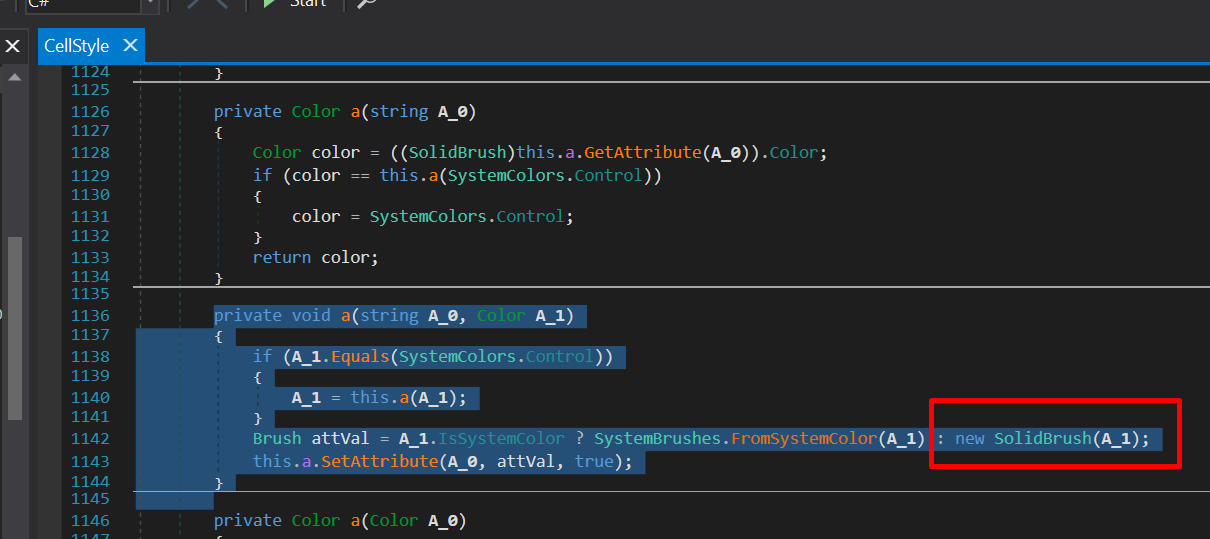
Thank you for providing the screenshot.
To answer your question, you do not need to manually dispose of internal objects created and used within the control’s architecture. C1FlexGrid and its internal renderers are designed to manage drawing resources automatically and clean them up internally.
However, if you manually create your own objects, such as custom Font, SolidBrush, or similar GDI+ instances, you will need to dispose of those manually in your own code. For the grid itself, its architecture handles internal resources safely. So, you do not need to be concerned about the internal resources.
Please let us know if you have any other questions.
Best regards,
Vivek Singh