Posted 16 June 2026, 2:25 am EST
Hello,
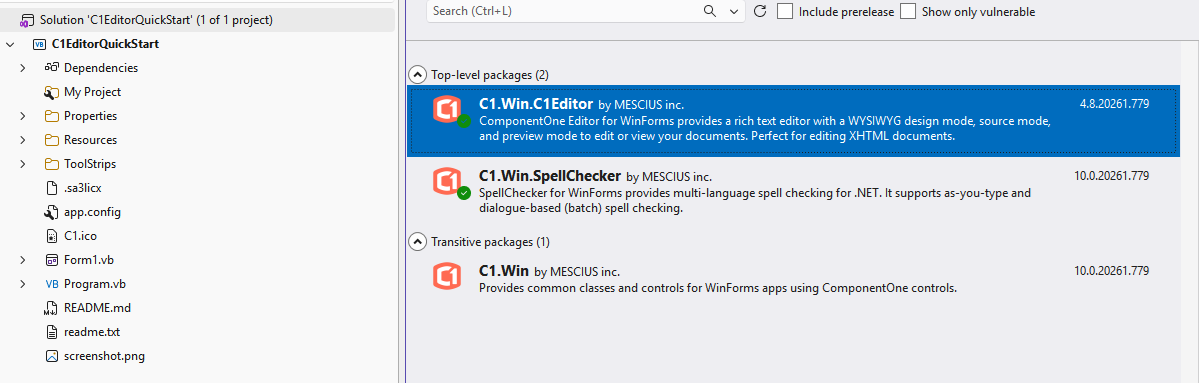
To clear up the confusion regarding the package versions, here is the explanation of the two different versions you are seeing in NuGet:
Introduction of Multi-Target Packages: Starting from our 2025v2(740) release, we transitioned to multi-targeted packages. This means that a single NuGet package now serves multiple target environments (both .NET and .NET Framework). When you add this package to your project, it will automatically detect your project’s target framework and use the relevant DLLs. These packages are named with C1.Win.* naming format.
Note: Due to this transition, we have also updated our DLL names and namespaces. For example, earlier the DLL name for the C1FlexGrid control was C1.Win.C1FlexGrid.x.x.dll, and the namespace was C1.Win.C1FlexGrid. After the update, they have changed to C1.Win.FlexGrid.x.x.dll and C1.Win.FlexGrid, respectively. Therefore, if your existing code still uses the older names, you will need to update them. You can do this easily using Visual Studio’s Find and Replace feature.
Legacy Packages are no longer updated: The packages using the C1.Win.C1* naming format are our older, framework-specific packages. Most of these have been discontinued, and the new versions will only be released in our multi-targeted packages like C1.Win.*
For your WinForms 2026v1 upgrade, please use the latest multi-targeted packages. They will fully support your .NET Framework 4.8 application while ensuring you get the latest updates.
If you have any confusion, you can let us know the C1 controls you currently use in your project, and we will let you know the relevant NuGet packages you need to install.
Regards,
Uttkarsh.