Compile issues

Posted by: eswar.darsi on 28 April 2026, 1:34 pm EST

  • Posted 28 April 2026, 1:34 pm EST

    We are trying to upgrade C1 to 4.8.20252.761 from 4.8.20251.721

    Applied renewed license key. When we build our solutions, we see these errors.

    Are there any changes in compile process again?

    Why do we get these errors while building. Sample licx file attached.

    Properties\licenses.licx(1): error LC0003: Unable to resolve type ‘C1.Win.FlexGrid.C1FlexGrid, C1.Win.FlexGrid.4.8’

    Properties\licenses.licx(4): error LC0003: Unable to resolve type ‘C1.Win.SuperTooltip.C1SuperLabel, C1.Win.SuperTooltip.4.8’

  • Posted 29 April 2026, 2:41 am EST

    Hello,

    Just for your information, starting with the 2025v2(740) release, we have introduced multi-target packages that work across both .NET Framework 4.8 and modern .NET projects. Because of this, we have updated the DLL names and namespaces of our controls. For example, in the .NET Framework, the DLL name and namespace for C1FlexGrid was C1.Win.C1FlexGrid, but in the latest releases, it has been simplified to C1.Win.FlexGrid. To upgrade, you will need to update your project references, your licx file, and any corresponding namespace imports in your code.

    We have also changed the licensing model to the new model (SA3Client). For more information, refer https://developer.mescius.com/forums/c1-studio/c1-2025-v2-1-maintenance-release-with-licensing-changes. So, To use the latest versions(v755 or later), you need to activate your serial key using sa3client.

    Assuming that you have activated the license key using sa3client and upgraded references, we looked into the error message you mentioned. It looks like the errors are being caused by a mismatch between the DLLs you have referenced in your project and the entries in your licenses.licx file.

    Please ensure the DLLs referenced in your project match the entries in your licenses.licx file. You should replace the old DLLs with the latest version (4.8.20252.761) and update the licx file to reflect these changes.

    If the issue still persists after checking that, please share your licx file with us along with the DLLs referenced in your project so we can take a closer look.

    Regards,

    Uttkarsh.

  • Posted 29 April 2026, 9:04 am EST - Updated 29 April 2026, 9:13 am EST

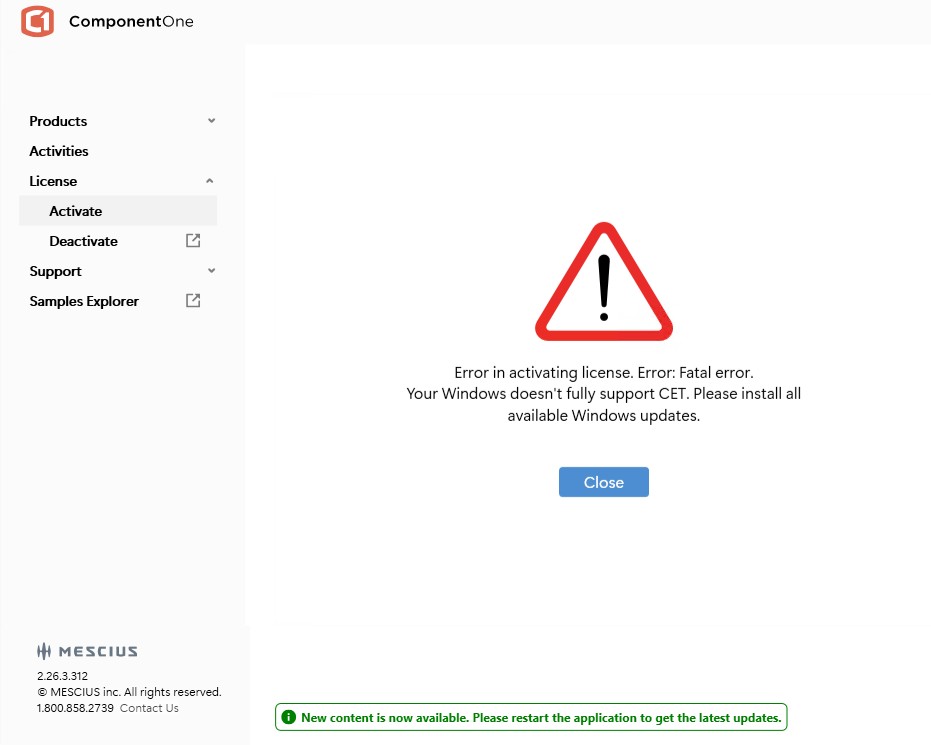
    Getting this error on build server when I tried to apply enterprise license we received recently. Build server OS is Windows Server 2022 Standard. Version 10.0.20348 Build 0348

    Why should I update OS? It looks crazy for applying renewed license I need to do all these?

  • Posted 30 April 2026, 6:31 am EST

    Hello,

    We looked into Control-flow Enforcement Technology (CET) and found that it is a hardware-based security feature in Windows designed to mitigate return-oriented programming (ROP) attacks. For more details, refer to: https://learn.microsoft.com/en-us/cpp/build/reference/cetcompat?view=msvc-170#:~:text=CET%20Shadow%20Stack.-,Remarks,applicable%20to%20the%20x64%20architecture.

    Based on our analysis, the error seems to be related to your system’s security configuration rather than the installer itself. We also haven’t received similar reports from other customers.

    As an alternative, you can try activating the license via the command line using the following steps:

    Run:

    sa3client activate "license-key-here" --force --legacy

    If the command is not recognized, first install the tool using:

    dotnet tool install -g sa3client

    Then rerun the activation command.

    Regards,

    Uttkarsh

Need extra support?

Upgrade your support plan and get personal unlimited phone support with our customer engagement team

Learn More

Forum Channels