Posted 1 October 2026, 6:37 am EST
Hi Hai,
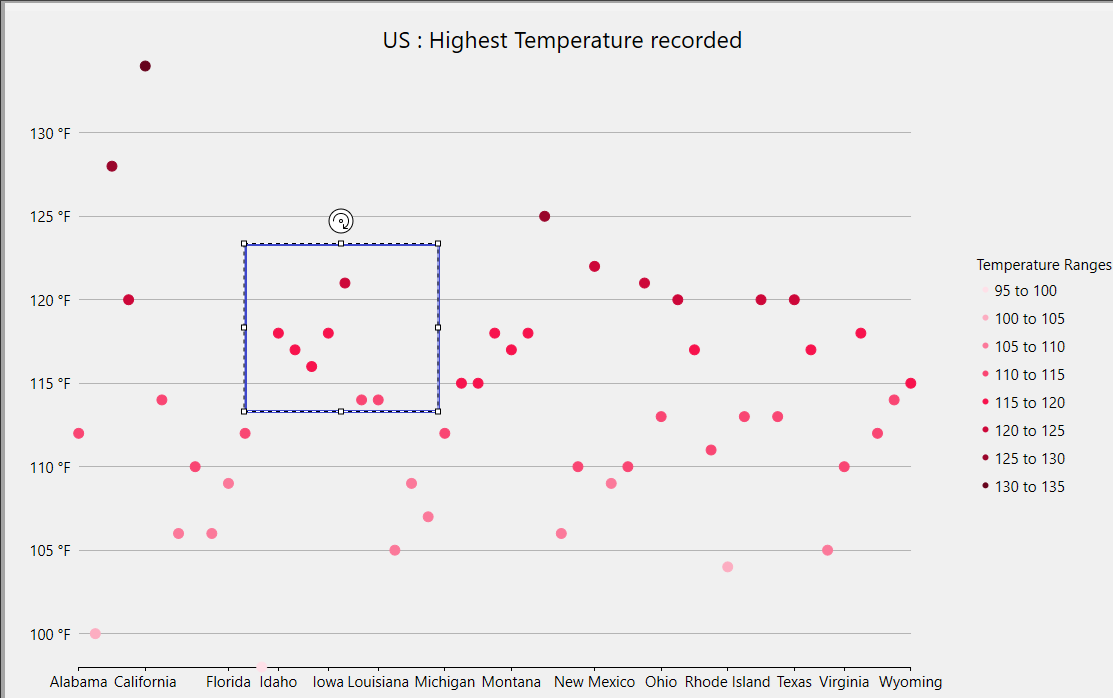
Yes, this is possible with FlexChart. I have attached a sample (FlexChart_Sample.zip) that does exactly what you describe: the user drags a rectangle on the plot, and all points inside it change to a selected color.
The approach has four parts:
- Handle MouseDown, MouseMove and MouseUp on the chart to track the start and end pixel positions of the rectangle. Clamp the end point to chart.PlotRect so the rectangle stays inside the plot area.
- Draw the dashed rectangle in the Rendered event using e.Engine.DrawRect, and call chart.Refresh() from MouseMove so it follows the mouse.
- On MouseUp, convert both corners to data coordinates with chart.PointToData(), then loop over the series values (series.GetValues(0) for Y, series.GetValues(1) for X) and store the indices of the points that fall inside the rectangle.
- Handle the series SymbolRendering event and call e.Engine.SetFill(…) with the selected color when e.Index is in the stored set. Refresh the chart after MouseUp to repaint.
After MouseUp, the stored indices (SelectedIndices in the sample) hold the selected points, so you can use them to update a grid, enable a button, or anything else you need.
A note on the X axis: in our sample X is bound to a string field, so it is a category axis and the point index is used as the X value. If your X values are numeric or dates, GetValues(1) returns them (dates as OADate doubles) and the same comparison works.
Please let us know if it helps.
Regards,
Uttkarsh