
Posted 31 December 2025, 3:43 am EST - Updated 31 December 2025, 3:48 am EST
See attached sample:
C1DockingTabTest.zip
Start it, make the form quite large (in my screenshot, it has a height of 920 pixel), then switch the C1DockingTab to “Auto hiding”.
Now, all tab page captions have the same height, which looks quite strange, as we have short texts where additional space is added, and long captions are clipped with “…”.
If the tab is not auto hiding, there is a “previous / next” control. I would expect it to also appear in auto hiding tabs with “TabSizeMode = Default”.
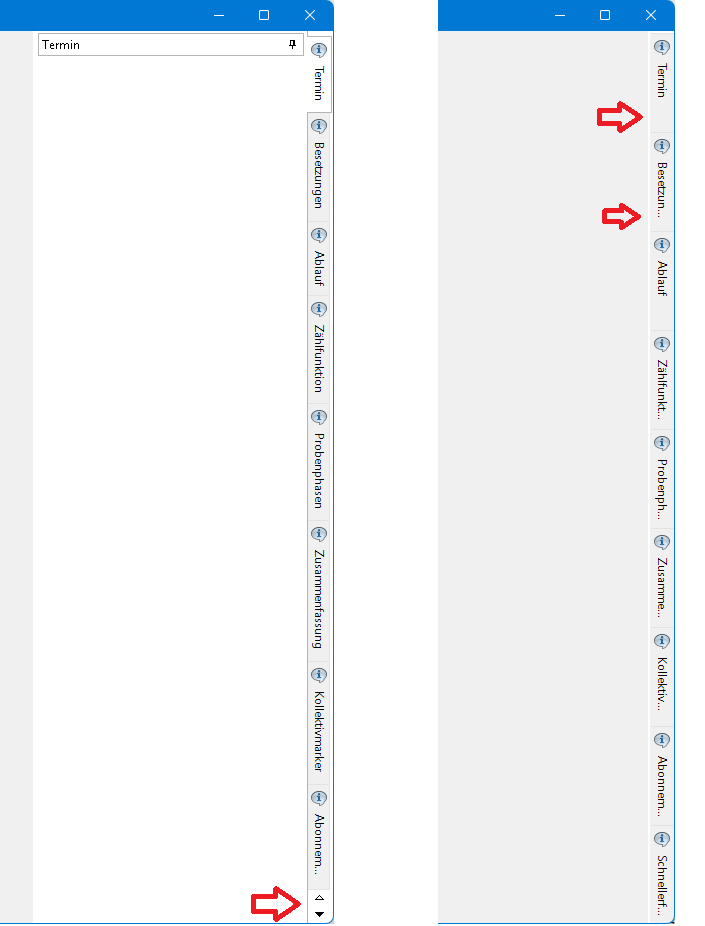
What to do you think? Do you consider it reasonable to add the “previous / next” controls?
This is a quite old issue (at least since 8.0.20233.631), but I noticed it when upgrading to .740 and suddenly realized that our C1DockingTab looks quite strange ;-). Don’t know why I never saw it before.
Best regards
Wolfgang