
Wijmo chart axis lines rendering weird on Chrome

Posted by: sloshy on 14 September 2017, 12:13 pm EST

  • Posted 14 September 2017, 12:13 pm EST

    Wijmo,

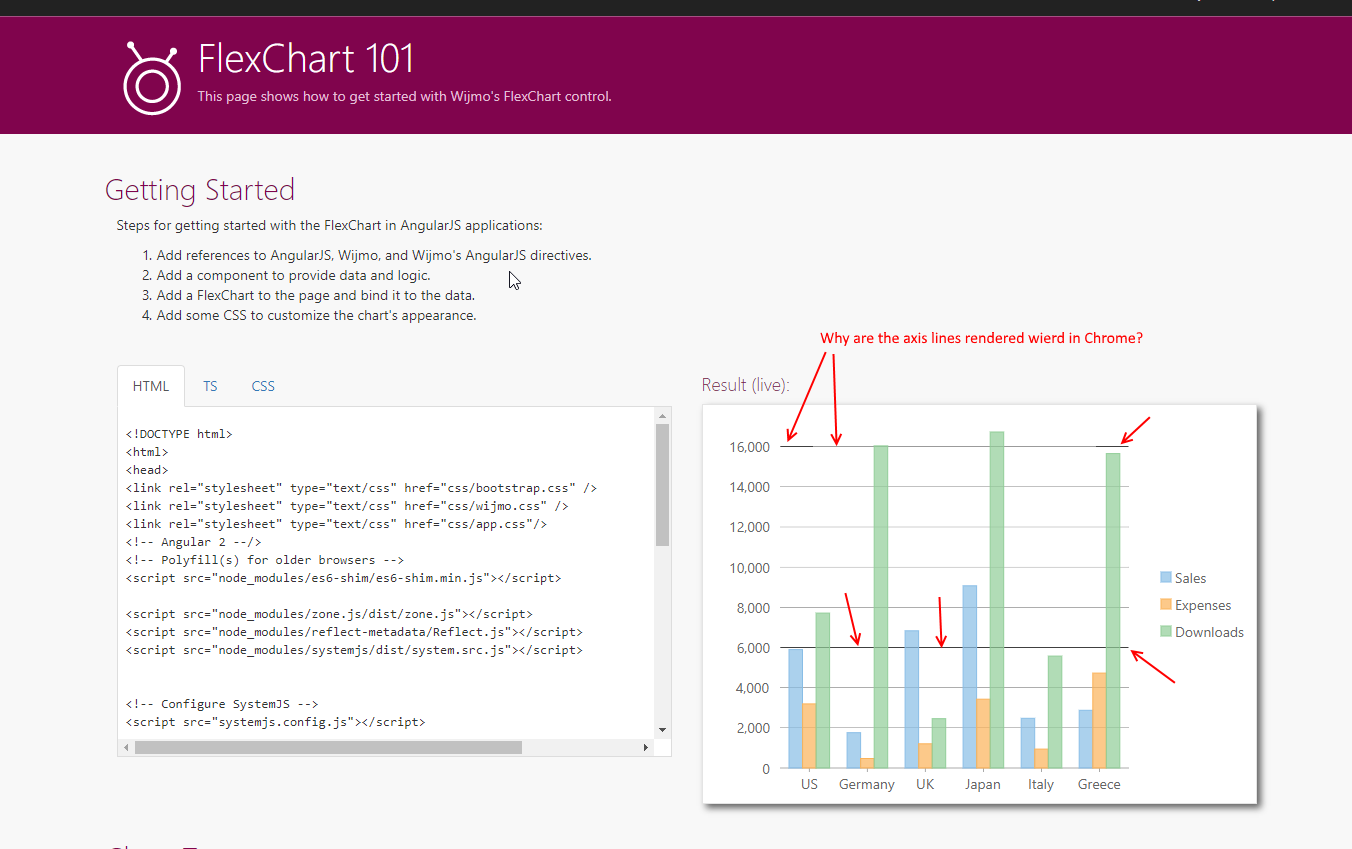
    Look at the attached picture. This is from your website.

    Why does the axis lines render weird on Chrome? I’m on 60.0.3112.90 of Chrome.

    I suspect this could be a Chrome issue, as this use to not be this way. Can you verify?

    Has this been reported to the google chrome team if its their issue?

    Thanks!
  • Posted 14 September 2017, 12:13 pm EST

    Hi,

    We are sorry, we are unable to replicate the issue at our end with updated chrome version 60.0.3112.113 (Official Build) (64-bit) and latest Wijmo build 5.20172.334. For your reference, please refer to the attached screenshot.

    Thanks,

    Manish Kumar Gupta

  • Posted 14 September 2017, 12:13 pm EST

    I’m still getting the issue on the latest version of Chrome on your website.

    hrmm…

    ?

  • Posted 14 September 2017, 12:13 pm EST

    Hi,

    We are able to replicate the issue at our end in Safati & Chrome with macOS Sierra v10.12.6. Please refer to the attached screenshot and confirm the issue.

    Thanks,

    Manish Kumar Gupta

  • Posted 14 September 2017, 12:13 pm EST

    Confirmed. Its what i’m seeing.

  • Posted 14 September 2017, 12:13 pm EST

    Hi,

    Thank you for confirming the issue.

    This issue has been reported to the concerned team for further investigation with tracking id 281335. We will let you know as we get any information on this.

    Thanks,

    Manish Kumar Gupta

  • Posted 8 January 2018, 9:12 am EST

    HI,

    We are sorry for the late reply.

    This issue has been verified with build 5.20173.380(Latest).

    ~Manish

Need extra support?

Upgrade your support plan and get personal unlimited phone support with our customer engagement team

Learn More

Forum Channels