Issue in Sizing of the column width in flex grid based on header text

Posted by: monicaladda on 14 September 2017, 12:08 pm EST

  • Posted 14 September 2017, 12:08 pm EST

    Hi,

    I am facing the issue of sizing the column width based on header text in the flex grid.

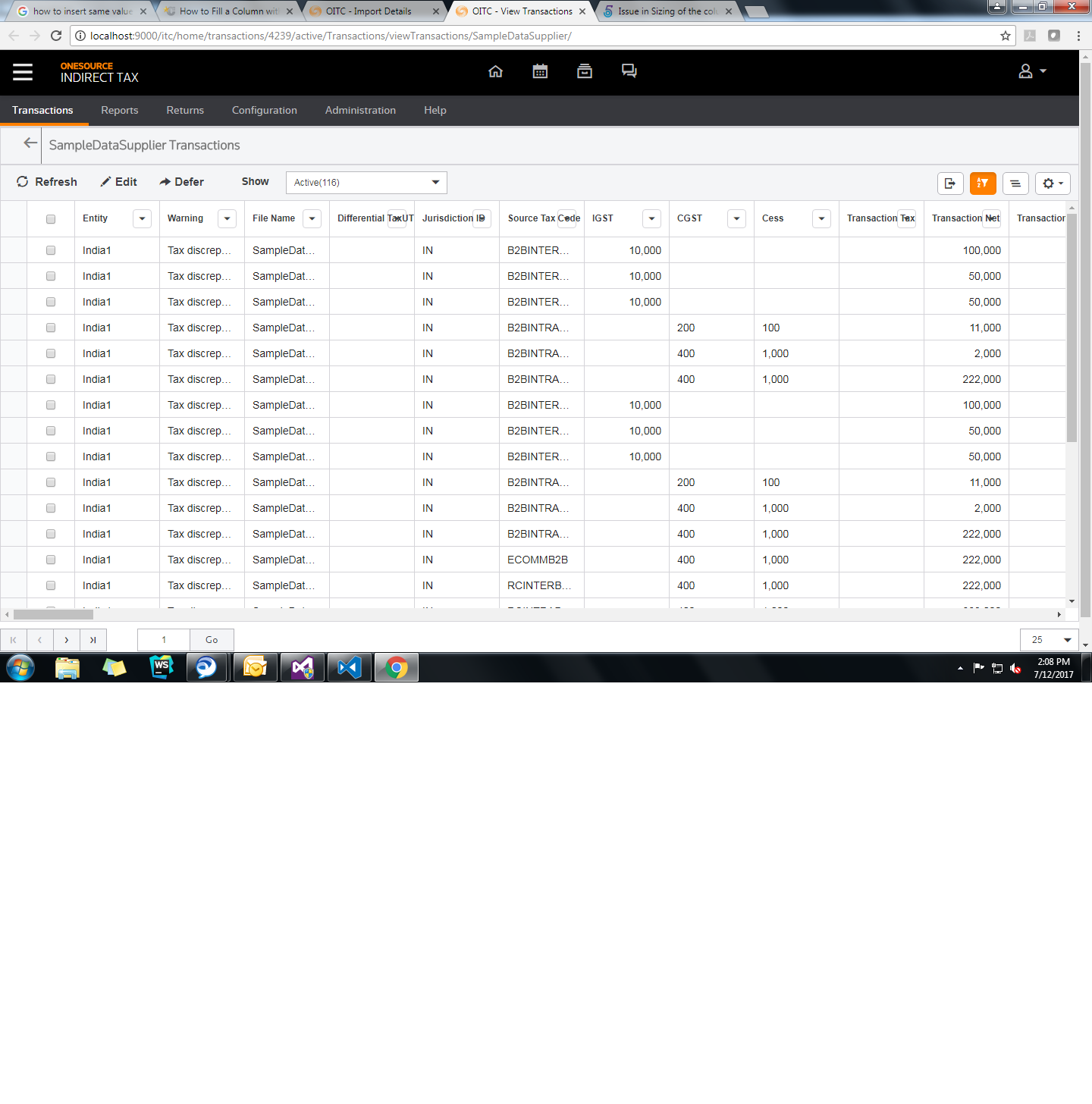
    Actually, autoSizeColumn is used to calculate and size the column based on the content in that column. but, in my scenario flexgrid is coming as like below:

    In this grid there is no content in most of columns, due to this columns header text is not displaying properly, getting override by filter icon. This happened due to incorrect column width.

    I need to calculate the width of column based on column content or column header text.

    How to calculate it, Please guide on urgent basis.

  • Posted 14 September 2017, 12:09 pm EST

    Hi…

    It would be appreciable if any one could reply as i need it on urgent basis

    Thanks in advance.

  • Posted 14 September 2017, 12:09 pm EST

    Hi,

    Please pass true value for header argument in autoSizeColumn() method. Please refer to the following code snippet for the same.

    grid.autoSizeColumn(0,true);

    Thanks,

    Manish Kumar Gupta

  • Posted 14 September 2017, 12:09 pm EST

    Thanks manish.

    I tried with the code snippet but couldn’t achieve it.

    The width should be either the header text or the content which ever is more.

    please find the attachment.

    And, any more updates would be appreciable.

  • Posted 14 September 2017, 12:09 pm EST

    Hi,

    We are investigating on this.

    Thanks,

    Manish Kumar Gupta

  • Posted 14 September 2017, 12:09 pm EST

    Hi,

    I am sorry for the inconvenience caused due to confusion between the autoSizeRow and the autoSizeColumn method’s header argument. let me clarify here:

    If autoSizeRow’s header argument is true, it resizes header row height based on content if wordWrap and width property is set.

    While if autoSizeColumn’s header argument is set to true, it resizes header’s column present in FlexGrid(e.g. Row header).

    Hence, here you need not pass header argument to false because header default value is false.

    Please refer to the attached sample that implements the same.

    Thanks,

    Manish Kumar Gupta

    2017/07/FlexGrid_autoSizeColumn_resize.zip

  • Posted 14 September 2017, 12:09 pm EST

    Thanks manish…

    Yes true but this works for only few number of columns which are in view port but if there are some 50 to 60 columns then the logic is not working correctly. and upon refresh the columns are getting aligned correctly(What could be the issue?).

    regards,

    Monica

  • Posted 14 September 2017, 12:09 pm EST

    hi…

    Waiting for an update on this as i need it on urgent basis.

    Thanks,

    Monica

  • Posted 14 September 2017, 12:09 pm EST

    Hi Monica,

    As per image provided by you, column header content filter icon with text. We are able to replicate the issue at our end and it looks like a bug. Hence, this issue has been escalated to the concerned team for further investigation with tracking id 269285. We will let you know as soon as we get any update on this.

    As a workaround, you need to handle scrollPositionChanged event and call autoSizeColumns method.

    This should work!

    Thanks,

    Manish Kumar Gupta

  • Posted 14 September 2017, 12:09 pm EST

    Hi manish,

    I called that autoSizeColumns method in scrollPosition event and yes it is working but it is slowing down the application because the number of times i scroll, the method call gets invoked, process and then show.

    waiting for the fix…

    Anyways thanks for the approach.

    Regards,

    Monica

  • Posted 14 September 2017, 12:09 pm EST

    Hi…

    Any update on the issue would be appreciable.

    Thanks,

    Monica

  • Posted 14 September 2017, 12:09 pm EST

    Hi,

    We are sorry, this issue is still with the development team. We have requested for an update on this issue. We will let you know as soon as we get any update on this issue.

    Thanks,

    Manish Kumar Gupta

  • Posted 14 September 2017, 12:09 pm EST

    Hi,

    Any update on the issue.

  • Posted 14 September 2017, 12:09 pm EST

    Hi,

    We are sorry, this issue is still with the development team.

    Regards,

    Manish Kumar Gupta

  • Posted 14 September 2017, 12:09 pm EST

    hi

    Any update on the issue

  • Posted 14 September 2017, 12:09 pm EST

    Hi,

    We are sorry, this issue is still with the team under investigation.

    Regards,

    Manish Kumar Gupta

  • Posted 14 September 2017, 12:09 pm EST

    hi…

    Any update on the issue

  • Posted 14 September 2017, 12:09 pm EST

    Hi,

    We are sorry for the inconvenience.

    This issue has been found fixed in the latest build 5.20172.349. For your reference, please refer to the attached sample for the same.

    Thanks,

    Manish Kumar Gupta

    2017/09/FlexGrid_autoSizeColumn_header.zip

  • Posted 26 September 2017, 1:20 am EST

    Hi manish,

    Any update on the issue.

  • Posted 2 April 2018, 12:12 am EST

    Hi manish,

    any update on the issue

  • Posted 2 May 2018, 7:19 am EST

    Hi Team,

    I could see the issue gets fixed in the new build but currently we are not using the latest wijmo build we are using wijmo 5.20173.300.

    Can we have any other workaround to handle in the build version we are using.

    your help will be much more appreciable .

    Thanks and Regards,

    Monica Ladda

Need extra support?

Upgrade your support plan and get personal unlimited phone support with our customer engagement team

Learn More

Forum Channels