Posted 19 February 2026, 9:39 am EST - Updated 19 February 2026, 9:44 am EST
Hi Team,
We’re using Wijmo FlexGrid with Angular 17 (Wijmo 5.20242.21).
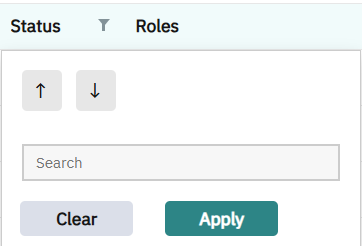
For the Status column, the data has only two possible values (e.g., boolean enabled: true/false or strings Enabled/Disabled). Instead of the default filter UI with a value list + search (see attached screenshot), we want the column filter popup to show two radio buttons:
( ) Enabled
( ) Disabled
When the user selects a radio option, the filter should update immediately (or on Apply, depending on feasibility). We also need a Clear action to remove the filter.
Recommended approach
What is the recommended way to replace the column filter editor for a specific column with a custom UI (two radio buttons) in Angular?
Is there a supported API using FlexGridFilter + custom FilterFactory / custom ColumnFilterEditor, or a way to provide a template for the filter popup of one column?
Implementation details we’re aiming for
Works whether the field is boolean (true/false) or string (‘Enabled’/‘Disabled’).
Selecting Enabled should apply (item) => item.enabled === true (or ‘Enabled’).
Selecting Disabled should apply (item) => item.enabled === false (or ‘Disabled’).
Clear resets the column filter.
The chosen option should reflect the current filter state when reopening the popup.
Keyboard/ARIA accessible (arrow keys/space to change, Esc to close).
APIs to use
Sample request
Could you share a StackBlitz (Angular 17, Wijmo 5.20242.21) showing:
A FlexGrid with a Status column (boolean or string).
wjFlexGridFilter enabled.
A custom filter UI for the Status column using two radio buttons inside the column filter popup (replacing the default checklist/search).
Programmatic wiring to ColumnFilter so that choosing a radio option updates the filter, and Clear removes it.
Rest of the columns use the default filter UI.
Environment
Wijmo: 5.20242.21
Angular: 17
Thanks!