
FlexGrid Filter editor highlight broken

Posted by: Alina.Gallahar on 7 January 2019, 6:23 pm EST

  • Posted 7 January 2019, 6:23 pm EST - Updated 3 October 2022, 8:14 pm EST

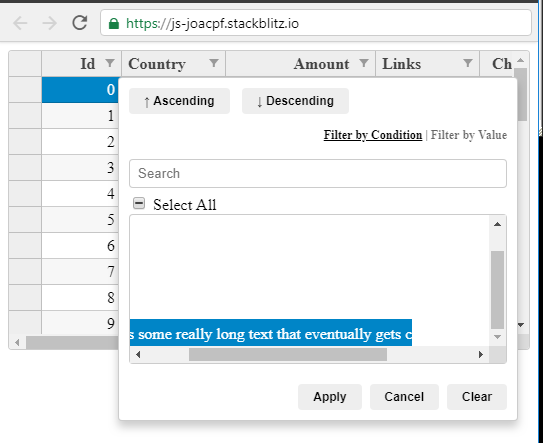
    We have come across an issue with the FlexGrid filter editor highlighting. When a filter text value is too long for the editor, the highlight does not extend beyond the scrollable area. So the option is given to scroll, but you cannot actually see the text because the highlight ends after the visible area.

    We have reproduced the issue with this example:

    https://stackblitz.com/edit/js-joacpf?file=index.js

    Steps to Reproduce:

    1. Click on the filter icon for the Country column

    2. In the filter editor that is displayed, scroll down to the bottom of the values to see “US plus some really long text that eventually gets cut off when you select it in the filter”

    3. Select this value so it is toggled and highlighted

    4. Scroll horizontally in order to view the rest of the value that is not currently visible

    Expected functionality: The highlight should extend to the entire row

    Actual functionality: The highlight stops after the visible portion is scrolled out of. See screenshot below.
    We were wondering if there was some sort of temporary solution to this that you could suggest, potentially using css?

    Thanks!

  • Posted 8 January 2019, 3:20 am EST

    Hi,

    Thanks for the reproduction sample and detailed explanation.

    We are able to replicate the issue at our end and have forwarded it to the concerned team for further investigation with internal tracking Id 360972.

    Till then you may opt for one of the following approaches:

    • Set the display for the filter item container to inline-grid(Not supported in IE, opera mini).

    Please refer to the following code snippet:

    .wj-columnfiltereditor .wj-listbox .wj-listbox-item{
      max-width: 2000px;
    }
    .wj-control.wj-valuefilter-editor .wj-listbox{
      display: inline-grid;
    }
    

    • Set white-space to normal for filter value item, however, it will wrap the extra content to next line.

    Please refer to the following code snippet:

    .wj-columnfiltereditor .wj-listbox .wj-listbox-item label{
       white-space: normal; 
    }
    

    You may also refer to the following sample:

    https://stackblitz.com/edit/js-hqukr2?file=style.css

    ~Sharad

  • Posted 14 January 2019, 3:39 pm EST

    Hey Sharad,

    Thanks for the update. Unfortunately neither of the workarounds will really work for us as we need to support IE and our text is too long for wrapping to be an effective solution. Please let me know if you hear any updates on whether this will be fixed in future releases.

    Thanks!

  • Posted 15 January 2019, 1:04 am EST

    Hi,

    Sorry for the inconvenience caused but the issue is still with the dev team. We will let you know as we get an update on this.

Need extra support?

Upgrade your support plan and get personal unlimited phone support with our customer engagement team

Learn More

Forum Channels