Excel Export: Need Checkbox Rendering (Including Group Headers) for Permissions

Posted by: nilesh_nichal on 5 May 2026, 3:32 am EST

  • Posted 5 May 2026, 3:32 am EST - Updated 5 May 2026, 3:37 am EST

    Hi Team,

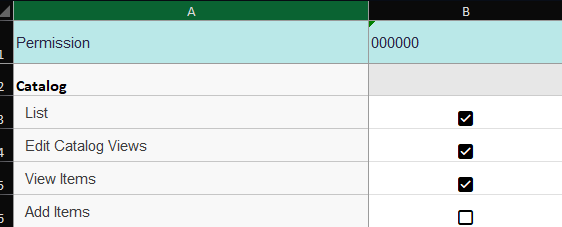
    We have a grid structured as shown in the image, and we want to export it to Excel. Below is the code we’re currently using for the export:

    public export() {

    wjcGridXlsx.FlexGridXlsxConverter.saveAsync(

    this.groupAccessGrid,

    {

    includeColumnHeaders: true,

    includeCellStyles: true,

    formatItem: this.exportFormatItem

    },

    “permissions”

    );

    }

    private exportFormatItem(args: wjcGridXlsx.XlsxFormatItemEventArgs) {

    const row = args.panel.rows[args.row];

    const col = args.panel.columns[args.col];

    const item = row.dataItem;

    if (row instanceof wjGrid.GroupRow || !item) {

    if (col.binding == ‘permission’ && item) {

    args.xlsxCell.textRuns[1].font.bold = true;

    args.xlsxCell.textRuns[1].font.size = 16;

    args.xlsxCell.textRuns[1].text = item.name;

    }

    return;

    }

    if (col.binding == ‘permission’) {

    args.xlsxCell.value = item.translatedPermission;

    }

    if (this.stateService.addedRolesOrAcg.includes(col.binding)) {

    const key =

    ${col.binding}|||${item.module}|||${item.permission}
    ;

    args.xlsxCell.value = item[key];

    args.xlsxCell.style = { hAlign: 2 };

    }

    }

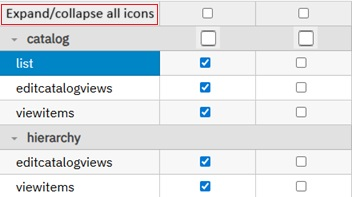
    The issue we’re facing is that we want checkboxes to appear in the exported Excel file, just like they are displayed in the grid—including in the grouped row headers.

    Please find the screenshot as below
  • Posted 5 May 2026, 6:09 am EST

    Hi Nilesh,

    Sorry, but this feature is not yet supported in Wijmo. We have created an enhancement request to add this feature in the future. The internal tracking ID for the same is - WJM-37658. We will update you when we have an update from the engineering team on the same.

    Regards

  • Posted 5 May 2026, 9:40 am EST - Updated 5 May 2026, 9:45 am EST

    Hi Team,

    Thanks for the update and for logging the enhancement request (WJM-37658).

    As a follow‑up: we understand that exporting real Excel checkbox controls (Form Control) might not be supported today. However, our requirement is primarily visual — we want the exported Excel cells to display a checkbox indicator, similar to what is shown in the attached screenshot (checked/unchecked box inside the cell), including for group row headers.

    Could you please confirm:

    Is there any supported workaround to render a checkbox-like output during export via formatItem, such as:

    exporting Unicode checkbox symbols (:ballot_box_with_check: / ☐ or :white_check_mark: / :white_large_square:), or

    exporting an image/icon inside the cell, or

    applying a cell style / number format that shows checkbox-like visuals?

    If Unicode symbols are recommended, is there any guidance on ensuring:

    correct alignment (center),

    consistent font rendering in Excel, and

    handling GroupRow headers as well?

    If none of the above are possible using FlexGridXlsxConverter, could you suggest an alternative approach (e.g., post-processing the generated workbook using Wijmo’s workbook APIs) to achieve the same visual checkbox result?

    We don’t need the checkbox to be editable/interactable in Excel — only the checkbox-like display is required.

  • Posted 6 May 2026, 1:51 am EST

    Hi Nilesh,

    You can use the export formatItem callback to output checkbox-like symbols such as :ballot_box_with_check:, ☐, and ▣ (mixed state). This should complete your requirements, as you only need a visual representation of checkboxes in the cells. Please refer to the following sample demonstrating the same - https://stackblitz.com/edit/vitejs-vite-2horoy7p

    Please note that checkboxes are not present in the group header rows in the above sample, which is the default behavior. We are assuming that you have some custom implementation on your end to display the checkboxes in the header rows. The above approach should work with your custom implementation; however, if you still face any issues, please share a sample with your current custom implementation so that we can have a better understanding of your project structure and assist you accordingly.

    Regards

  • Posted 6 May 2026, 2:23 am EST

    Hi Team,

    Thanks for sharing the sample and the recommendation to use Unicode checkbox symbols via the formatItem callback. The suggested approach works well for rendering checkbox‑like visuals in the normal data rows.

    You also mentioned:

    “We are assuming that you have some custom implementation on your end to display the checkboxes in the header rows.”

    Based on your guidance, you have already provided the solution for rendering checkbox visuals in the exported cells. Now, we would like to extend the same solution to display the checkbox in front of the Group Header rows as well.

    Currently, we do not have an existing custom implementation for checkboxes in the group header rows. Could you please help us with:

    The recommended approach to render a checkbox (visual only, using Unicode symbols or similar) in front of the GroupRow header text in the FlexGrid.

    How the same can be handled during Excel export, so that the checkbox also appears in the group header row cells using formatItem.

    Any sample or code snippet demonstrating how to detect and format GroupRow header cells to prepend the checkbox symbol before the header text.

    We only need a visual representation (non‑interactive), consistent with what is shown in the data rows.

    Looking forward to your guidance

  • Posted 6 May 2026, 7:13 am EST

    Hi Nilesh,

    The solution we shared in our last response should work as expected, as you are not using any custom implementation, as you mentioned. However, as per the screenshots you shared, we recommend using the hierarchical data in the grid to show checkboxes in group header rows as needed. You can refer to the following sample demonstrating the same - https://stackblitz.com/edit/angular-ivy-mlrmjoyy?file=src%2Fapp%2Fapp.component.ts

    In case, you face any issues, please let us know.

    Regards

  • Posted 7 May 2026, 2:06 am EST

    Thanks for the response and for sharing the sample.

    We went through the suggested hierarchical data approach. However, our use case is slightly different from the referenced StackBlitz example. We are currently using FlexGrid with grouped rows (CollectionView grouping) and not a hierarchical data source.

    Our original requirement was to show checkboxes in the GroupRow headers for grouped rows, similar to what is discussed and addressed in the forum thread below:

    https://developer.mescius.com/forums/wijmo/flexgrid-how-to-show-a-checkbox-in-grouprow-header-grouped-rows-in-angular

    In that solution, the checkbox is rendered by customizing the formatItem for GroupRow and handling the selection logic explicitly, which aligns more closely with our current grid setup and earlier discussion.

    Could you please confirm if this GroupRow + formatItem approach is still the recommended and supported solution for grouped (non-hierarchical) FlexGrid scenarios?

    If there are any updates or a more compatible/best-practice solution that works with grouped rows (without switching to hierarchical data), kindly let us know.

    This would help us align the implementation with the expected Wijmo approach while meeting the original requirement.

    Thanks for your support.

  • Posted 7 May 2026, 5:56 am EST

    Hi Nilesh,

    Yes, you can keep using that approach as well, if it is a better fit for your requirements. We have updated the Excel export sample accordingly. You can refer to the following updated sample - https://stackblitz.com/edit/angular-kx3zls1n?file=src%2Fapp%2Fapp.component.ts

    In case, you still face any issues, or if there is something we missed, please let us know.

    Regards

Need extra support?

Upgrade your support plan and get personal unlimited phone support with our customer engagement team

Learn More

Forum Channels