Posted 6 February 2026, 9:30 am EST - Updated 6 February 2026, 9:35 am EST
Hi Team,
I’m using Wijmo FlexGrid with Angular and my grid data is grouped (e.g., groups like catalog and hierarchy).
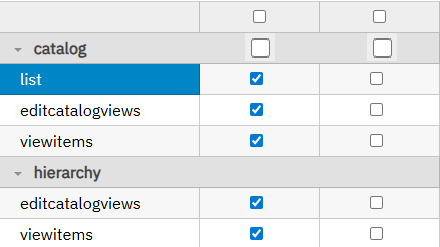
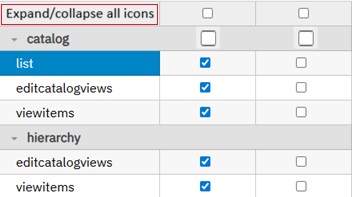
I want to display a checkbox in front of each group header row (the GroupRow) similar to the screenshot below, so the user can select/deselect all rows inside that group.
Expected behavior:
Show a checkbox near the group header text (e.g., “catalog”, “hierarchy”).
When the group checkbox is checked:
all child rows under that group should become checked/selected.
When unchecked:
uncheck/deselect all child rows.
(Optional) If some child rows are selected and others not, show indeterminate state on the group checkbox.
What I tried / current setup:
I already have row-level checkboxes using a boolean field (e.g., selected) in a normal grid cell.
But the group header row is not a normal data row, and I’m not sure what is the recommended way to render an interactive checkbox there.
Questions:
What is the best way to render a checkbox inside a GroupRow in FlexGrid (Angular)?
Should this be done using formatItem for group rows?
How can I correctly update child rows for that group when the checkbox is toggled?
Is there a built-in Wijmo approach for group selection / group checkboxes?
Environment details:
Wijmo version: 5.20242.21
Angular version: 17
Screenshot / UI example:
(Attach screenshot)
Please share the sample / StackBlitz.