Editable tree grid with nested boolean column

Posted by: abhijeet.dey on 11 February 2026, 6:03 am EST

    • Post Options:
    • Link

    Posted 11 February 2026, 6:03 am EST - Updated 11 February 2026, 8:07 am EST

    Hi

    I want to build an editable tree grid (more than 2 levels of nesting) which will have two columns. The first column would be read-only string column, and the second column would a boolean type checkbox column. My requirement is three things:

    1. There should be a checkbox in the column header cell which should check/uncheck all the rows

    2. When I select/unselect the checkbox of a parent row, all the nested child checkboxes should be selected/unselected

    3. When partial child checkboxes are selected, the parent checkbox should be in an intermediate state (dash icon). Same for the column header checkbox.

    Can you please provide a code sample for this

    https://developer.mescius.com/wijmo/demos/Grid/TreeGrid/EditableTreeGrid/angular

  • Posted 11 February 2026, 7:53 am EST

    Hi Abhijeet,

    You can use the BooleanChecker in the Treegrid for this functionality; it will automatically add the checkboxes in the column header and group rows. The checkboxes in the leaf nodes may need to be added manually, i.e., rows that don’t have any further children. You can use the formatItem event for that purpose. The checkbox selection state will be automatically handled by the grid when any checkbox state is changed. Please refer to the following sample for a better understanding - https://stackblitz.com/edit/angular-ivy-wwsm3hxd?file=src%2Fapp%2Fapp.component.ts

    In case you face any issues, please let us know.

    Regards

  • Posted 11 February 2026, 8:09 am EST

    Does this BooleanChecker also work if I programmatically change the boolean value in itemSource ?

  • Posted 11 February 2026, 8:36 am EST - Updated 11 February 2026, 8:41 am EST

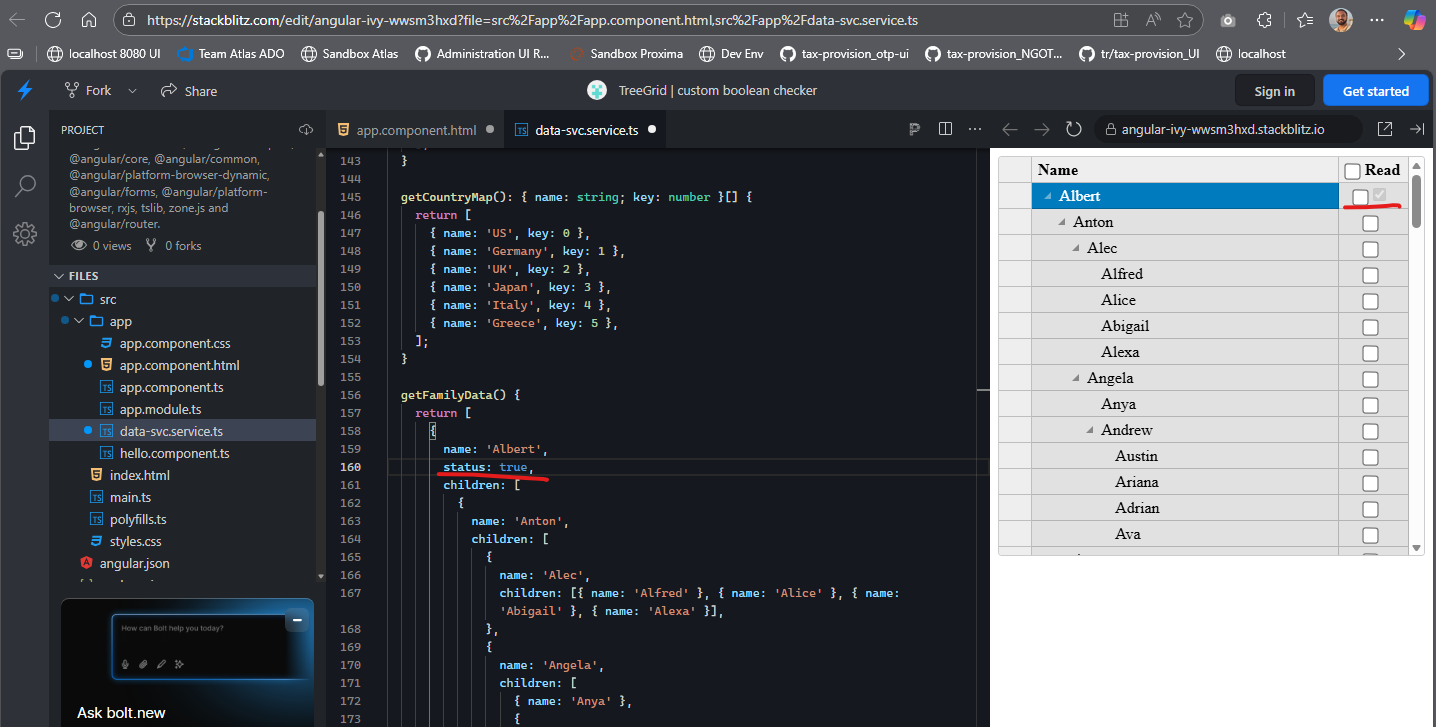
    I added the status true to dataSvc object, but the boolean checker column did not show it checked, instead, it’s showing another checkbox

  • Posted 11 February 2026, 10:53 am EST - Updated 11 February 2026, 1:46 pm EST

    Once the user has selected/unselected the checkboxes in the BooleanChecker, how do I read all of the checkbox values? Only the normal Row checkbox is binded with the dataItem. The GroupRow dataItems are not getting updated.

  • Posted 12 February 2026, 2:56 am EST

    Hi Abhijeet,

    The BooleanChecker is designed to update the data of the leaf nodes only; it doesn’t bind with the group rows that have child rows. It seems it is not completing all your requirements, so we have prepared another custom solution with the same features. Please refer to the following sample for the same - https://stackblitz.com/edit/angular-ivy-kzneqgnv?file=src%2Fapp%2Fapp.component.ts

    In the above sample, we have inserted custom checkboxes through the formatItem event and handled the click event to update their selected states as needed. You can use the ‘getCellData’ method or directly check the ‘status’ property on any item to get their selected status in the above sample. Please take a look and let us know if you still face any issues.

    Regards

Need extra support?

Upgrade your support plan and get personal unlimited phone support with our customer engagement team

Learn More

Forum Channels