Posted 23 April 2026, 8:33 am EST
Hello Enrique,
The team provided the following update:
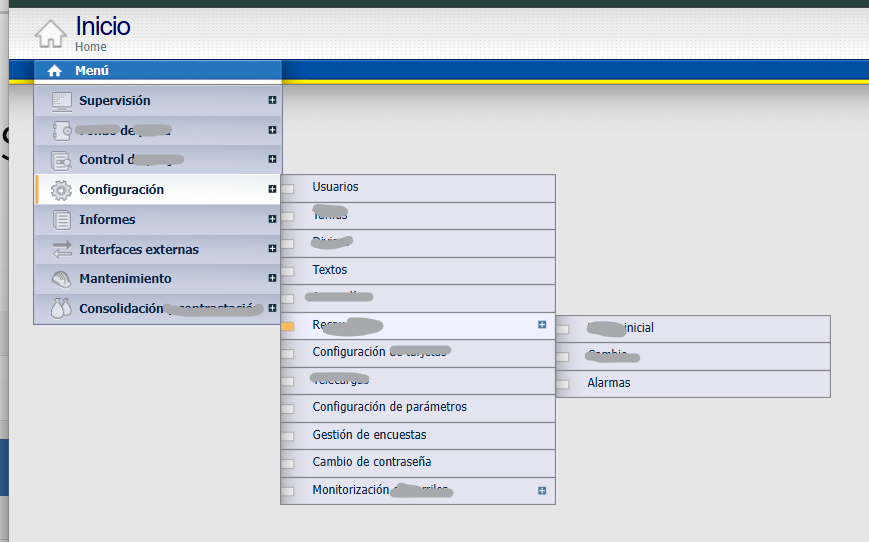
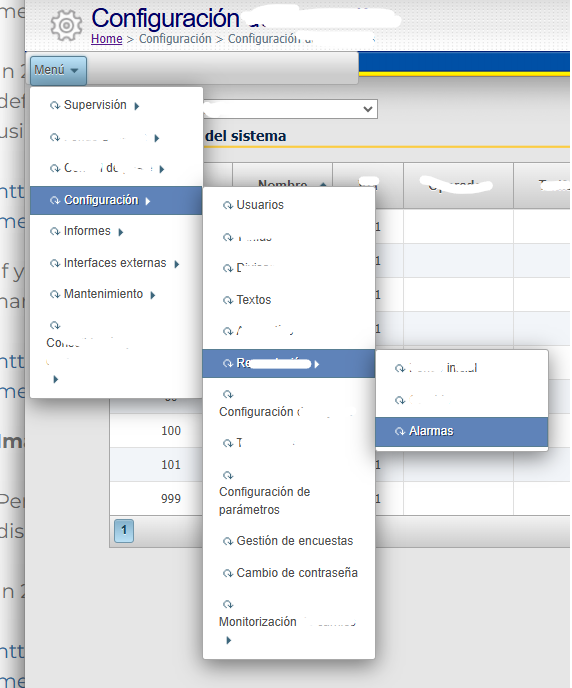
In the current 2025v2 (399) C1Menu, the styling model has fundamentally changed. The legacy properties such as UseEmbeddedVisualStyles, VisualStyle, and VisualStylePath are no longer supported. The control is now fully CSS-based, and its rendering structure differs from the 2010v1 implementation. Therefore, visual differences (item width behavior, icon alignment, submenu arrow positioning, etc.) are expected due to design changes in the newer control.
Based on our review, the reported behavior appears to be a limitation or intentional architectural change in the current control rather than a defect.
If achieving a UI identical to 2010v1 is required, this would need to be handled through custom CSS adjustments on the client side.
-
Rendering Model Changed
In 2025v2, the server emits a minimal ul structure, and the jQuery c1menu widget dynamically transforms it at runtime. This differs from the older 2010v1 rendering model, which affects how CSS must target elements.
-
Legacy VisualStyle Properties Removed
UseEmbeddedVisualStyles, VisualStyle, and VisualStylePath are no longer supported. Styling must now be handled via explicit theme CSS references and custom CSS overrides.
-
Width and Alignment Issues Root Cause
- Default menu width is 150px unless overridden via the Width property or CSS targeting .wijmo-wijmenu.
- The link element inside each item is styled at 92% width in the default CSS, which prevents the submenu arrow from aligning fully to the right.
- Bootstrap theme CSS may introduce position: relative; left: 2px; on .ui-icon, which can interfere with arrow positioning.
- Float-based layout in the default theme can cause misalignment of icons and text.
-
Recommended Approach
- Reference the appropriate Wijmo theme CSS directly.
- Set menu width using the control Width property or override .wijmo-wijmenu.
- Replace float-based layout with display: flex on .wijmo-wijmenu-link for proper icon and arrow alignment.
- Ensure correct CSS selectors are used (e.g., .wijmo-wijmenu-item, not .wijmo-mijmenu-item).
Regards,
Uttkarsh.