SortExpression C1GridView to 2026v1 413

Posted by: enrique.pv-ext on 16 October 2026, 3:19 pm EST

  • Posted 16 October 2026, 3:19 pm EST - Updated 16 October 2026, 3:24 pm EST

    Hi,

    Migrate from 2010v1 to 2026v1 413 in ASP.NET WebForms NET Framework 4.8.1.

    Using C1GridView from C1.Web.Wijmo.Controls.48.dll

    For using sorting columns in GridView

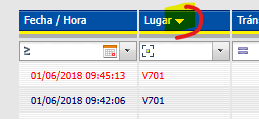
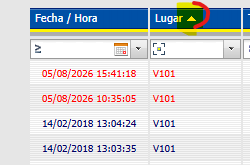
    old version, arrow Up/Down

    sort by column + filter

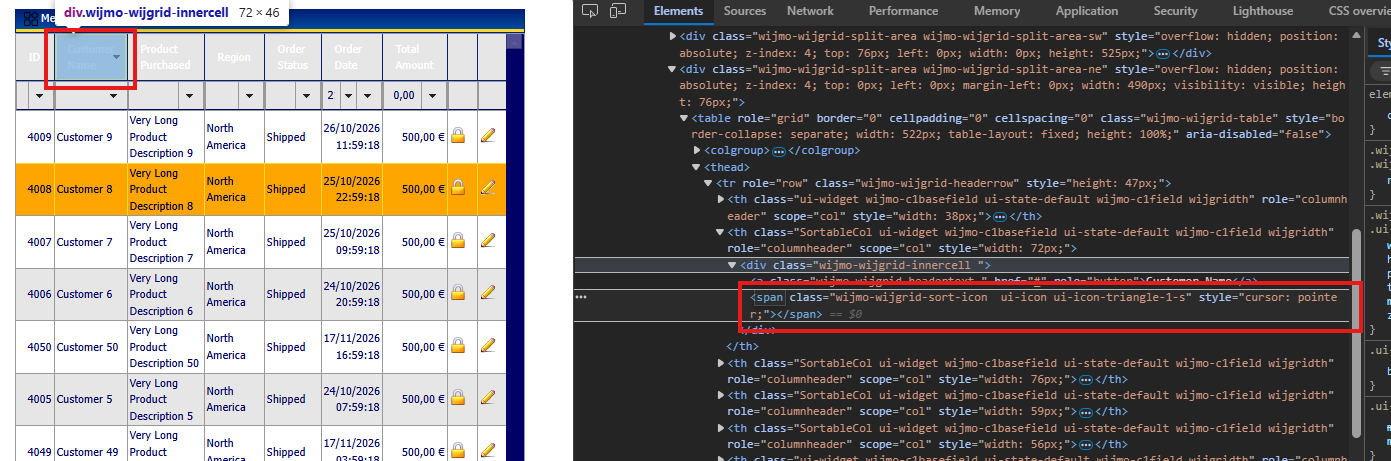
    New Version, sort column + filter

    We found a behavioral difference regarding GridView sorting after migrating from C1.Web.UI.Controls.3 to C1.Web.Wijmo.

    Legacy behavior (C1.Web.UI.Controls.3):

    The control appeared to automatically generate the SortExpression from the DataField when no explicit SortExpression was specified. Because of that, columns such as NUMERO_TRANSITO, TURN, TARIFA, CAT_TAB, and CAT_AVC were sortable even though they did not explicitly define a SortExpression.

    In practice, many of the explicit SortExpression attributes on other columns were redundant because sorting worked without them.

    Current behavior (C1.Web.Wijmo):

    The Wijmo C1GridView, similarly to the standard ASP.NET GridView, seems to require an explicit SortExpression in order for a column to be sortable.

    If SortExpression is not specified:

    The column cannot be sorted.

    The server-side OnSorting event is not raised for that column.

    The migration tool appears to have added missing SortExpression values to preserve the original behavior, although I could not find documentation confirming this.

    We also noticed another difference:

    In the new version, the grid no longer displays the visual ascending/descending indicators (Up/Down arrows) showing which column is currently sorted.

    Additionally, some column header styles still make the column appear sortable even when no SortExpression is defined. The visual styling changes on hover and looks like a sortable column, but clicking it does nothing.

    My questions are:

    Is the requirement for an explicit SortExpression in C1GridView an intentional design change?

    As part of the migration, should we review all GridViews and ensure that every sortable column has a SortExpression defined?

    Are the sort direction indicators (ascending/descending arrows) expected to be rendered automatically, or is additional CSS/theme configuration required?

    Is there a recommended approach for restoring the visual sort indicators?

    Is it expected that a column without SortExpression still receives sortable-looking CSS styles?

    Any migration recommendations or best practices for reviewing sorting functionality across existing GridViews would be appreciated.

  • Posted 19 October 2026, 5:58 am EST

    Hello Enrique,

    Thank you for the detailed description.

    Please note that we do not provide a migration tool between C1.Web.UI.Controls.3 and C1.Web.Wijmo.Controls, so we cannot comment on what your tool changed. The two grids are built on different architectures, so not every feature or behavior from the older grid has a direct equivalent. We recommend treating the move as a re-implementation and testing each GridView after the change.

    On sorting: in C1GridView, a column is sortable only when SortExpression is set, the same as in the standard ASP.NET GridView. Without it, clicking the header does not sort and the Sorting event is not raised. We recommend reviewing each GridView and setting SortExpression (usually the same as DataField) on every column that should be sortable.

    For the sort direction arrows, they render by default in our test with AllowSorting enabled on 2026v1 413, so this is likely caused by a CSS or theme override in your project. Please check whether your custom stylesheets hide or restyle the sort icon in the header. If you can share the CSS applied to the grid, we can take a look.

    For the header hover style, the grid applies the same header styling to all columns, so it does not distinguish sortable from non-sortable ones. You can assign a CssClass to the HeaderStyle of columns without a SortExpression and override the hover style for that class. (see CreateBoundField() in Default.aspx.cs and CSS styles in Default.aspx in the attached sample)

    Sample: GridView_Sample.zip

    Regards,

    Uttkarsh

  • Posted 20 October 2026, 8:39 am EST - Updated 20 October 2026, 8:48 am EST

    /* Flechas de ordenacion en cabecera oscura: sprite blanco existente
       (jquery-wijmo.css apunta a PNG inexistentes y .ui-widget-header/.ui-state-default
       pueden pisar la imagen). */
    .wijmo-wijgrid .wijmo-wijgrid-headerrow th .wijmo-wijgrid-sort-icon.ui-icon {
        background-image: url('/App_Themes/Sep/wijmo-custom/images/ui-icons_ffffff_256x240.png') !important;
        width: 16px;
        height: 16px;
    }

    now, by default, it’s appear arrow down, without click to order by the column.

    I have check if column not has a CssClass, arrow down is appears.

     <cc1:C1BoundField DataField="NUMERO_TRANSITO" SortExpression="NUMERO_TRANSITO" SortDirection="Descending">
         <ItemStyle Width="90px" HorizontalAlign="Center" />
     </cc1:C1BoundField>
     <cc1:C1BoundField DataField="TURN" SortExpression="TURN" SortDirection="Descending">
         <ItemStyle HorizontalAlign="Center" Width="90px" />
     </cc1:C1BoundField>
     <cc1:C1BoundField DataField="OPERADOR" SortExpression="OPERADOR" SortDirection="Descending">
         <ItemStyle Width="170px" HorizontalAlign="Left" CssClass="GridText" />
     </cc1:C1BoundField>

    any suggestions ?

  • Posted 21 October 2026, 6:01 am EST - Updated 21 October 2026, 6:07 am EST

    Hello Enrique,

    As we understand, you have set the SortDirection property to Descending, which is why the down arrow appears by default. This behavior is expected.

    However, we’re not entirely sure what issue you’re experiencing. Could you please clarify the exact behavior you’re expecting and update the sample we shared earlier to reproduce the issue?

    If the issue is that the sort indicators do not update correctly when you click a column header, please share all CSS files and custom styles that directly or indirectly affect the C1GridView. A sample that reproduces the behavior would also help us investigate and provide more specific guidance.

    Without a reproducible sample or the relevant CSS, it would be difficult to identify the underlying cause.

    Regards,

    Uttkarsh.

Need extra support?

Upgrade your support plan and get personal unlimited phone support with our customer engagement team

Learn More

Forum Channels