Scroll horizontal and paging C1GridView 2025v2 399

Posted by: enrique.pv-ext on 9 January 2026, 4:41 am EST

  • Posted 9 January 2026, 4:41 am EST - Updated 9 January 2026, 4:46 am EST

    Hi,

    Migrate from 2010v1 to 2025v2 399 in ASP.NET WebForms NET Framework 4.8.1.

    Using C1GridView from C1.Web.Wijmo.Controls.48.dll

    Code markup:

          <cc2:C1GridView ID="C1GridView1" runat="server"  
                     CallbackOptions="None"
                    ShowFilter="true" 
                    OnFiltering="Filter"  
                     
                    AutoGenerateColumns="False" 
                    PageSize="15"
                    AllowPaging="True" 
                    onpageindexchanging="C1GridView1_PageIndexChanging1" 
                    onrowcancelingedit="C1GridView1_RowCancelingEdit1"
                     OnRowEditing="C1GridView1_RowEditing"
                    ShowFooter="False" 
                    
                    HorizontalAlign="Left" 
                    FilterStyle-HorizontalAlign="Left" 
                    FooterStyle-HorizontalAlign="Left" 
                    HeaderStyle-HorizontalAlign="Left" 
                   
                    Visible="False"
                    VisualStylePath="~/VisualStyles" 
                    UseEmbeddedVisualStyles="false"
                    VisualStyle="Vista" 
                     SelectedRowStyle-HorizontalAlign="Left" 
                    EditRowStyle-ForeColor="Black" 
                    EditRowStyle-BackColor="#FFFFCC" 
                    AlternatingRowStyle-HorizontalAlign="Left" 
                    RowStyle-HorizontalAlign="Left" 
                    EditRowStyle-HorizontalAlign="Left" 
                     onrowdatabound="C1GridView1_RowDataBound" 
                        onrowcreated="C1GridView1_RowCreated">                               
    

    Not scroll in GridView, not paging is shown, the windows is small, little height

    Window has more height, now paging is shown
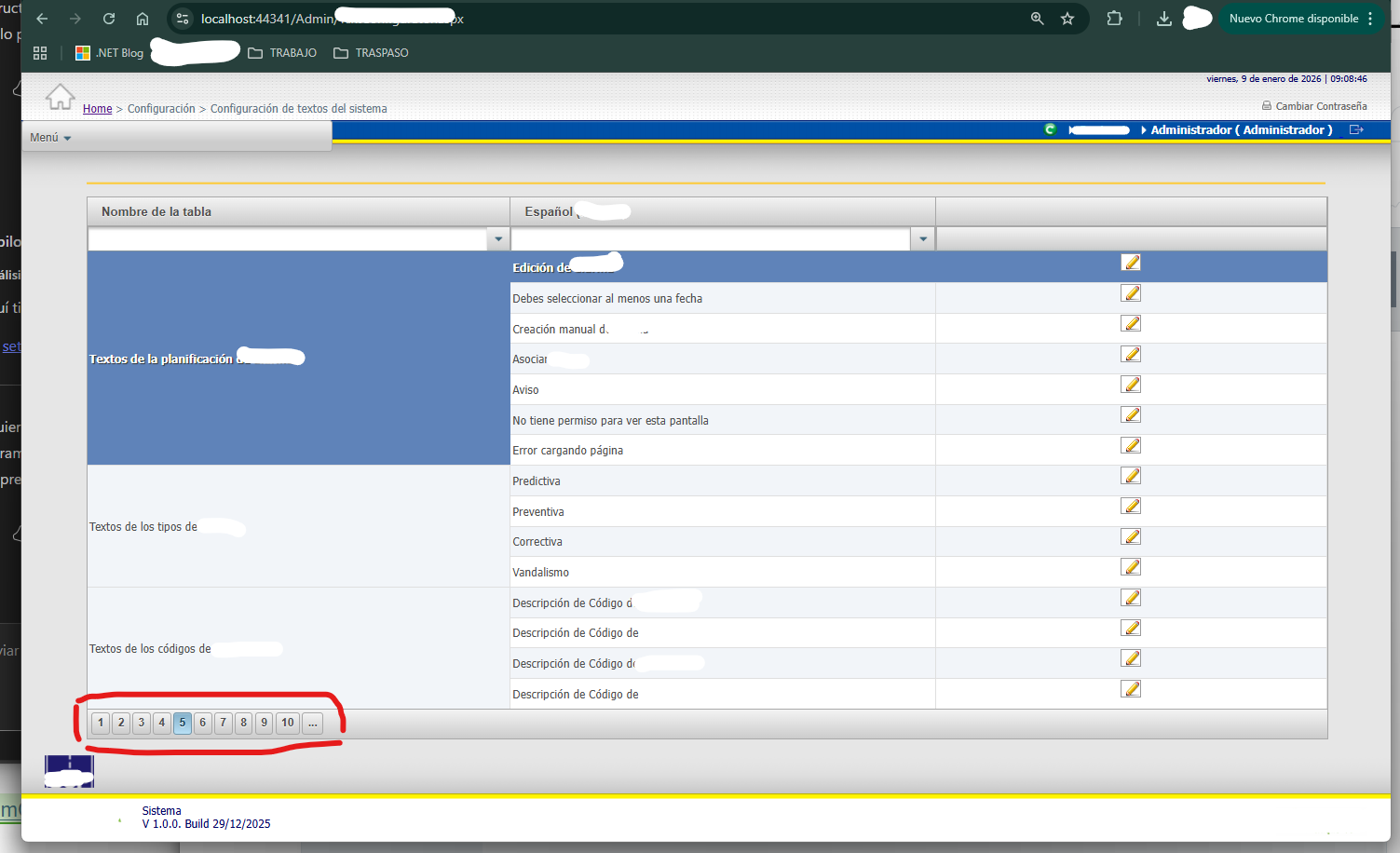
    Any suggestions for view paging and scroll in gridview if height is small?

  • Posted 13 January 2026, 3:30 am EST

    Hello Enrique,

    We’re sorry but we could not observe the behavior at our end. The grid is scrollable when pagination is enabled. Please refer to the attached sample and behavior video and let us know if we are missing anything.

    Sample: GridView_Pagination.zip

    Behavior Video: behavior.zip

    Please update the attached sample or share a stripped-down version of your project for us to investigate further.

    Regards,

    Uttkarsh.

  • Posted 26 January 2026, 11:27 am EST - Updated 26 January 2026, 11:33 am EST

    I have

     <cc1:C1GridView ID="ConfigurationParamGrid" runat="server" 
                    DataKeyNames="ID,PARAM,VALUE"
                    AutogenerateColumns="False"                     
                    Width="100%"                     
                    EmptyDataText= "No existen parámetros de configuración" 
                    AllowPaging="true" PageSize="25" 
                    AllowSorting="True"
                    ShowFilter="True"
                    OnFiltering="ConfigurationParamGrid_Filter" 
                    OnRowCommand="ConfigurationParamGrid_RowCommand"
                    OnSorting="ConfigurationParamGrid_Sorting"
                    OnSorted="ConfigurationParamGrid_Sorted"
                    OnPageIndexChanging="ConfigurationParamGrid_PageIndexChanging" 
                    OnRowDataBound="ConfigurationParamGrid_RowDataBound"      
            ScrollMode="Both" 
            StaticHeader="True"
            VisualStyle="Vista"
            UseEmbeddedVisualStyles="True">                     

    I add properties 2025v2 399: ScrollMode, StaticHeader, UseEmbeddedVisualStyles, VisualStyle

            ScrollMode="Both" 
            StaticHeader="True"
            VisualStyle="Vista"
            UseEmbeddedVisualStyles="True"

    and I add PagerSettings

    [code]

            <PagerSettings Mode="Numeric" Position="Bottom" />
    
            </cc1:C1GridView>[/code]
    

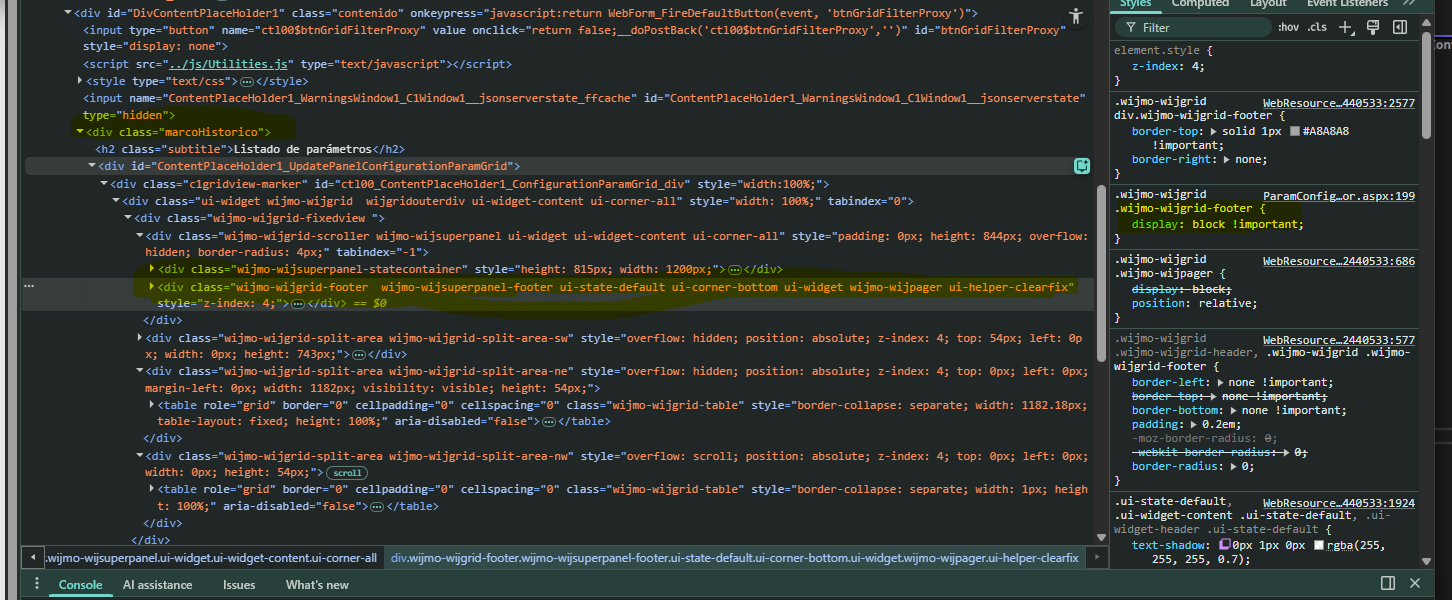
    I try too

            /* Fix for Pager visibility in some VisualStyles */
            .wijmo-wijgrid .wijmo-wijgrid-footer {
                display: block !important;
            }
        </style>

    Not visible available scroll for gridview, and paging not shown:

  • Posted 27 January 2026, 9:00 am EST

    Hello,

    There is no need to use CSS as we have commented it out in the sample. We used it to test some scenarios to replicate the behavior at your end but could not replicate it.

    This time we updated GridView aspx with the code you shared but we still could not replicate the behavior. Could you please update the attached modified sample with your exact implementation or share a stripped-down version of your project that reproduces the behavior?

    Sample: GridView_Pagination_Mod.zip

    Without a replicating sample, it’ll be difficult for us to investigate the behavior at our end.

    Regards,

    Uttkarsh.

Need extra support?

Upgrade your support plan and get personal unlimited phone support with our customer engagement team

Learn More

Forum Channels