Pipeline License Activation Restricted Network

Posted by: enrique.pv-ext on 30 September 2026, 9:20 am EST

  • Posted 30 September 2026, 9:20 am EST

    How can a pipeline license be used in a CI/CD agent without internet access or Restricted Network ?

    https://developer.mescius.com/componentone/docs/license/online-license/common-licensing-scenarios/licensing-apps-on-docker-with-pipeline#activate-and-deactivate-in-the-pipeline

    GCLM tool ?

    sa3client tool ?

    dotnet tool install -g sa3client requires t internet access ?

    Our net enterprise has Restricted Network, by IT (Intune-Defender or Firewalls).

    Supports offline activation ? HOW-TO ??

    Prerequisites:

    Network access to the licensing service —> URLs to licensing service for add it in Intune-Defender or Firewalls

    The command-line licensing tool available on the agent —> install from internet Restricted Network + URL for Firewalls

    please, any help about it Pipeline License Activation ?

    Thanks all, friends!!

    Thank you in advance for clarifying these points. This information is required for us to define a compliant and scalable licensing strategy for our CI/CD infrastructure (Restricted Network )

    please, step by step , please…

  • Posted 1 October 2026, 2:04 am EST - Updated 1 October 2026, 2:09 am EST

    Hello Enrique,

    Pipeline license activation works completely offline. Installing sa3client on an offline machine takes a few extra steps:

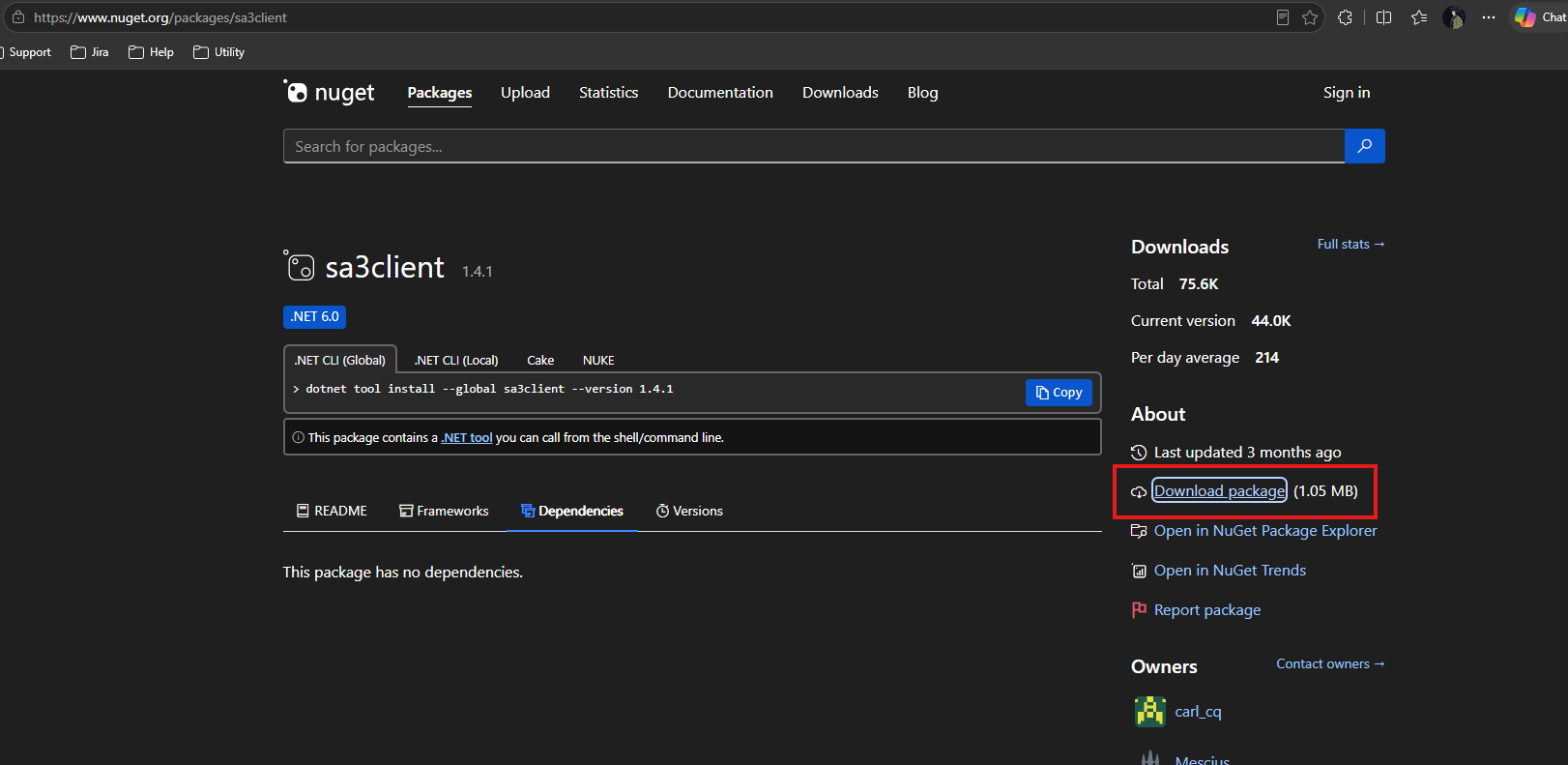
    1. On a machine with internet access, download the sa3client .nupkg file.


      Direct download link: https://www.nuget.org/api/v2/package/sa3client/1.4.1

    2. Copy the file to the offline machine, for example into the “C:\LocalPackages” directory.

    3. Run the following command to install sa3client:

    dotnet tool install -g sa3client --add-source "C:\LocalPackages"
    

    Once sa3client is installed, activate your pipeline key with this command:

    sa3client local-activate "serial-key" "password" --path "local-package-path"
    
    • serial-key: your pipeline key
    • password: your pipeline key password
    • local-package-path: the full path to the local activation package that came with your pipeline key. Copy that package to the offline machine first, for example into “C:\C1LocalActivationPackage”. The full path would then be “C:\C1LocalActivationPackage\Package_C1P053XXXXXX.data”

    For more information, see the Activate a Pipeline License in the Pipeline documentation.

    Regards,

    Uttkarsh

  • Posted 2 October 2026, 4:33 am EST - Updated 2 October 2026, 7:10 am EST

    Thanks all !!

    1 ) how-to can I get the local activation package ??

    Pipeline License Package Contents:

    Pipeline Serial Key

    Format: Prefix-0000-0000-0000-0000-200

    Local Activation Package File

    Package_Prefix-XXXXXXXX.data

    (The prefix and first 8 digits match the serial key.)

    Password(s)

    One or more passwords, optionally time-limited.

    2 ) Activate Before the Build (each build) ??

    sa3client local-activate “<serial-key>” “<password>” --path “<local-package-path>”

    Use --path to specify the folder containing the activation package file.

    If omitted, the current directory is used.

    If using pipeline Azure Devops, use SECRET for password serial key and do it (activate) in each build ?

  • Posted 2 October 2026, 7:34 am EST

    Activate Before the (each) Build

    sa3client local-activate “” “” --path “”

    any Azure Devops pipeline sample for one server CICD, and 2 Self-hosted Agents ?

    thanks a lot !!

  • Posted 5 October 2026, 4:16 am EST

    We use Git in Azure Devops.

    We have

    one CICD server(Windows)

    2 Azure Pipelines Self-Hosted Agents

    We have CI pipeline Azure Devops.

    ComponentOne pipeline license not actived in CI-SRV01 server.

    I compile in my development machine with one Developer license activated.

    CI pipeline Build OK, why ? pipeline license not actived

    CI-SRV01

    ├─ Agent01 AG01

    └─ Agent02 AG02

    2026-10-01T15:29:21.3684545Z Project "C:\SH-Windows-SRVSEP-CICD01_AG01\_work\1\s\SEP_xxx.sln" (1)
    
     is building "C:\SH-Windows-SRVSEP-CICD01_AG01\_work\1\s\src\Web\XXXX.Sep.WebApp\XXXX.Sep.WebApp.csproj" (2) 
    
    on node 1 (default targets).
    
    2026-10-01T15:29:21.3685302Z Project "C:\SH-Windows-SRVSEP-CICD01_AG01\_work\1\s\src\Web\XXXX.Sep.WebApp\XXXX.Sep.WebApp.csproj" (2) 
    is building "C:\SH-Windows-SRVSEP-CICD01_AG01\_work\1\s\src\Common\Sep.Common.Core\Sep.Common.Core.csproj" (3:2) 
    
    on node 1 (default targets).
    
    
    2026-10-01T15:35:33.0353387Z     11011 Warning(s)
    2026-10-01T15:35:33.0353607Z     0 Error(s)
    2026-10-01T15:35:33.0353689Z 
    2026-10-01T15:35:33.0353913Z Time Elapsed 00:06:11.44
    2026-10-01T15:35:33.0354131Z 0
    2026-10-01T15:35:33.0471256Z ##[section]Finishing: Build Solution
  • Posted 5 October 2026, 6:59 am EST

    Hello Enrique,

    → How can I get the local activation package?

    The local activation package (Package_Prefix-XXXXXXXX.data) is delivered together with your pipeline serial key and password when the pipeline license is issued. If you can’t find it, please contact our Sales team at eu.sales@mescius.com and they can send it again.

    → Do I need to activate before each build?

    The key needs to be activated on every machine or container that runs your builds. If one pipeline builds several projects on the same machine, one activation is enough for that run. With a pipeline license you can activate as many times per day as you need, so adding the activation step to every build is safe.

    → Using Azure DevOps with a secret for the serial key and password

    Yes, storing the serial key and password as secret variables is the correct way to do it. You can find the steps to manage secret variables and variable groups here: https://learn.microsoft.com/en-us/azure/devops/pipelines/process/set-secret-variables

    → Why does the build succeed when the pipeline license isn’t activated?

    This depends on where the ComponentOne controls are used in your project. If they are used in the designer (.aspx markup), the evaluation error appears while building the application. If they are only used in code-behind, the license is evaluated at run-time only, so the build can pass without an activation. Are the C1 controls or components in this solution used only in code-behind?

    If they are, that would explain the successful build. To confirm, could you please also check the following and share the results?

    1. Does the deployed application show an evaluation banner or message at run-time?
    2. What is the output of
      sa3client list --all
      on CI-SRV01, run as the account that runs the agents?

    Once we have that, we can confirm whether the key is active on the server.

    Regards,

    Uttkarsh.

  • Posted 5 October 2026, 10:27 am EST

    Thanks all, I’ll try access to CI-SRV01 server.

    1. for install sa3client, what’s account, can I use ? admin account ??
    dotnet tool install -g sa3client --add-source "C:\LocalPackages"
    1. the account that runs the agents? the same account that install sa3client ? admin account ? another permissions-rights ?

    thanks friend Uttkarsh !!

  • Posted 6 October 2026, 12:25 am EST

    Hello Enrique,

    Yes, you can use an admin account. It does not have to be the same account that runs the agents.

    The license information is stored at the machine level (C:\ProgramData\SA3), so an activation done by one account is shared by all accounts on CI-SRV01, including the accounts that run AG01 and AG02. Using an admin account for the activation also avoids any permission problems when writing to that folder.

    1. Install sa3client with any account that can run dotnet:
    dotnet tool install -g sa3client --add-source "C:\LocalPackages"
    
    1. Activate the key:
    sa3client local-activate "serial-key" "password" --path "C:\C1LocalActivationPackage"
    
    1. Check the result:
    sa3client list --all
    

    Because you have a pipeline license, you can activate the key as many times as you want, and there is no harm in doing so. To be on the safe side, we recommend always running the activation step before the build in your Azure DevOps pipeline (with the serial key and password stored as secret variables). That way the build does not depend on an earlier manual activation.

    Note that ‘dotnet tool install -g’ installs the tool itself in the profile of the user who runs it (‘%USERPROFILE%.dotnet\tools’). That only affects where sa3client is found, not the license.

    So, install SA3Client for each agent before build, activate the license and then build.

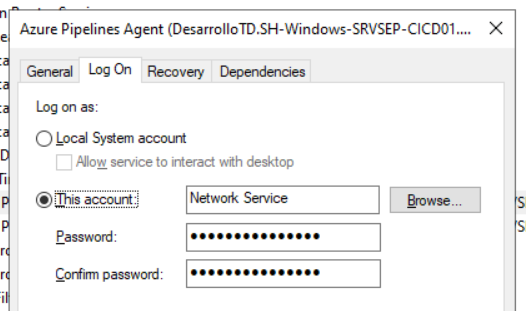
    To find the account that runs the agents, open services.msc on CI-SRV01 and check the “Log On As” column for the Azure Pipelines agent services of AG01 and AG02.

    Once the key is activated, please share the output of sa3client list --all, and let us know whether the deployed application shows an evaluation message at run-time. With that, we can confirm the key is active on the server.

    Regards,

    Uttkarsh

  • Posted 6 October 2026, 6:02 am EST - Updated 6 October 2026, 6:09 am EST

    → open services.msc on CI-SRV01 and check the “Log On As” column for the Azure Pipelines agent services

    accout is Network Service

    → we recommend always running the activation step before the build in your Azure DevOps pipeline (with the serial key and password stored as secret variables). That way the build does not depend on an earlier manual activation.

    please, any Azure DevOps pipeline sample YAML for running the activation step before the build

    I dont understand this:

    So, install SA3Client for each agent before build, activate the license and then build.

    install for each agent ?? One server CICD with 2 agents (Windows Service), can you explain with more detail, please ?

    thanks, Uttkarsh, friend!! please, any help

  • Posted 6 October 2026, 8:01 am EST

    Hello Enrique,

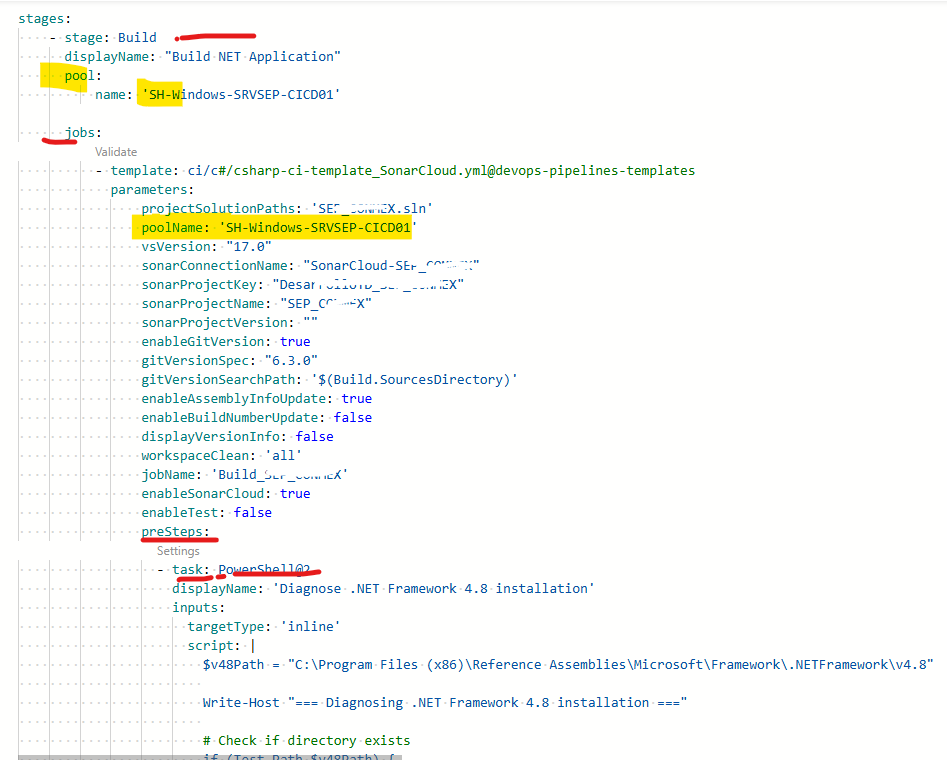
    I have attached a sample YAML for your setup (one server, two agents running as Network Service). I haven’t tested it, as it follows the general pattern for Azure DevOps pipelines. If you run into any issues, please let us know.

    c1-pipeline-license-activation.zip

    Install for each agent: the license is stored at machine level in C:\ProgramData\SA3, so one activation on CI-SRV01 covers AG01 and AG02. The sa3client tool is installed per account profile. Both of your agents run as Network Service, so they share one install. The YAML skips the install if the tool is already there.

    What the pipeline does before the build:

    1. Installs sa3client offline from C:\LocalPackages. Please copy sa3client.1.4.1.nupkg there once.
    2. Runs sa3client local-activate and then sa3client list --all, so the result shows in the build log.

    Setup:

    • Upload Package_C1P053XXXXXX.data to Pipelines > Library > Secure files and authorize the pipeline to use it.
    • Create C1_SERIAL_KEY and C1_LICENSE_PASSWORD as secret variables.
    • Replace the secure file name and pool name with your own.

    Activating on every run is safe with a pipeline license. Once it has run, please share the sa3client list --all output and whether the deployed app still shows an evaluation message.

    Regards,

    Uttkarsh

  • Posted 6 October 2026, 9:17 am EST

    Thanks, I’'ll try pipeline later.

    Now, I get error 7003

    C:\Temp\LocalPackages>sa3client list --all

    No product

    C:\Temp\LocalPackages>sa3client local-activate “CIP7xxx” “password” --path “C:\Temp\LocalPackages\C1LocalActivationPackage\Package_C1P7xxx.data”

    License activation failed

    Local Package Error, Invalid Key (7003)

    The serial key format is incorrect or does not match the local package. Please re-enter the serial key.

    C:\Temp\LocalPackages>sa3client local-activate CIP7xxx “password” --path “C:\Temp\LocalPackages\C1LocalActivationPackage\Package_C1P7xxx.data”

    License activation failed

    Local Package Error, Invalid Key (7003)

    The serial key format is incorrect or does not match the local package. Please re-enter the serial key.

    C:\Temp\LocalPackages>sa3client local-activate CIP7xxx password --path “C:\Temp\LocalPackages\C1LocalActivationPackage\Package_C1P7xxx.data”

    License activation failed

    Local Package Error, Invalid Key (7003)

    The serial key format is incorrect or does not match the local package. Please re-enter the serial key.

    C:\Temp\LocalPackages>sa3client list --all

    No product

    Any suggestions please?

  • Posted 7 October 2026, 12:02 am EST

    Hello Enrique,

    We need some sensitive details to look into this, so I have opened a ticket on our private portal: EAS-56081-B5J057.

    Please continue the conversation to avoid any misunderstanding.

    Regards,

    Uttkarsh

  • Posted 15 October 2026, 9:04 am EST

    Pipeline License Activation is OK, typo error key and password.

    Pipeline License Activation on machine, once.

Need extra support?

Upgrade your support plan and get personal unlimited phone support with our customer engagement team

Learn More

Forum Channels