Posted 8 July 2026, 8:12 am EST - Updated 8 July 2026, 8:22 am EST
Hi,
Migrate from 2010v1 to 2025v2 399 in ASP.NET WebForms NET Framework 4.8.1.
Using C1GridView from C1.Web.Wijmo.Controls.48.dll
There is no OnGroupAggregate server event and C1GroupTextEventArgs class in latest version.
Replace with the client-side OnClientGroupAggregate event, and set the column’s Aggregate property to Custom.
I need use the OnClientGroupAggregate client side event:
C1GridView ID=“C1GridView1” runat=“server” OnClientGroupAggregate=“OnClientGroupAggregate”I have migrated several pages. Another pages, I have any problems about CheckBox column, and codeBehind Session, and variables
Legacy OnGroupAggregate server event:
protected void BagsGrid_GroupAggregate(object sender, C1.Web.UI.Controls.C1GridView.C1GroupTextEventArgs e)
{
Thread.CurrentThread.CurrentCulture = Util.GetCulture();
decimal sum = 0;
decimal detractionsSum = 0;
decimal tollSum = 0;
for (int i = e.StartItemIndex; i <= e.EndItemIndex; i++)
{
decimal val = Convert.ToDecimal(((C1GridView)sender).DataKeys[i]["AMOUNT"]);
CheckBox cb = (CheckBox)((C1GridView)sender).Rows[i].Cells[1].FindControl("CheckBoxGrid");
if (cb.Checked)
{
// Sum total amount
sum += val;
// Sum only toll amount
tollSum += val;
}
cb.Attributes.Add("onchange", "recalculateTotal('" + cb.ClientID + "','" + val.ToString() + "','" + Util.GetCulture().Name + "' );");
}
string sequence = gridTotalSequence.ToString();
string currencySymbol = "<span>" + Util.GetCulture().NumberFormat.CurrencySymbol + "</span> ";
e.Text += _textsShown[16] + " " + currencySymbol + "<span id=\"GridTotal" + sequence + "\">" + string.Format("{0:N}", sum) + "</span>";
gridTotalSequence = 2;
Session["PartialWithdrawGridTotal"] = sum.ToString();
// HiddenTotal.Value = sum.ToString();
// e.Text = string.Format("{0:C}", sum);
}
}
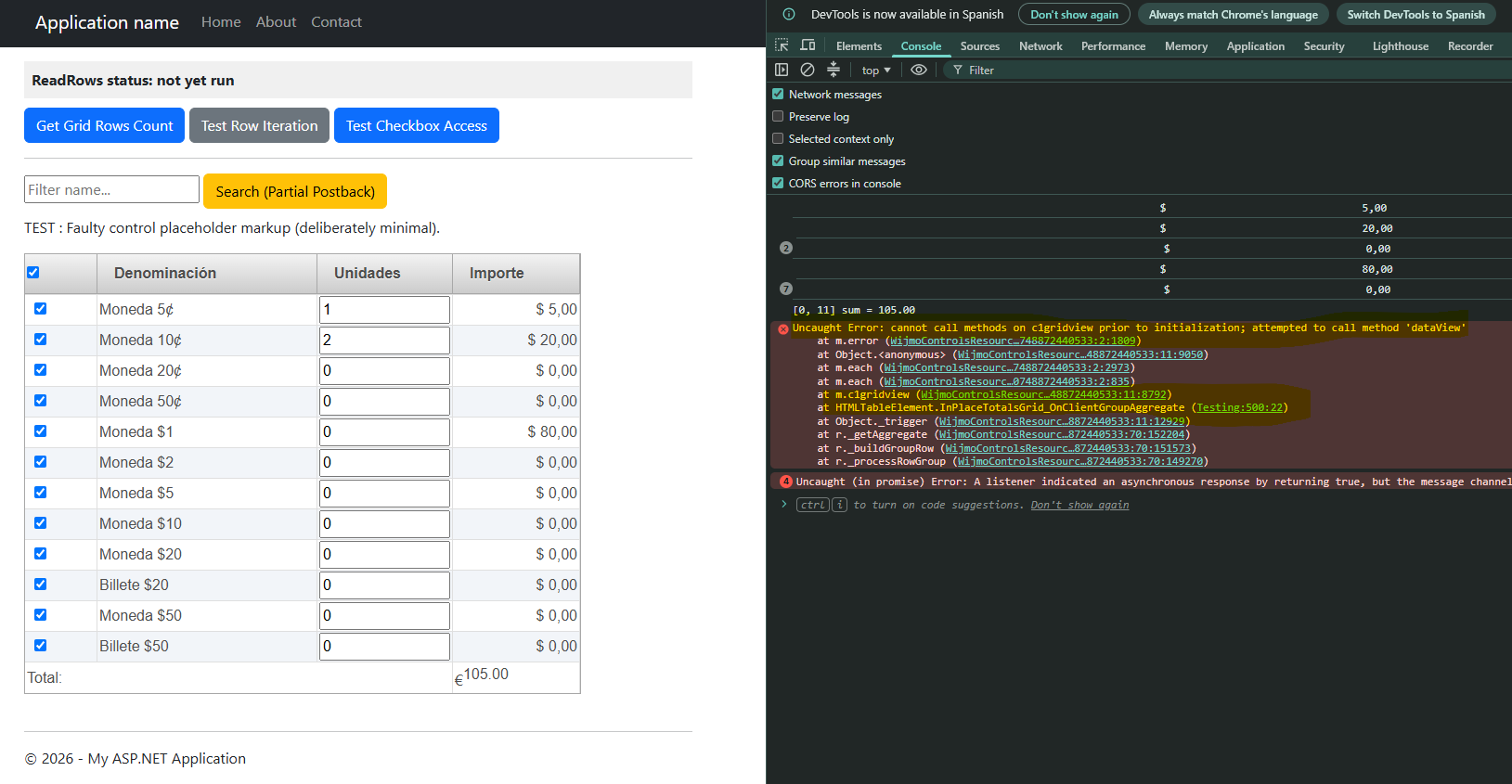
My OnClientGroupAggregate client
     function BagsGrid_OnClientGroupAggregate(sender, args) {
         console.log("BagsGrid_OnClientGroupAggregate TEST GRIDVIEW: " + args.column.dataIndex);
     var CurrencySymbol = '<%= Util.GetCulture().NumberFormat.CurrencySymbol %>';
     let sum = 0;
     let grid = $(sender);
     let data = grid.c1gridview('dataView');
     if (!data) { return; }

     var totalItems = data.totalItemCount();
     var startIndex = args.startIndex;
     var endIndex = args.endIndex;

     // Clamp indices (equivalente al bucle for del servidor: StartItemIndex → EndItemIndex)
     if (startIndex < 0) { startIndex = 0; }
     if (endIndex >= totalItems) { endIndex = totalItems - 1; }

     for (var i = startIndex; i <= endIndex; i++) {
         let row = data.item(i);
         if (!row) { continue; }

         let amountText = row[args.column.dataIndex];
         if (amountText) {
             sum += parseLocaleNumber(amountText);
         }
     }

     // Format c0: integer, locale es-ES (without decimal places)
     // Equivalente a string.Format("{0:C}", sum) con cultura es-ES
     let formattedSum = sum.toLocaleString('es-ES', {
         minimumFractionDigits: 0,
         maximumFractionDigits: 0
     });

     args.text = CurrencySymbol +
         "<span style='max-width:85px;display:inline-block;overflow:hidden'>" + formattedSum + "</span>";
 }
Markup aspx
   <cc2:C1GridView ID="BagsGrid" runat="server"
       OnDataBound="BagsGrid_DataBound"
       OnClientGroupAggregate="BagsGrid_OnClientGroupAggregate">
       <Columns>
           <cc2:C1TemplateField Visible="False">
               <GroupInfo HeaderText="Total:" FooterText="Total:" Position="HeaderAndFooter">
               </GroupInfo>
           </cc2:C1TemplateField>
           <cc2:C1TemplateField>
               <HeaderTemplate>
                   <asp:CheckBox type="CheckBox" ID="CheckBoxHeader" Checked="true" onclick="javascript:SelectedOrUnSelectedChecked(this);" runat="server" />
               </HeaderTemplate>
               <ItemTemplate>
                   <asp:HiddenField ID="HiddenValue" runat="server" Value='<%# Bind("AMOUNT") %>' />
                   <asp:CheckBox ID="CheckBoxGrid" runat="server" Checked="true"
                       CausesValidation="false" AutoPostBack="false" />
               </ItemTemplate>
               <ItemStyle Width="40px" />
           </cc2:C1TemplateField>
           <cc2:C1BoundField DataField="AMOUNT" SortExpression="AMOUNT" SortDirection="None"
               DataFormatString="c0" Aggregate="Custom"
               HeaderText="Importe">
               <ItemStyle CssClass="GridNumber" Width="165px" />
           </cc2:C1BoundField>
           <cc2:C1ButtonField ButtonType="Image" CommandName="view_Liquidated"
               ImageUrl="~/App_Themes/Content/Imagenes/find.png" Text="Liqudiaciones">
               <ItemStyle Width="50px" />
           </cc2:C1ButtonField>
       </Columns>
   </cc2:C1GridView>
CheckBox
//        CheckBox cb = (CheckBox)((C1GridView)sender).Rows[i].Cells[1].FindControl("CheckBoxGrid");
      //        if (cb.Checked)
      //        {
      //            sum += val;
      //        }
                            <cc2:C1TemplateField>
                                <HeaderTemplate>
                                    <asp:CheckBox type="CheckBox" ID="CheckBoxHeader" Checked="true" onclick="javascript:SelectedOrUnSelectedChecked(this);" runat="server" />
                                </HeaderTemplate>
                                <ItemTemplate>
                                    <asp:HiddenField ID="HiddenValue" runat="server" Value='<%# Bind("AMOUNT") %>' />
                                    <asp:CheckBox ID="CheckBoxGrid" runat="server" Checked="true"
                                        CausesValidation="false" AutoPostBack="false" />
                                </ItemTemplate>
                                <ItemStyle Width="40px" />
                            </cc2:C1TemplateField>
Variable
    string sequence = gridTotalSequence.ToString();
  public partial class SecurityCompanyRetirement : ContentBasePage
  {
      int gridTotalSequence = 1;
Session, migrate to client ??
           Session["PartialWithdrawGridTotal"] = sum.ToString();
        //    HiddenPartialWithdrawalTotal.Value = sum.ToString();
        //    e.Text = string.Format("{0:C}", sum);
Please, any suggestions, any help will be very appreciated