Legacy code C1Calendar to 2025v2 399

Posted by: enrique.pv-ext on 13 May 2026, 3:13 am EST

    • Post Options:
    • Link

    Posted 13 May 2026, 3:13 am EST

    Hi,

    Migrate from 2010v1 to 2025v2 399 in ASP.NET WebForms NET Framework 4.8.1.

    Using C1InputDate from C1.Web.Wijmo.Controls.48.dll

    Changes C1DateInput to C1InputDate control.

    Using C1InputDate and C1Calendar.

    Legacy popupBeside and C1.Web.UI.PositioningMode.bottomLeft, any alternatives ?

         function SelectDateDesde() {
             var calendar = Sys.Application.findComponent("<%=C1CalDesde.ClientID%>");
             var input = document.getElementById("Text1");
             calendar.popupBeside(input, C1.Web.UI.PositioningMode.bottomLeft);
         }
    
         function CalendarClosedDesde() {
             var calendar = Sys.Application.findComponent("<%=C1CalDesde.ClientID%>");
             var input = document.getElementById("Text1");
             var month;
             month = calendar.get_selectedDate().getMonth() + 1;
             input.value = calendar.get_selectedDate().getDate() + "/" +
                 month + "/" +
                 calendar.get_selectedDate().getFullYear();
         }

    any suggestions ?

    Thanks for all !! great job!

  • Posted 13 May 2026, 5:49 am EST

    Hello Enrique,

    In newer version, select date using selectDate() method and show popup using popup() method as follows:

    function SelectDateDesde() {
        var date = $('#<%= C1InputDate1.ClientID %>').c1inputdate('option', 'date');
        var calendar = $('#<%= C1Calendar1.ClientID %>');
    
        calendar.c1calendar("popup", {
            of: $('#calendar-popup'),   // anchor element
            my: 'right top',               // which corner of the calendar to anchor
            at: 'right bottom'             // which corner of the anchor element to align to
        });
    
        calendar.c1calendar("selectDate", date);
    }

    To set the position use jQuery Position plugin. For more information see: https://jqueryui.com/position/

    For implementation, please refer to the attached sample: C1Calendar_Sample.zip

    Regards,

    Uttkarsh.

  • Posted 13 May 2026, 9:44 am EST

    Great, thanks!

    Now, any alternative for onGroupTitleClicked event javascript C1Calendar ?

    legacy code 2010v1

    var OpenWindowSelectDatePlaza = function(windowId) {
        try {
            var dialog = $find(windowId);
            dialog.showModal();
            var div = document.getElementById('c1modallayer');
            div.style.display = 'block';
    
            //onclick = $find().onGroupTitleClicked(this, event);
            $find('ctl00_ContentPlaceHolder1_C1WindowDatePlaza_C1WindowSelectParams_C1Calendar').onGroupTitleClicked(this, event)
        }
        catch (e) {
            alert('OpenWindowSelectDatePlaza' + e);
        }
    }

    please, help me! thanks in advanced,grateful

  • Posted 14 May 2026, 3:31 am EST

    Hello Enrique,

    We could not find any alternative for onGroupTitleClicked event. The equivalent is attaching a click handler to the rendered title element directly as follows:

    $(document).ready(function () {
        var calendarId = '<%= C1Calendar1.ClientID %>';
    
        // Calendar may re-render; use delegated event on the container
        $('#' + calendarId).on('click', '.wijmo-wijcalendar-title', function (e) {
            alert('onGroupTitleClicked handler');
        });
    });

    Please refer to the attached sample for implementation. (see C1Calendar_Sample_Mod.zip)

    If this does not align with your requirements, please share more details about the exact behavior of the event in the older version, such as what triggered the event, the execution order of any related events being used, and the event arguments. We will try to identify the best possible alternative.

    Regards,

    Uttkarsh.

  • Posted 14 May 2026, 5:56 am EST - Updated 14 May 2026, 6:01 am EST

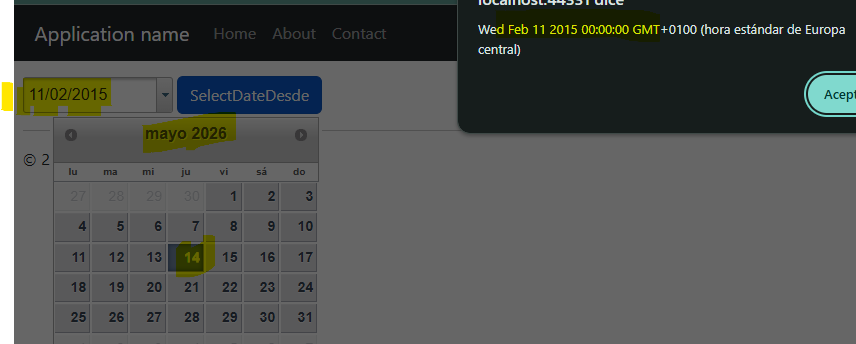
    I try attached sample: C1Calendar_Sample.zip

    Change date in C1InputDate1, and click on calendar, using selectDate() dont’ works for me…

    function SelectDateDesde() {
        var date = $('#<%= C1InputDate1.ClientID %>').c1inputdate('option', 'date');
    
        alert(date);
    
        var calendar = $('#<%= C1Calendar1.ClientID %>');
    
        calendar.c1calendar("popup", {
            of: $('#calendar-popup'),   // anchor element
            my: 'right top',               // which corner of the calendar to anchor
            at: 'right bottom'             // which corner of the anchor element to align to
        });
    
        calendar.c1calendar("selectDate", date);
    }

    show attached image:

  • Posted 15 May 2026, 12:32 am EST

    Hello Enrique,

    The selectDate only selects the date visually but doesn’t navigate the calendar to the month containing that date. You need to also call option to set the displayDate before or after selecting.

    Here’s the fix:

    function SelectDateDesde() {
        var date = $('#<%= C1InputDate1.ClientID %>').c1inputdate('option', 'date');
        var calendar = $('#<%= C1Calendar1.ClientID %>');
        
        // Navigate the calendar to the month of the selected date FIRST
        calendar.c1calendar('option', 'displayDate', date);
        
        // Then select the date
        calendar.c1calendar('selectDate', date);
        
        // Then open the popup
        calendar.c1calendar("popup", {
            of: $('#calendar-popup'),
            my: 'right top',
            at: 'right bottom'
        });
    }

    The key addition is calendar.c1calendar(‘option’, ‘displayDate’, date) before selectDate. This forces the calendar to navigate to the month where the date lives, then selectDate highlights it.

    Also note I moved popup to after the date operations — opening the popup first and then changing options can sometimes cause a rendering flash or the navigation to be ignored depending on widget initialization timing.

    Regards,

    Uttkarsh.

  • Posted 19 May 2026, 10:38 am EST

    Great!

    calendar.get_selectedDate() ??

    calendar.get_selectedDate().getMonth() ??

    calendar.get_selectedDate().getDate() ??

    calendar.get_selectedDate().getFullYear() ??

            function CalendarClosedDesde() {
    <%--            var calendar = Sys.Application.findComponent("<%=C1CalDesde.ClientID%>");
                var input = document.getElementById("Text1");--%>
    
                var date = $('#<%= Text1.ClientID %>').c1inputdate('option', 'date');
                var calendar = $('#<%= C1CalDesde.ClientID %>');
    
                var month;
                month = calendar.get_selectedDate().getMonth() + 1;
                input.value = calendar.get_selectedDate().getDate() + "/" +
                    month + "/" +
                    calendar.get_selectedDate().getFullYear();
            }
    
  • Posted 20 May 2026, 3:16 am EST

    Hello Enrique,

    Please use ‘getSelectedDate’ method to get the selected date. The code equivalent will be as follows:

    calendar = $('#<%= C1Calendar1.ClientID %>');
    var selectedDate = calendar.c1calendar('getSelectedDate');
    var month = calendar.c1calendar('getSelectedDate').getMonth();
    var date = calendar.c1calendar('getSelectedDate').getDate();
    var year = calendar.c1calendar('getSelectedDate').getFullYear();

    Please let us know if you have further queries.

    Regards,

    Uttkarsh.

  • Posted 20 May 2026, 3:33 am EST

    thanks !!

    maybe using this code ??

            function CalendarClosedDesde() {
    
    <%--
                var calendar = Sys.Application.findComponent("<%=C1CalDesde.ClientID%>");
                var input = document.getElementById("Text1");
                var month;
                month = calendar.get_selectedDate().getMonth() + 1;
                input.value = calendar.get_selectedDate().getDate() + "/" +
                    month + "/" +
                    calendar.get_selectedDate().getFullYear();
    --%>
    
                var inputDate = $('#<%= Text1.ClientID %>');
    
                var date = $('#<%= Text1.ClientID %>').c1inputdate('option', 'date');
                var calendar = $('#<%= C1CalDesde.ClientID %>');
    
                var selectedDate = calendar.c1calendar('getSelectedDate');
                var month = calendar.c1calendar('getSelectedDate').getMonth();
                var day = calendar.c1calendar('getSelectedDate').getDate();
                var year = calendar.c1calendar('getSelectedDate').getFullYear();
    
                var value = day + "/" + (month + 1) + "/" + year;
                // Convertir value (dd/MM/yyyy) a Date de JavaScript
                var parts = value.split("/");
                var valueAsDate = new Date(
                    parseInt(parts[2], 10),      // año
                    parseInt(parts[1], 10) - 1,  // mes (0-based)
                    parseInt(parts[0], 10)       // día
                );
    
                inputDate.c1inputdate('option', 'date', valueAsDate);
            }
  • Posted 20 May 2026, 6:58 am EST

    Hello Enrique,

    Yes, your approach is correct.

    [Suggestion] However, since ‘getSelectedDate’ already returns a JavaScript ‘Date’ object, you do not need to rebuild the date manually using day/month/year and create another ‘Date’ object.

    You can simplify the code as follows:

    function CalendarClosedDesde() {
    
        var inputDate = $('#<%= Text1.ClientID %>');
        var calendar = $('#<%= C1CalDesde.ClientID %>');
    
        var selectedDate = calendar.c1calendar('getSelectedDate');
    
        // Set directly to C1InputDate
        inputDate.c1inputdate('option', 'date', selectedDate);
    
        // If needed separately
        var month = selectedDate.getMonth() + 1;
        var day = selectedDate.getDate();
        var year = selectedDate.getFullYear();
    }

    Since ‘selectedDate’ is already a valid JavaScript ‘Date’ object, no additional conversion is required.

    Regards,

    Uttkarsh.

Need extra support?

Upgrade your support plan and get personal unlimited phone support with our customer engagement team

Learn More

Forum Channels