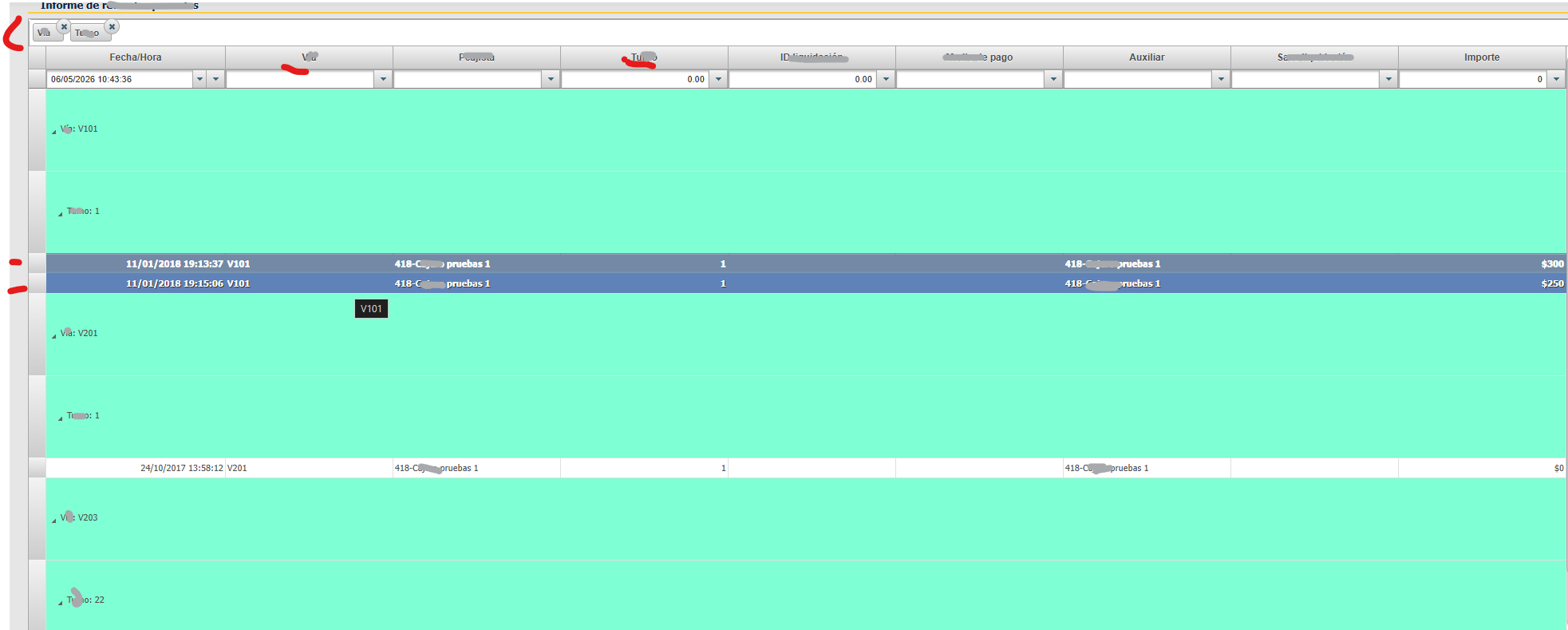
Grouping in C1GridView 2025v2 399

Posted by: enrique.pv-ext on 5 May 2026, 3:32 am EST

  • Posted 5 May 2026, 3:32 am EST - Updated 5 May 2026, 3:56 am EST

    Hi,

    Migrate from 2010v1 to 2025v2 399 in ASP.NET WebForms NET Framework 4.8.1.

    Using C1GridView from C1.Web.Wijmo.Controls.48.dll

    Dont exists properties AllowGrouping, GroupingStyle-Height, GroupByCaption, GroupingStyle-BackColor and event OnGroupColumnMoved

    GroupAreaVisible property does not exists.

    My markup OLD code:

     AllowGrouping="true" 
     GroupingStyle-Height="20" 
     GroupByCaption='<%# (string)_textsShown[150] %>'
     GroupingStyle-BackColor="Transparent"
    
    OnGroupColumnMoved="C1GridView1_GroupColumnMoved"

    Not exists OnGroupColumnMoved

    Legacy spaguetti code 2010v1 version:

        protected void C1GridView1_GroupColumnMoved(object sender, C1GridViewColumnMoveEventArgs e)
        {
      if (C1GridView1.GroupedColumns.Count == 0)
      {
          #region Without grouping fields
    
          //Save old filters 
          Object[] b = new Object[C1GridView1.Columns.Count];
          C1BaseFieldCollection col = C1GridView1.Columns;
          col.CopyTo(b, 0);
    
          //Reconfigure grid structure
          C1GridView1.Columns.Clear();
          ConfigureGridViewColumns(int.Parse(Session["reportID"].ToString()));
    
          //Apply filters
          for (int i = 0; i < C1GridView1.Columns.Count; i++)
          {
              for (int j = 0; j < b.Length; j++)
              {
                  if (C1GridView1.Columns[i].GetType() == typeof(C1BoundField))
                  {
                      if (((C1BoundField)C1GridView1.Columns[i]).DataField == ((C1BoundField)b[j]).DataField)
                      {
                          ((C1BoundField)C1GridView1.Columns[i]).FilterValue = ((C1BoundField)b[j]).FilterValue;
                          break;
                      }
                  }
              }
          }
    
          //Get datasource of grid
          C1GridView1.DataSource = Web.Util.GetGridFilterByFieldType(C1GridView1, _dataSources.Tables[0], GetConfigurationParameter(ConfigurationParamType.DefaultDatetimeFormatString), null);
          C1GridView1.DataBind();
          #endregion
      }
      else
      {
          #region Add or change grouping field
          //Grouping field
          C1BoundField fieldGroupBy = (C1BoundField)(((C1.Web.Wijmo.Controls.C1GridView.C1GridViewColumnMovedEventArgs)(e)).Column);
    
          if (C1GridView1.GroupedColumns.Count > 1)
          {
              //If there are two grouping fields, then delete and add only last grouping field selected
              C1GridView1.GroupedColumns.Clear();
              C1GridView1.GroupedColumns.Add(fieldGroupBy);
          }
    
          //Apply order by grouping field
          C1.Web.Wijmo.Controls.C1GridView.C1GridViewSortEventArgs s = new C1GridViewSortEventArgs(((C1BoundField)fieldGroupBy).SortExpression, ((C1BoundField)fieldGroupBy).SortDirection);
          C1GridView1.DataBind();
          C1GridView1_Sorting(C1GridView1, s);
          #endregion
      }

    New events in 2025v2:

      OnColumnGrouped="C1GridView1_ColumnGrouped"
      OnColumnGrouping="C1GridView1_ColumnGrouping"
      OnColumnUngrouped="C1GridView1_ColumnUngrouped"
      OnColumnUngrouping="C1GridView1_ColumnUngrouping"
      OnColumnMoved="C1GridView1_ColumnMoved"
      OnColumnMoving="C1GridView1_ColumnMoving"

    GroupInfo new 2025v2:

    var col = (C1BoundField)C1GridView1.Columns[0]; 
     
    // 2025v2 Grouping Logic 
    col.GroupInfo.GroupSingleRow = false; 
    col.GroupInfo.Position = GroupPosition.Header;  
    col.GroupInfo.OutlineMode = OutlineMode.StartExpanded; 

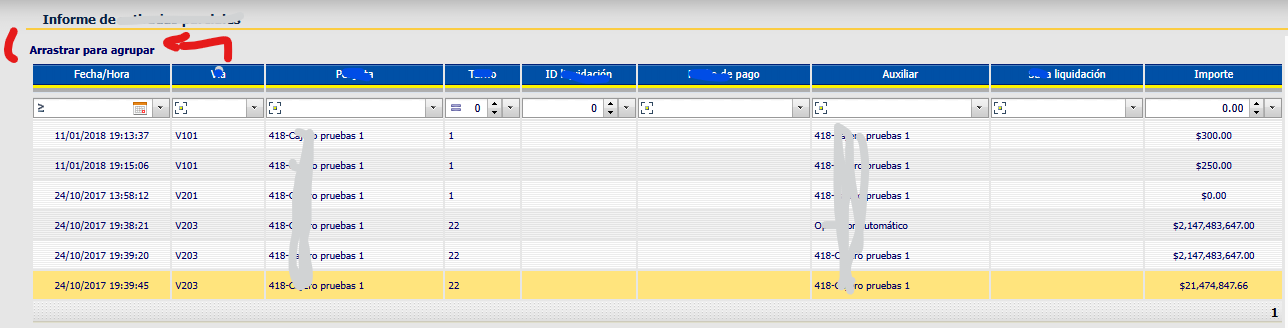
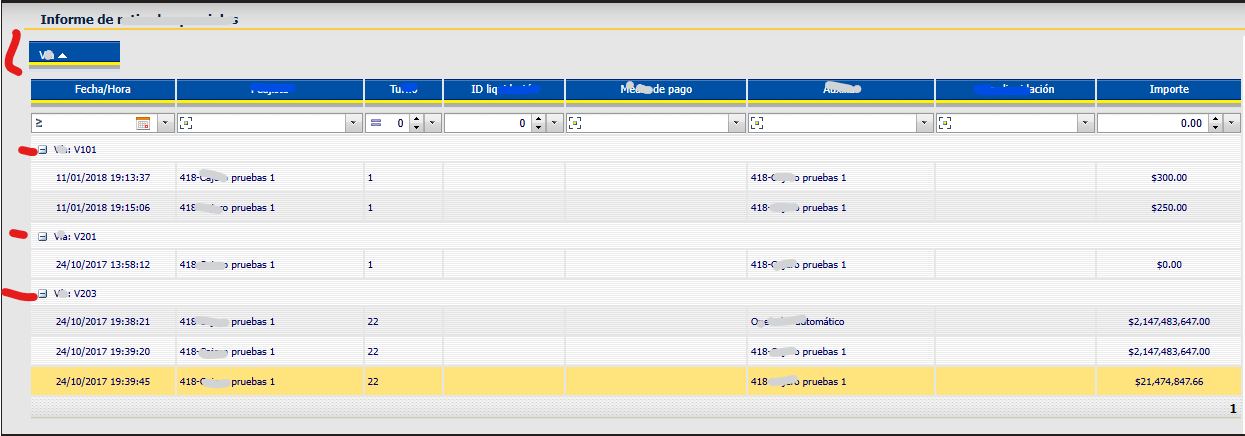
    Grouping in 2010v1 working, dragging column in “area”, and then grouping by the column.

    Gridview without not columns for group
    Gridview with a column for Group:
    Gridview with a ANOTHER column for Group:
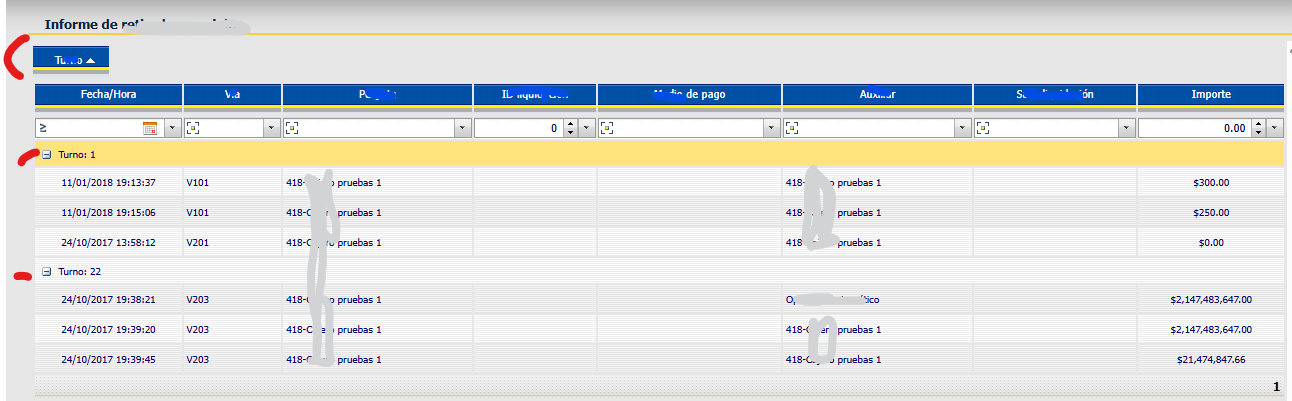
    Only ONE column for grouping.

    alternatives for use grouping in 2025v2 ?

    full sample using too OnColumnGrouped, OnColumnGrouping, OnColumnUngrouped,

    OnColumnUngrouping ?

    thanks all!

  • Posted 5 May 2026, 8:07 am EST

    Hi Kiquenet,

    We are working on your query and will get back to you as soon as possible.

    Regards,

    Akshay

  • Posted 6 May 2026, 2:00 am EST

    Hi Kiquenet,

    It seems like you have already found alternatives for almost all the properties you have mentioned above. Please refer to the attached sample.

    As for the GroupingStyle, I would suggest you to use the following CSS to set the Group header style and height

    <style>
        .wijmo-wijgrid-groupheaderrow{
            background-color:aquamarine;
            height:100px;
        }
    </style>
    

    Regards,

    AkshayC1WebForms_GridView.zip

  • Posted 6 May 2026, 5:06 am EST - Updated 6 May 2026, 5:11 am EST

    Thanks all!

    I try it

    I get this:

    I want ONLY ONE Column for Grouping, not 2 or more.

    Please, questions about it:

    What is ShowRowHeader

    Why CallbackSettings-Action=“All” ?

    Is Required ClientSelectionMode??

    Is required OnClientSelectionChanged ?

        ShowRowHeader="true" ShowGroupArea="true"
        GroupAreaCaption="Drag and drop fields here"
        CallbackSettings-Action="All"
        ClientSelectionMode="SingleRow" OnClientSelectionChanged="C1GridView1_OnClientSelectionChanged"
        OnColumnGrouped="C1GridView1_ColumnGrouped" OnColumnMoved="C1GridView1_ColumnMoved" OnColumnUngrouped="C1GridView1_ColumnUngrouped"

    I want ONLY ONE Column for Grouping, not 2 or more.,

    My legacy code

     //Grouping field
    C1BoundField fieldGroupBy = (C1BoundField)(((C1GridViewColumnMovedEventArgs)(e)).Column);
    
                      if (C1GridView1.GroupedColumns.Count > 1)
                      {
                           //If there are two grouping fields, then delete and add only last grouping field selected
                           C1GridView1.GroupedColumns.Clear();
                            C1GridView1.GroupedColumns.Add(fieldGroupBy);
                       }
    

    Alternatives for

    C1GridView1.GroupedColumns

    ((C1GridViewColumnMovedEventArgs)(e)).Column


    ?

    and backcolor grouping ? backcolor for row selected and row cursor ??

    please, any help very appreciated! thanks!!

  • Posted 7 May 2026, 1:49 am EST

    Hi,

    To enable grouping for only one column, you may update the ColumnGrouped event so it set grouping as none for all other columns.

    Sample Code

            protected void C1GridView1_ColumnGrouped(object sender, C1.Web.Wijmo.Controls.C1GridView.C1GridViewColumnGroupedEventArgs e)
            {
                // Loop through all columns currently in the grid
                foreach (C1BoundField col in C1GridView1.Columns)
                {
                    // If the column in the loop is NOT the one the user just grouped...
                    if (col != e.Drag)
                    {
                        col.GroupInfo.Position = C1.Web.Wijmo.Controls.C1GridView.GroupPosition.None;
                    }
                }
                // Rebind the grid to reflect the updated, single-column grouping
                BindGrid();
            }
    

    The styling issues can be handled with CSS like the one below

            <style>
                tr.wijmo-wijgrid-row.wijmo-wijgrid-groupheaderrow{
                    background-color:lemonchiffon;
                    height:30px;
                }
                .wijmo-wijgrid tr.wijmo-wijgrid-row.ui-state-hover td:not(.wijmo-wijgrid-rowheader){
                    background:antiquewhite;
                    background-color:antiquewhite;
                    cursor: pointer;
                    
                }
                .wijmo-wijgrid-row.wijmo-wijgrid-datarow .wijgridtd[aria-selected="true"]{
                    background-color:burlywood;
                    border-color:darksalmon;
                }
            </style>
    

    Please refer to the attached sample below

    C1WebForms_GridView.zip

  • Posted 7 May 2026, 8:33 am EST

    IMHO, this is not required in C1GridView1_ColumnGrouped:

    Only e.Drag column has .GroupInfo.Position value not None.

        foreach (C1BoundField col in C1GridView1.Columns)
         {
             // If the column in the loop is NOT the one the user just grouped...
             if (col != e.Drag)
             {
                 col.GroupInfo.Position = C1.Web.Wijmo.Controls.C1GridView.GroupPosition.None;
             }
         }

    What is GroupSingleRow property ?

    Whats means Position: Header or Footer ?

    What is OutlineMode OutlineMode.StartExpanded ?

    ColumnGrouped event:

    And what is e.Drag vs e.Drop ? differences ?

    whats means e.Position; ?

    What is DestIndex?

    protected void C1GridView1_ColumnGrouped(object sender, C1.Web.Wijmo.Controls.C1GridView.C1GridViewColumnGroupedEventArgs e)
            {
                // Example: Notify the user which column is now primary for grouping
                string colName = e.Drag.HeaderText;
                var x = e.Drop?.HeaderText;
                var pos = e.Position;
                var id = e.DestIndex;

    I can count grouped columns like this ?

       var groupedColumns = new List<string>();
       foreach (C1BaseField baseField in C1GridView1.Columns)
       {
           var col = baseField as C1BoundField;
           if (col == null)
           {
               continue;
           }
    
           var position = col.GroupInfo != null ? col.GroupInfo.Position : GroupPosition.None;
           if (position != GroupPosition.None)
           {
               groupedColumns.Add(!string.IsNullOrEmpty(col.DataField) ? col.DataField : (col.HeaderText ?? string.Empty));
           }
       }
    
       var groupedCount = groupedColumns.Count;
       var groupedColumnsText = string.Join(", ", groupedColumns);
       Logger.Info(string.Format("Grouped columns count: {0}. Grouped columns: {1}", groupedCount, groupedColumnsText));

    Thanks all,

  • Posted 8 May 2026, 2:51 am EST

    Hi,

    >> IMHO, this is not required in C1GridView1_ColumnGrouped: Only e.Drag column has .GroupInfo.Position value not None.

    In my testing, if I do not re-bind the data the grouping only groups the data based on the first page and then after I change the page the data is recalculated.

    As for the property info, please check the following pages of our API Doc:

    >> I can count grouped columns like this ?

    Yes, yoou can check the GroupInfo position to get the count.

    Regards,

    Akshay

  • Posted 8 May 2026, 3:58 am EST

    Thanks Akshay!

    The ONLY way is check the GroupInfo position to get the count, isn’t ?

    How to get Sort Expression for Group Columns (GroupInfo)?

    In older version, legacy code:

    gridView.GroupedColumns[0].SortExpression

     //Group grid datasource 
       var result = from row in GetGridFilterByFieldType(gridView, mainTable, appDateFormat, sortEventArgs).AsEnumerable()
                          group row by new
                          {
                              Name = row.Field<object>(gridView.GroupedColumns[0].SortExpression)
                          } into grp
                          select new
                          {
                              NAME = grp.Key.Name,
                              COUNT = grp.Count(),
                          };
    
            DataTable dt = result.ToList().ToDataTable();
             dt.Select(null, (gridView.GroupedColumns[0].SortDirection == C1SortDirection.Ascending ? "Name ASC" : "Name DESC"));
  • Posted 11 May 2026, 2:02 am EST

    Hi,

    >> The ONLY way is check the GroupInfo position to get the count, isn’t ?

    For count, you can also check for grouped index like

            protected void C1GridView1_ColumnGrouped(object sender, C1.Web.Wijmo.Controls.C1GridView.C1GridViewColumnGroupedEventArgs e)
            {
                var groupedColumns = new List<string>();
                foreach (C1Field baseField in C1GridView1.Columns)
                {
                    var col = baseField as C1BoundField;
                    if (col == null)
                    {
                        continue;
                    }
    
                    var index = col.GroupedIndex;
    
                    if (index != -1)
                    {
                        groupedColumns.Add(!string.IsNullOrEmpty(col.DataField) ? col.DataField : (col.HeaderText ?? string.Empty));
                    }
                }
    
                var groupedCount = groupedColumns.Count;
                var groupedColumnsText = string.Join(", ", groupedColumns);
                BindGrid();
            }
    

    >> How to get Sort Expression for Group Columns (GroupInfo)?

    AFAIK, there should be a SortExpression or SortDirection field on Column. If that doesn’t work for you, I would suggest that you create a new case for the same.

Need extra support?

Upgrade your support plan and get personal unlimited phone support with our customer engagement team

Learn More

Forum Channels