
Posted 15 October 2026, 10:55 am EST - Updated 16 October 2026, 2:38 am EST
Hi,
Migrate from 2010v1 to 2026v1 413 in ASP.NET WebForms NET Framework 4.8.1.
Using C1GridView from C1.Web.Wijmo.Controls.48.dll
   gridLists.DataSource = Context.Cache["CenterLists"];

   gridLists.Columns[0].HeaderText = (string)_textsShown[14];
   gridLists.Columns[1].HeaderText = (string)_textsShown[15];
   gridLists.Columns[2].HeaderText = (string)_textsShown[32];
   gridLists.Columns[3].HeaderText = (string)_textsShown[33];
   gridLists.Columns[4].HeaderText = (string)_textsShown[64];
   gridLists.Columns[5].HeaderText = (string)_textsShown[65];
   gridLists.EmptyDataText = (string)_textsShown[45];

   gridLists.DataBind();
                                        <cc1:C1GridView ID="gridLists"
                                            runat="server"
                                            AllowPaging="false"
                                            AllowSorting="false"
                                            Height="800px"
                                            Width="100%"
                                            ClientIDMode="AutoID"
                                            ScrollingSettings-Mode="Vertical"
                                            ShowFilter="True"
                                            AutogenerateColumns="false"
                                            ShowFooter="False"
                                            AllowGrouping="True"

                                            GroupAreaCaption="agrupacion"
                                            ShowRowHeader="true" ShowGroupArea="true"
                                            AllowColMoving="true"
                                            CallbackSettings-Action="None"

                                            OnColumnMoved="gridLists_ColumnMoved"
                                            OnColumnGrouped="gridLists_ColumnGrouped"
                                            OnColumnGrouping="gridLists_ColumnGrouping"
                                            OnColumnUngrouping="gridLists_ColumnUngrouping"
                                            OnColumnUngrouped="gridLists_ColumnUngrouped"

                                            OnFiltering="gridLists_Filter"
                                            OnPageIndexChanging="gridLists_PageIndexChanging"
                                            OnSorting="gridLists_Sorting"
                                            OnSorted="gridLists_Sorted"
                                            OnRowDataBound="gridLists_DataBound"
                                            OnRowCreated="gridLists_OnRowCreated">
                                            <EditRowStyle ForeColor="Black" BackColor="#FFFFCC" HorizontalAlign="Left" />
                                            <FooterStyle HorizontalAlign="Left" />
                                            <SelectedRowStyle HorizontalAlign="Left" />
                                            <RowStyle HorizontalAlign="Left" Height="22px" />
                                            <AlternatingRowStyle HorizontalAlign="Left" />
                                            <FilterStyle HorizontalAlign="Left" />
                                            <HeaderStyle HorizontalAlign="Left" Height="25px" />

                                            <%--                                            <RowHeader></RowHeader>--%>
                                            <Columns>
                                                <cc1:C1BoundField DataField="FECHA" SortExpression="FECHA">
                                                    <ItemStyle HorizontalAlign="Center" Width="250px" />
                                                </cc1:C1BoundField>
                                                <cc1:C1BoundField DataField="LUGAR" SortExpression="LUGAR" Visible="false">
                                                    <GroupInfo Position="Header" OutlineMode="StartCollapsed"></GroupInfo>
                                                    <ItemStyle HorizontalAlign="Left" Width="150px" />
                                                </cc1:C1BoundField>
                                                <cc1:C1BoundField DataField="TIPO_LISTA" SortExpression="TIPO_LISTA">
                                                    <ItemStyle HorizontalAlign="Left" Width="400px" />
                                                </cc1:C1BoundField>
                                                <cc1:C1BoundField DataField="VERSION" SortExpression="VERSION">
                                                    <ItemStyle HorizontalAlign="Left" Width="150px" />
                                                </cc1:C1BoundField>
                                                <cc1:C1BoundField DataField="SEP_VERSION" SortExpression="SEP_VERSION">
                                                    <ItemStyle HorizontalAlign="Left" />
                                                </cc1:C1BoundField>
                                                <cc1:C1BoundField DataField="SEP_DATE_TIME" SortExpression="SEP_DATE_TIME">
                                                    <ItemStyle HorizontalAlign="Center" Width="250px" />
                                                </cc1:C1BoundField>
                                            </Columns>
                                        </cc1:C1GridView>
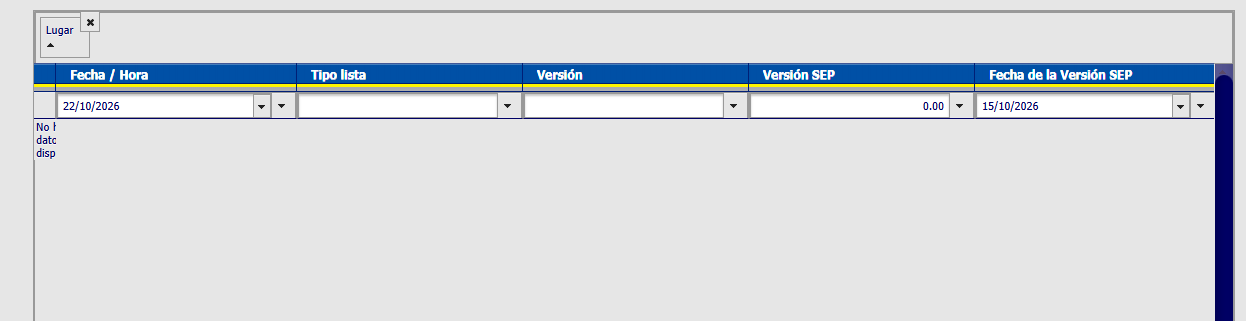
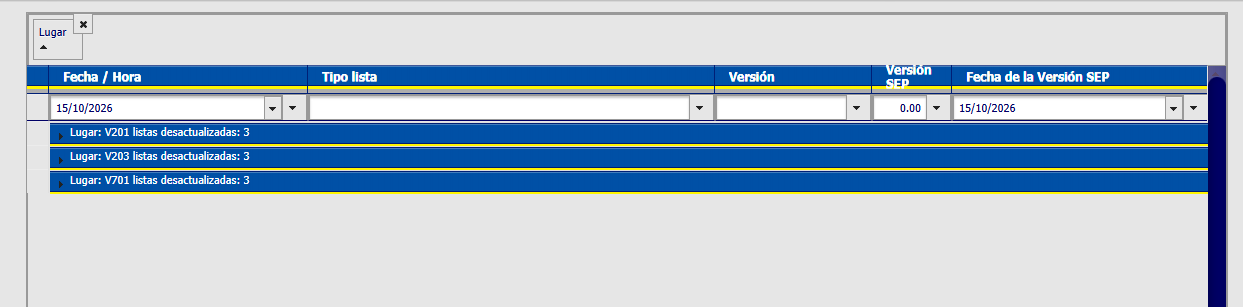
in older version, its appears

any help please , friends ? thanks all!!