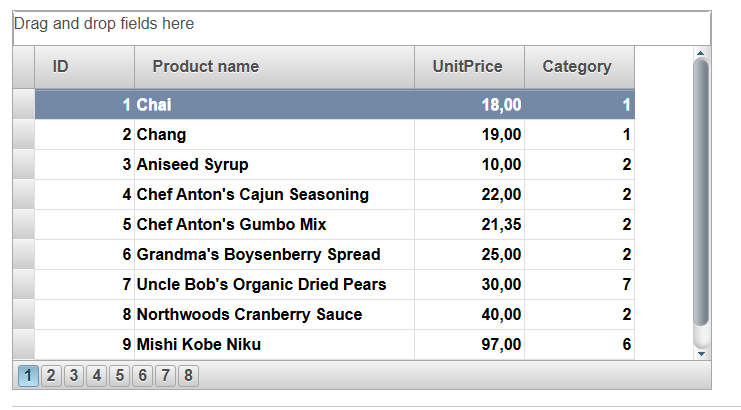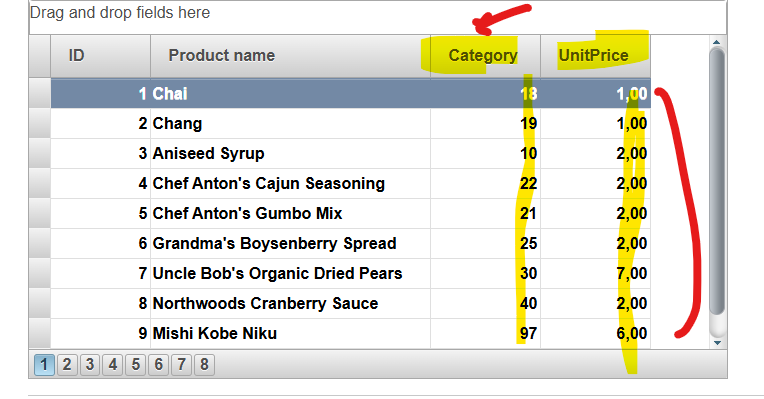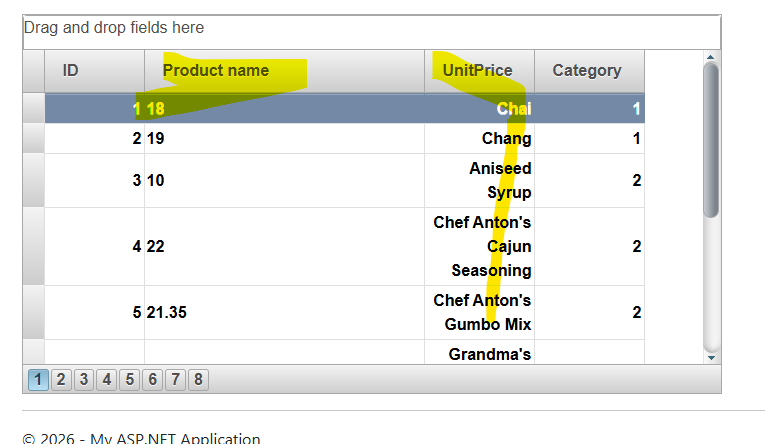
Posted 5 May 2026, 3:51 am EST - Updated 5 May 2026, 4:02 am EST
Hi,
Migrate from 2010v1 to 2025v2 399 in ASP.NET WebForms NET Framework 4.8.1.
Using C1GridView from C1.Web.Wijmo.Controls.48.dll
Dont exists event OnGroupColumnMoved
GroupAreaVisible property does not exists.
My markup OLD code:
OnGroupColumnMoved="C1GridView1_GroupColumnMoved"Not exists OnGroupColumnMoved
Legacy spaguetti code 2010v1 version:
    protected void C1GridView1_GroupColumnMoved(object sender, C1GridViewColumnMoveEventArgs e)
    {
  if (C1GridView1.GroupedColumns.Count == 0)
  {
      #region Without grouping fields

      //Save old filters
      Object[] b = new Object[C1GridView1.Columns.Count];
      C1BaseFieldCollection col = C1GridView1.Columns;
      col.CopyTo(b, 0);

      //Reconfigure grid structure
      C1GridView1.Columns.Clear();
      ConfigureGridViewColumns(int.Parse(Session["reportID"].ToString()));

      //Apply filters
      for (int i = 0; i < C1GridView1.Columns.Count; i++)
      {
          for (int j = 0; j < b.Length; j++)
          {
              if (C1GridView1.Columns[i].GetType() == typeof(C1BoundField))
              {
                  if (((C1BoundField)C1GridView1.Columns[i]).DataField == ((C1BoundField)b[j]).DataField)
                  {
                      ((C1BoundField)C1GridView1.Columns[i]).FilterValue = ((C1BoundField)b[j]).FilterValue;
                      break;
                  }
              }
          }
      }

      //Get datasource of grid
      C1GridView1.DataSource = Web.Util.GetGridFilterByFieldType(C1GridView1, _dataSources.Tables[0], GetConfigurationParameter(ConfigurationParamType.DefaultDatetimeFormatString), null);
      C1GridView1.DataBind();
      #endregion
  }
  else
  {
      #region Add or change grouping field
      //Grouping field
      C1BoundField fieldGroupBy = (C1BoundField)(((C1.Web.Wijmo.Controls.C1GridView.C1GridViewColumnMovedEventArgs)(e)).Column);

      if (C1GridView1.GroupedColumns.Count > 1)
      {
          //If there are two grouping fields, then delete and add only last grouping field selected
          C1GridView1.GroupedColumns.Clear();
          C1GridView1.GroupedColumns.Add(fieldGroupBy);
      }

      //Apply order by grouping field
      C1.Web.Wijmo.Controls.C1GridView.C1GridViewSortEventArgs s = new C1GridViewSortEventArgs(((C1BoundField)fieldGroupBy).SortExpression, ((C1BoundField)fieldGroupBy).SortDirection);
      C1GridView1.DataBind();
      C1GridView1_Sorting(C1GridView1, s);
      #endregion
  }
New events in 2025v2:
  OnColumnMoved="C1GridView1_ColumnMoved"
  OnColumnMoving="C1GridView1_ColumnMoving"
I try add ColumnMoved event:
        protected override void OnInit(EventArgs e)
        {
            base.OnInit(e);
            //C1GridView1.GroupColumnMoved += new C1GridViewGroupColumnMovedEventHandler(C1GridView1_GroupColumnMoved);
            C1GridView1.ColumnMoved += C1GridView1_ColumnMoved;
            //C1WebReport.ReportError += new C1.C1Report.ReportEventHandler(C1WebReport_ReportError);
        }

        private void C1GridView1_ColumnMoved(object sender, C1.Web.Wijmo.Controls.C1GridView.C1GridViewColumnMovedEventArgs e)
        {
            throw new NotImplementedException();
        }
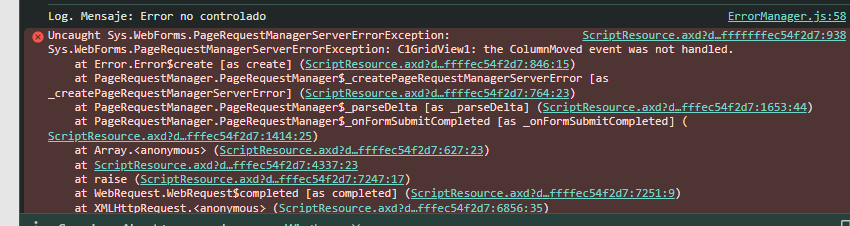
ColumnMOved event not handled in console?
any full samples using columns moving and working when I moved column A, then move column B, etc?
OnColumnMoved and OnColumnMoving events ?
thanks all!