
Posted 25 March 2026, 10:24 am EST - Updated 26 March 2026, 3:21 am EST
Hi,
Migrate from 2010v1 to 2025v2 399 in ASP.NET WebForms NET Framework 4.8.1.
Using C1InputDate from C1.Web.Wijmo.Controls.48.dll
Changes C1DateInput to C1InputDate control.
Before, Date property for C1DateInput can be not null
Now, Date can be nullable
I update txtToDateTime.Date, but not shown in page:
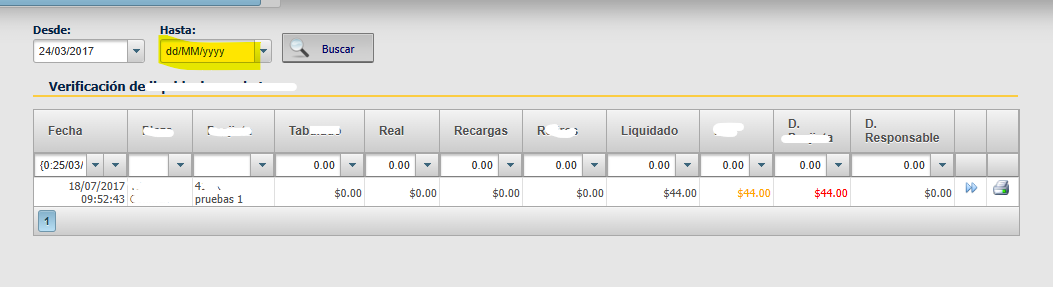
My code, in method for search. GridView in updatePanel,
InputDate controls OUT of updatePanels. Search Button is within updatePanel
I try use c1inputdate in javascript, but not working. It’s not shows value in control
string fechaHasta = string.Empty;
  string fechaDesde = string.Empty;

  DateTime dateA;
  DateTime dateB;


  if (!txtToDateTime.Date.HasValue)
  {
      txtToDateTime.Date = DateTime.Now;

      var dateString = txtToDateTime.Date.Value.ToString("dd/MM/yyyy");

      ScriptManager.RegisterStartupScript(
          this,
          GetType(),
          "refreshC1Date" + Guid.NewGuid(),
          $"$('#{txtToDateTime.ClientID}').c1inputdate('option', 'value', '{dateString}');",
          true
      );
  }


  fechaDesde = txtFromDateTime.Date.Value.ToShortDateString() + " 12:00 am";
  fechaHasta = txtToDateTime.Date.Value.ToShortDateString() + " 23:59 pm";

  dateA = Convert.ToDateTime(fechaDesde);
  dateB = Convert.ToDateTime(fechaHasta);
Markup aspx
<cli:C1InputDate ID="txtToDateTime" runat="server" Width="105px"
                DateFormat="dd/MM/yyyy" Culture="Spanish (Peru)"
                 DropDownButtonAlign="Right" PopupPosition-At-Left="Right" />

                 <%--ShowWeekNumbers="false" ClientOnAfterClose="CalendarClosedDesde" FirstDayOfWeek="Monday" CalendarTitle="{0:dd} de {1:MMMM} de {2:yyyy}" MonthViewTitle="{0:MMMM} de {1:yyyy}"--%>
            <cc4:C1Calendar ID="C1Calendar3" runat="server" Style="font-size: xx-small"
                Height="180px" Width="230px"
                PopupMode="True" WeekDayFormat="Abbreviated" AllowPreview="false"
                ShowWeekNumbers="false"
                TitleFormat="dd 'de' MMMM 'de' yyyy"
                MonthViewTitleFormat="MMMM 'de' yyyy" />
        </div>
    </div>
    <div class="botones" style="float: left; padding-top: 13px;">
        <asp:UpdatePanel ID="UpdatePanelDateSearch" runat="server">
            <ContentTemplate>
                <asp:LinkButton ID="ButtonViewGrid" runat="server"
                    CausesValidation="false" OnClick="ButtonViewGrid_Click">
                    <asp:Label ID="lblBtnButtonViewGrid" CssClass="search" runat="server" Text="Buscar"></asp:Label>
                </asp:LinkButton>
            </ContentTemplate>
        </asp:UpdatePanel>
        <asp:UpdateProgress ID="UpdateProgress5" runat="server" DynamicLayout="true"
            AssociatedUpdatePanelID="UpdatePanelDateSearch" DisplayAfter="100">
            <ProgressTemplate>
                <div class="UpdateProgressFullScreen">
                    <div class="UpdateProgressInside">
                        <asp:Image ID="Image5" runat="server"
                            ImageUrl="~/App_Themes/Content/Imagenes/cargando2.gif" AlternateText="Cargando" />
                    </div>
                </div>
            </ProgressTemplate>
        </asp:UpdateProgress>
    </div>
</div>
any suggestions ?

