C1DateInput to C1InputDate 2025v2 399

Posted by: enrique.pv-ext on 19 February 2026, 4:09 am EST

    • Post Options:
    • Link

    Posted 19 February 2026, 4:09 am EST

    Hi,

    Migrate from 2010v1 to 2025v2 399 in ASP.NET WebForms NET Framework 4.8.1.

    Using C1InputDate from C1.Web.Wijmo.Controls.48.dll

    Changes C1DateInput to C1InputDate control.

    Now those properties not appears:

    webcalendar="C1Calendar2"
    webcalendarpopupposition="Below"
    custombuttonalign="Right"
    
    useembeddedvisualstyles="False" 
    visualstyle="Vista"
    visualstylepath="~/VisualStyles"

    any suggestions for alternatives other properties ?

  • Posted 20 February 2026, 9:08 am EST

    Hello Enrique,

    We’re investigating the alternatives and will update you once we have more information.

    Regards,

    Uttkarsh.

  • Posted 23 February 2026, 2:17 am EST

    Hello Enrique,

    • webcalendar=“C1Calendar2”: We have escalated this to the development team to see if there are any alternative for this property. Could you please share the exact use-case of this property? What was its function and how was it set?

      [Internal Tracking ID: C1WEB-30340]

    • webcalendarpopupposition=“Below”: You can use the properties starting with “PopupPosition-*” to configure pop-up position.

    • custombuttonalign=“Right”: You can use the “DropDownButtonAlign” property to set the button position.

    • Legacy Styling properties: Legacy styling properties are not used anymore, please use CSS based styling instead.

    Sample: InputDate_Sample.zip

    Regards,

    Uttkarsh.

  • Posted 23 February 2026, 4:49 am EST - Updated 23 February 2026, 4:56 am EST

    Thanks at all.

    webcalendar=“C1Calendar2” references the ID of Calendar control.

    C1Calendar2 is the ID of my calendar control in my page.

    Please, which is the alternative value for webcalendarpopupposition=“Below” using PopupPosition?

    PopupPosition-At-Left="Right"

    thanks all in advanced

  • Posted 24 February 2026, 3:23 am EST - Updated 24 February 2026, 3:28 am EST

    Hello Enrique,

    Regarding “webcalendar” property, there is a “Calendar” string-type property in new C1InputDate which determines the calendar element for a date input. Could you please confirm if it works for your use-case? If you face any issues, please let us know the details such as expected (previous) behavior and current behavior.

    For “webcalendarpopupposition=“Below””, we’re not exactly sure how you are displaying the calendar at your end, so we suggested relevant properties that can help you display the calendar at intended position.

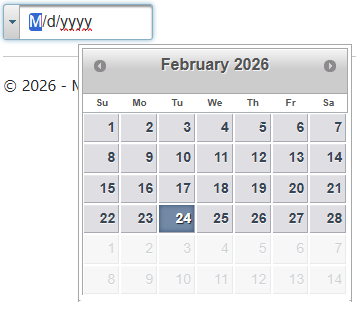
    For example, if you want to display the calendar at bottom - starting at center, you can use the following combination:

    PopupPosition-At-Left="Center" PopupPosition-At-Top="Bottom"

    This will result in the following:

    Regards,

    Uttkarsh.

  • Posted 24 February 2026, 4:53 am EST

    Thanks all!

    Now, I cannot test it, I get error LicenseException, the trial expired.

  • Posted 25 February 2026, 12:28 am EST

    Hello Enrique,

    We hope you have received the trial extension and had the opportunity to test the solution we provided. It appears that the issue has been resolved at your end.

    If you need any further assistance or have additional questions, please feel free to reach out.

    Regards,

    Uttkarsh.

Need extra support?

Upgrade your support plan and get personal unlimited phone support with our customer engagement team

Learn More

Forum Channels