
VS Code Extension Corrupts ActiveX buttons

Posted by: bberkhouse on 11 June 2026, 4:49 pm EST

  • Posted 11 June 2026, 4:49 pm EST - Updated 11 June 2026, 4:54 pm EST

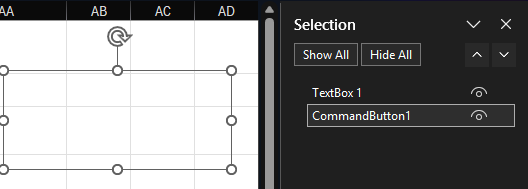
    While using the SpreadJS XLSX Editor extension (Version 19.1.2 on 6/11/26) in VS Code (Version 1.124), I selected an .xlsm file in my repo and viewed the file but made no edits. When accessing the file again through Microsoft Excel, the ActiveX buttons embedded within the file were no longer visible. Upon further investigation I discovered that they had been converted into shapes and were “invisible” (no fill, no text, no outline) & could only be seen when using the “Selection Pane”. Is there a fix for this?

  • Posted 12 June 2026, 8:18 am EST

    Hi,

    Thank you for sharing the image with us. We tried to reproduce the behavior on our end using the available information, but were unable to do so.

    Could you please share the file in which you are experiencing the issue? If it contains confidential information, you may replace it with dummy data or create a case through the private portal and share it there. Additionally, please provide the exact steps you followed to reproduce the behavior.

    Additionally, It would also be helpful if you could share a GIF or video demonstrating the issue, as this will help us investigate it more effectively.

    Regards,

    Priyam

Need extra support?

Upgrade your support plan and get personal unlimited phone support with our customer engagement team

Learn More

Forum Channels