Posted 9 June 2026, 3:10 am EST
- Updated 9 June 2026, 3:15 am EST
Hi,
What Is Currently Supported
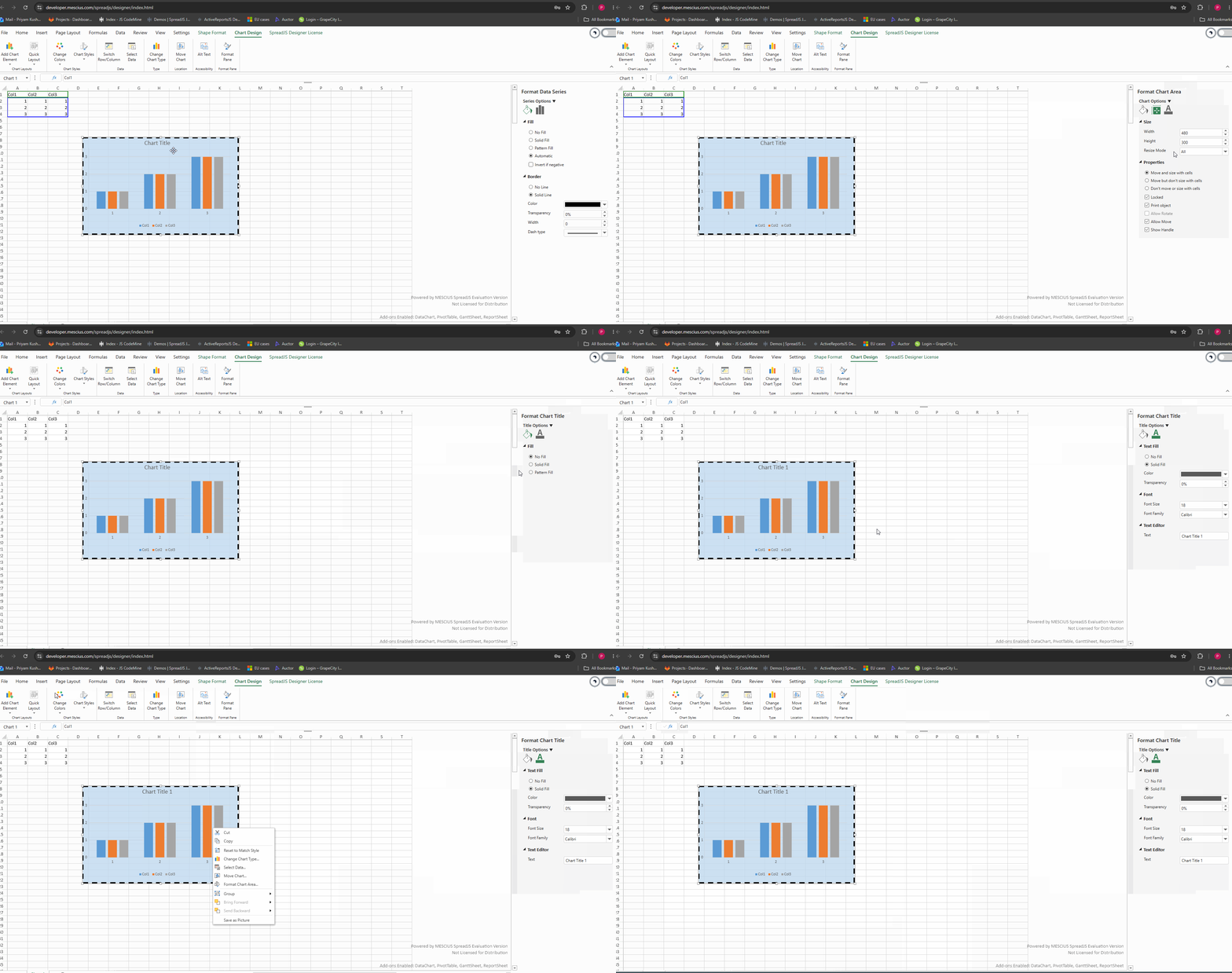
While direct in-chart element selection and inline title editing are not available at this time, SpreadJS does provide three ways to customise your charts after creation:
Chart Side Panel — accessible when a chart is selected, allowing you to update the chart title, modify series data, adjust axes, change chart type, and configure most visual properties.
Ribbon — contextual chart tabs appear in the ribbon when a chart is selected, giving you formatting and configuration options consistent with a spreadsheet toolbar workflow.
Context Menu — right-clicking on a chart surfaces a context menu with quick access to common chart actions.
Please refer to the attached GIF which demonstrates all three of these workflows in action:
What Is Not Yet Supported
We understand that in Microsoft Excel, users can:
Click directly on the chart area or individual chart elements to select them.
Double-click the chart title to edit it inline without leaving the chart.
At this time, direct in-chart interaction of this kind is not available in SpreadJS, and chart properties will need to be managed through the side panel, ribbon, or context menu as outlined above. That said, we have raised this with our development team to assess whether this can be supported in a future release — the internal tracking reference for this request is SJS-35081. We will keep you updated as soon as we hear back and have more information to share.
Best regards,
Priyam