
Unable to hide formula popup and function help popup at cell level

Posted by: soumen.choudhury on 20 November 2018, 11:25 pm EST

    • Post Options:
    • Link

    Posted 20 November 2018, 11:25 pm EST - Updated 3 October 2022, 11:03 am EST

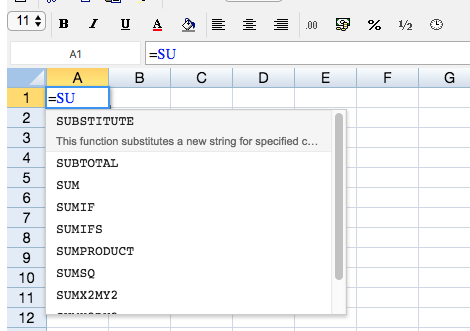
    Is there any way to hide formula popup and function help popup at cell level in Spread JS 11?

    We used autocomplete(false) and showHelp(false) to hide those popups in formula text box, but those call are not doing anything at the cell level.

    This is one of major functionality we are looking for. It used to work perfectly fine in Spread JS 9.

  • Posted 21 November 2018, 8:16 am EST

    Hello,

    I am able to replicate this issue at my end. I have informed the development team about this. I will let you know as soon as I get an update on it. The tracking id for this is #267506

    Thanks,

    Deepak Sharma

  • Posted 25 November 2018, 9:22 pm EST

    Hi Deepak,

    Any update on this issue?

  • Posted 26 November 2018, 3:13 am EST

    Hi Soumen,

    As per the development team, the showHelp and autoComplete is instance level method. in the sample, set it to true or false could only control the outside formula text box instance.

    You would need to disable the formulaTextBox used in cells internally using the code as follows:

    spread.options.enableFormulaTextbox = false

    http://help.grapecity.com/spread/SpreadSheets12/webframe.html#SpreadJS~GC.Spread.Sheets.Workbook~options.html

    Thanks,

    Deepak Sharma

  • Posted 26 November 2018, 1:37 pm EST

    Thanks Deepak.

    Its working as expected.

Need extra support?

Upgrade your support plan and get personal unlimited phone support with our customer engagement team

Learn More

Forum Channels