Posted 2 March 2022, 12:39 pm EST - Updated 3 October 2022, 9:21 am EST
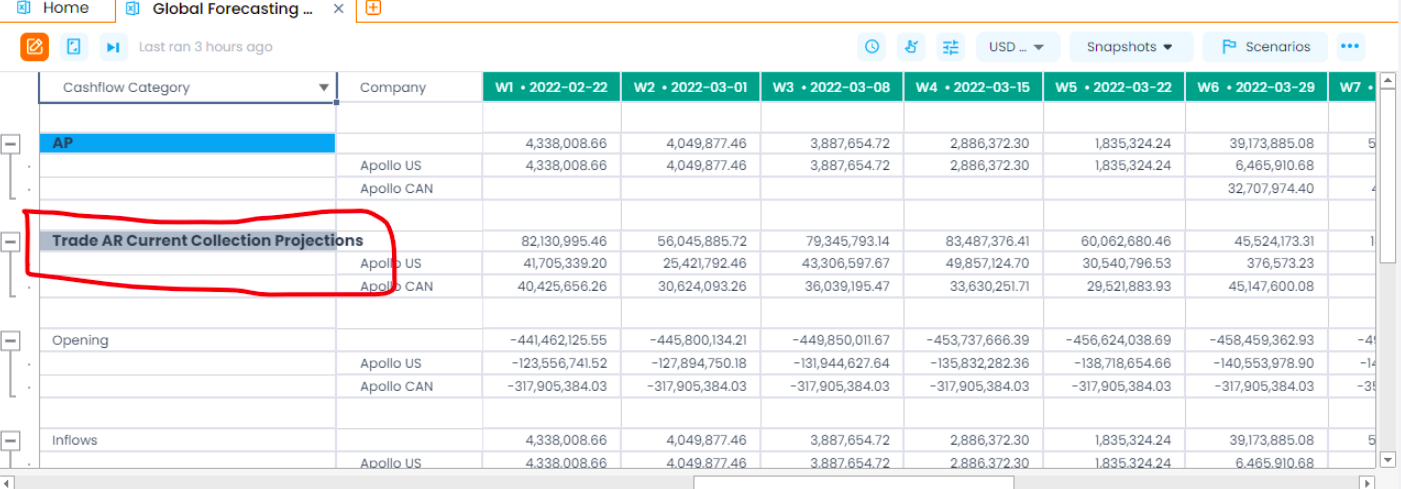
Text outflow Issue in Spreadjs Sheet
Posted by: seshareddy.kamaganiguntla on 2 March 2022, 12:39 pm EST
-

seshareddy.kamaganiguntla
-

ankit.kumar

Posted 3 March 2022, 4:39 am EST
Hi,
We were unable to replicate the issue at our end. Please share a working sample and the steps you have followed so that we can investigate it at our end and assist you accordingly.
Regards
Ankit -
seshareddy.kamaganiguntla
Posted 3 March 2022, 10:52 am EST
We have used used general formatter and modified it:
-
const CustomFormatType = new GC.Spread.Formatter.GeneralFormatter(‘’,‘’);
-
const formatterProducer = (formatter : GC.Spread.Formatter.GeneralFormatter ) => {
return function (obj: any, formattedData: any) {
if (typeof obj === “number”) {
return formatNumber(obj, formattedData,formatter);
}
else if (typeof obj === “string”) {
if (Number.isFinite(Number(obj))) {
return formatNumber(parseFloat(obj), formattedData, formatter);
}
}
return obj ? obj.toString() : “”;
}
} -
CustomFormatType.format = formatterProducer(gFormatter);
-
const formatNumber = (value: any, formattedData: any, formatter : GC.Spread.Formatter.GeneralFormatter) => {
formatter.format(value, formattedData);
let content: any = ;
let pushToContent = false;
formattedData.content.forEach((item: any) => {
switch (item.type) {
case “decimalSeparator”:
item.value = userState.decimalsSeparator;
content.push(item);
break;case "groupSeparator": item.value = userState.thousandsSeparator; content.push(item); break; case "text": if (item.value === ' ') { if (pushToContent) { item.value = userState.thousandsSeparator; content.push(item); } } else { content.push(item); } break; case "number": content.push(item); pushToContent = true; break; default: content.push(item); } }) formattedData.content = content; return value;}
-
console of gformatter:
Object { formatCached: “(#,##0.0);(-#,##0.0);0.0;[Red](@)”, cultureName: “en-us”, typeName: “”, Sd: false, PropertyChanged: , formatters: (4) […], hasAt: true, expressionNumber: 3 }
-
-
ankit.kumar
Posted 4 March 2022, 7:12 am EST
Hi,
We are still unable to replicate the issue at our end. Could you please share a working sample and the steps you have followed so that we can investigate at our end and assist you accordingly.
You can also modify the sample and share back to us: https://jscodemine.grapecity.com/share/UmQi3xkNJEOeMhA9a3ZH_g/
Regards
Ankit
-
seshareddy.kamaganiguntla
Posted 30 March 2022, 7:23 am EST
Hii ,
Sorry for late reply , We were able to replicate the issue in the sandbox .
Here is the link for the sandbox
https://jscodemine.grapecity.com/share/gBJAxaXlQE2CZba9WkQn3A/?isEmbed=true&isExplorerShow=false[img]https://gccontent.blob.core.windows.net/forum-uploads/file-2681162f-f0a6-44d9-8633-841b29cb4e05.png[/img] -
ankit.kumar
Posted 31 March 2022, 12:29 am EST
Hi Sesha,
We found out that you are formatting the value using the general formatter in the formatNumber function (Line no. 75 in the app.js file). The format method formats the specified object as a string with a formatter data object. While returning from the formatNumber function, you should return the new formatted string.
Changes I have made to the code with respect to file app.js
- Store the formatted string in a new variable called newFormattedValue (Line no. 75).
- Return the formatted string from the formatNumber function(Line no. 114).
Format Method: https://www.grapecity.com/spreadjs/docs/latest/online/SpreadJS~GC.Spread.Formatter.GeneralFormatter~format.html
You can also refer to the following case that discusses the similar issue: https://www.grapecity.com/forums/spreadjs/autofitrowautofitcolumn-wi_1
Modified Sample: https://jscodemine.grapecity.com/share/m-kkPrw51UaPCclgvN8Hdw/
Please let us know if you need further assistance on this.
Regards
Ankit