Tabs customization, add custom component into cells

Posted by: k.szabariova on 5 July 2021, 6:18 am EST

    • Post Options:
    • Link

    Posted 5 July 2021, 6:18 am EST

    Hello,

    I discovered SpreadJS with React last week and went through most demos and documentation but there are few things I need to be able to do before choosing this library, that I am not sure are possible as I couldn’t find them.

    1. Is there a way to place a custom button into a tab box (where you are switching between sheets)?

    2. How to listen to an event when user clicks the “add new tab” button (+). I want to override the default functionality (adding new sheet) with my own functionality (adding some modal window etc).

    3. Is it possible to input custom React component inside a cell? I want to place a ReactSelect inside a cell. I am aware you have some Dropdowns “Lists”, but that is not very customisable (user can’t filter options by typing or add a new option, I’m not sure if they are style-able). So using a custom React component would be preferred to my needs.

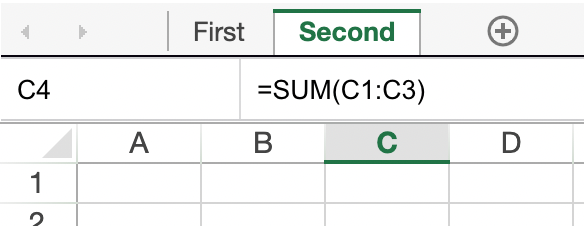
    4. Is it possible to add a “formula bar” in between sheet and the tabs? So I would need to be able to move tabs row a litter further away from the sheet, to be able to place my own custom row (with some added functionality) in between.

    Thank you for your reply,

    Kind regards,

    Kristina

  • Posted 6 July 2021, 3:22 am EST

    Hello,

    1. We are sorry but this feature is not supported.in SpreadJS. We are sorry for the inconvenience.

    2. You may use the SheetChanging event for the required functionality. Please refer to the following code snippet and let us know if you face any issues.

    
        spread.bind(GC.Spread.Sheets.Events.SheetChanging, (e: any, args: any) => {
          if (args.propertyName === "insertSheet") {
            console.log("SheetInsertButton Clicked");
            //prevent the default behaviour
            args.cancel = true;
          }
        });


    SheetChanging: https://www.grapecity.com/spreadjs/docs/v14/online/SpreadJS~GC.Spread.Sheets.Events~SheetChanging_EV.html

    1. this issue needs further investigation hence we have escalated this issue to our Devs. We will update you once we get any information from the team. The internal ID for this issue will be SJS-9154.

    2. We are sorry but we not able to understand the use case. Could you please explain more about the use case that you are trying to implement so that we could have a better understanding of the issue and assist you accordingly?

    Regards

    Avinash

  • Posted 6 July 2021, 7:30 am EST - Updated 3 October 2022, 9:44 am EST

    Thank you for prompt response.

      • This would be super useful, it would give me a lot of power to my hadns. Looking forward to hearing back from you about this. And if not, please let me know what is some “hacky” way to do it. For reference, I found * “https://codesandbox.io/s/spread-js-starter-sztlx
      • I include picture to make it clear what I want - my custom formula bar would be between tabs bar and spreadsheet.
  • Posted 7 July 2021, 7:43 am EST

    Hi,

    1. Yes, Implementing the custom cell would be the recommended approach but we are not custom Cell support the React component that is why have asked regarding the issue to our Devs. We will update you once we get any findings related this issue.

    2. Thanks for the information but we are sorry the formula bar position could not be between the sheet tab. SheetTab position could only be right, left, top, or bottom. but it should attached spreadsheet.

    SheetTab Postion: https://www.grapecity.com/spreadjs/demos/features/workbook/tab-strip#demo_source_name

    Regards

    Avinash

Need extra support?

Upgrade your support plan and get personal unlimited phone support with our customer engagement team

Learn More

Forum Channels